August 19, 2026
·
Updated October 28, 2026
·
17 min read
Crawl Budget: 11 Enterprise SEO Mistakes That Waste It
A crawl budget troubleshooter for large and fast-changing sites: who needs to care according to Google, how to read the Crawl Stats report and server logs without common reporting mistakes, the 11 enterprise SEO mistakes that waste crawling (faceted navigation, parameters, internal search, noindex, robots.txt, soft 404s, redirect chains, canonicals, server errors, sitemaps and JavaScript-only links), and a fix order you can validate.

Crawl budget is the set of URLs Google can and wants to crawl on one hostname. It is limited by how much load your server handles well (crawl capacity) and by how much Google wants your content (crawl demand). On large sites, when it runs short, the cause is usually not Google's limits but a site that keeps handing Googlebot URLs that should never have existed: filter combinations, tracking parameters, internal search pages, redirect hops and soft 404s.
This guide starts with Google's own test for whether crawl budget matters to you, shows how to confirm waste in the Crawl Stats report and your server logs, then covers the 11 enterprise SEO mistakes that waste it most often, with how to spot and fix each one. Every rule here is checked against Google's crawl budget guide and crawling documentation as of October 2026.
When crawl budget actually matters
Crawl budget is a narrow slice of technical SEO, and Google’s guide says outright that most sites can skip it. If your pages are usually crawled the same day they’re published, keeping your sitemap current and checking the Page Indexing report is enough. The guide is written for three kinds of sites:
| Site profile | Rough size | How often content changes |
|---|---|---|
| Large sites | 1 million+ unique pages | Moderately often (about weekly) |
| Medium or larger sites | 10,000+ unique pages | Very rapidly (daily) |
| Sites with a big indexing backlog | Any size | A large share of URLs sit in “Discovered - currently not indexed” |
Google calls these rough estimates, not exact thresholds. If you’re in the third group, also work through why pages stay discovered but not indexed, because quality and duplication can cause that status too.
Three details from the guide matter most for enterprise sites:
- Budget is per hostname. Google treats
www.example.comandcode.example.comas separate sites with separate crawl budgets, so diagnose each host on its own. - Capacity is shared across Google’s crawlers. Googlebot, AdsBot and the Shopping crawler each have their own demand but share one capacity limit, so heavy demand from one leaves less for the others.
- You control “perceived inventory” most. Without guidance, Google tries to crawl all or most of the URLs it knows about, so every duplicate, removed or unimportant URL in that inventory wastes crawling time.
Google’s own list of low-value URLs, from its 2017 crawl budget explainer, is ordered by significance: faceted navigation and session identifiers, on-site duplicate content, soft error pages, hacked pages, infinite spaces and proxies, then low-quality and spam content. Most of the 11 mistakes below fall into those categories.
What crawl budget is not
Crawl budget is not a ranking factor: Google says crawling is necessary for being in the results, but it’s not a ranking signal. The goal isn’t more crawling, it’s more of your crawling landing on pages you want indexed. Two myths cause real damage:
- “Blocking junk frees budget for good pages.” Google says blocking or hiding URLs won’t shift budget elsewhere unless Google is already hitting your crawl capacity limit.
- “A crawled page will get indexed.” Each crawled page is still evaluated and consolidated before Google decides whether to index it. Crawl fixes help Google reach pages; they don’t make weak pages index-worthy.
How to confirm crawl waste before you fix anything
Template and robots.txt changes on a large site have a big blast radius, so prove the waste first. Use three sources: the Crawl Stats report (Google’s view of its crawling), server or CDN logs (per-URL detail, since Search Console has no crawl history you can filter by URL or path), and the Page Indexing report (what happened after the crawl).
Read the Crawl Stats report
Open it under Settings > Crawl stats in Search Console. It only works on root-level properties: a Domain property or a root URL-prefix property such as https://example.com. Google says sites with fewer than a thousand pages shouldn’t need it.
What to check, in this order:
- Host status. Green means no significant availability problems in 90 days. Otherwise, open robots.txt fetching, DNS resolution and server connectivity; each chart has a red threshold line (for DNS, failures on more than 5% of a day’s requests).
- Crawl responses. Most should be 200 unless you’re mid-migration. A growing share of 3xx, 404 or 5xx is crawling spent on URLs that can’t rank.
- Crawl purpose. Discovery is a first crawl, Refresh a recrawl. A big launch or new sitemap should bump discovery crawls; if it stays flat, check that the new URLs are linked and in your sitemaps.
- File type and Googlebot type. Lots of image, JSON or “Other” requests, or spikes from AdsBot or page-resource loads, show where capacity goes besides HTML.
- Average response time. Watch the trend: Google lowers its crawl capacity limit when a site slows down.
Google Search Central’s own walkthrough of the report:
Enterprise SEO reporting mistakes in Crawl Stats
Many bad crawl budget decisions start with a misread report. These follow from how the Crawl Stats report counts its data:
- Reading it at canonical level. It counts the URLs Google actually requested, not canonicals, so a product with five parameter variants shows up five times.
- Counting redirects as pages. Each hop is a separate request; a two-hop chain triples the requests for one page.
- Treating example URLs as complete. They’re a representative sample, and some requests may not be counted at all. Spot patterns here, quantify in logs.
- Mixing hosts. A Domain property rolls up every subdomain, but budget is per hostname. Check each host; the Hosts list shows only the top 20 child domains by recent traffic.
- Making total crawl requests the KPI. Higher totals can just mean more waste. Track the share of requests on indexable 200 URLs and how fast new URLs get discovery crawls.
Segment your logs into crawl buckets
Export a few weeks of Googlebot requests from server, CDN or WAF logs. User agents are easy to fake, so verify requests by reverse DNS (the host must end in googlebot.com, google.com or googleusercontent.com, and a forward lookup must return the same IP) or against Google’s published IP ranges. Then sort every verified request into a bucket:
| Bucket | How to identify it | What you want to see |
|---|---|---|
| Indexable 200s | Status 200, self-canonical, no noindex, listed in the sitemap | The large majority of HTML requests |
| Redirects | 301, 302, 307, 308 | A small share, falling after migrations |
| Gone | 404, 410 | Stable or falling; never internal links pointing at them |
| Server errors | 5xx, 429 | Close to zero |
| Parameter and facet URLs | Query strings, filter paths, sort orders | Only the combinations you chose to make indexable |
| Internal search | Your search path or query parameter | None, if you block it |
| Noindex pages | Meta robots or X-Robots-Tag noindex | Few; each one is a wasted fetch |
| Resources | JS, CSS, JSON/XHR, images | Proportional to pages; no runaway API endpoints |
Join the buckets to Page Indexing exports by URL pattern. The biggest leak is usually one rule or template creating thousands of URLs nobody wanted.
1. Letting faceted navigation create infinite URLs
Filters for color, size, brand and sort order help shoppers, but when each state gets a crawlable URL the combinations become an infinite URL space. Google’s faceted navigation guide names two costs: overcrawling, because crawlers can’t tell a filter URL is useless until they fetch it, and slower discovery of new pages.
How to spot it: in logs, facet and sort parameters take a large share of Googlebot requests; in Page Indexing, filter URLs pile up as duplicates or “Crawled - currently not indexed”.
How to fix it:
- Inventory every facet, parameter and URL format your templates can produce.
- Give the few combinations with real search demand (say, “women’s running shoes”) clean, stable, linked URLs.
- For the rest, Google’s first recommendation is a robots.txt disallow on the filter parameters, keeping item pages and an unfiltered listing crawlable. Filters in URL fragments (
#color=green) also stay out of crawling, since Google generally ignores fragments. - Treat rel=“canonical” and rel=“nofollow” as weaker backups; Google calls both less effective long term, and nofollow only works if every link to the URL has it.
- If filter URLs must stay crawlable, use
&as the separator, keep filter order fixed, and return a real 404 for empty combinations instead of an empty 200 page.
2. Leaving tracking and session parameters on internal links
Campaign tags, session IDs and click-tracking parameters on internal links create a new URL for the same page every time. Google lists session identifiers and sort-or-filter parameters among the URLs that drain crawling without adding content.
There’s no Search Console switch for this any more: Google retired the URL Parameters tool in 2022, saying only about 1% of its configurations were useful and that crawlers now work out parameters on their own. That still doesn’t stop the requests, so fix it where the URLs are created.
How to spot it: group logged URLs by parameter name. Any parameter that appears on Googlebot requests but doesn’t change the content (utm_*, sessionid, ref, sid) is waste.
How to fix it: strip tracking parameters from internal links (use analytics events for internal clicks), keep session state in cookies, point the canonical URL of any variant at the clean version, and disallow clearly junk parameters in robots.txt once nothing links to them.
3. Letting internal search result pages be crawled
Every query a user, bot or link can type into your site search produces a new URL, so internal search is an infinite space by definition. Google’s troubleshooting guide says to block infinite spaces with robots.txt, and it lists an empty internal search result page as a common cause of soft 404s.
How to spot it: filter logs for your search path or parameter (/search, ?q=, ?s=), and check sitemaps, related-search widgets and “popular searches” footers that hand these URLs to Googlebot.
How to fix it: disallow the search path in robots.txt, remove search URLs from sitemaps and templates, and build real category or collection pages for the queries that deserve to rank. A robots.txt generator helps draft the rule for review. If search pages are already indexed, leave them crawlable with noindex until they drop out, then block them.
4. Using noindex to save crawl budget
Google addresses this directly: don’t use noindex to manage crawl budget, because Google still requests the page and only drops it after seeing the tag or header. A noindexed URL linked from every template keeps getting fetched, so you pay the crawl cost for nothing.
Noindex is for keeping a page users need out of results, and it depends on crawling: if the page is blocked in robots.txt, Google never sees the noindex, and the URL can still appear in results if other pages link to it.
How to spot it: export “Excluded by noindex” pages from the Page Indexing report, join them to log hits, and sort by request count and internal links. Legacy tag pages, launch-day environment toggles and template defaults are typical culprits.
How to fix it: decide per URL group. If it should rank, remove noindex and improve it. If it shouldn’t exist, remove internal links and return 404 or 410. If Google never needs to fetch it, take it out of the index first, then block crawling. Add a release check that fails on unexpected noindex in templates or X-Robots-Tag headers.
5. Using robots.txt as a crawl budget dial
robots.txt is the right tool for URLs Google should never crawl and the wrong tool for most other jobs. Three common misuses:
- Toggling rules to “reallocate” budget. Google says not to add and remove robots.txt rules regularly or rotate sitemaps for this. Blocked URLs also stay in the crawl queue much longer and are recrawled once unblocked.
- Blocking resources pages need to render. Blocking decorative images is fine; blocking the CSS, JavaScript or API responses a template needs for its main content makes pages harder to understand and can turn them into soft 404s.
- Expecting it to deindex or canonicalize. A disallowed URL can still be indexed without its content (see mistake 4), and Google says not to use robots.txt for canonicalization.
How to spot it: diff robots.txt against its history, map each rule to real URL patterns (wildcards often match more than intended), and use URL Inspection on key templates to confirm resources load.
How to fix it: keep the file short and stable, document each rule, and review changes like a template release. Keep the file itself reachable: if robots.txt returns a 5xx or 429, Google stops crawling for the first 12 hours, then uses the last good copy for up to 30 days.
6. Serving soft 404s instead of real 404 or 410 responses
A soft 404 is a page that tells users it doesn’t exist (or shows nearly nothing) while returning a 200 status. Google says soft 404 pages continue to be crawled and waste your budget, while a real 404 is a strong signal not to crawl that URL again. Typical causes: discontinued products rendering an empty template, empty search and filter results, expired listings, and pages broken by a failed database connection or JavaScript file.
How to spot it: the Page Indexing report lists soft 404s. In logs, look for 200 responses with unusually small byte sizes on templates that normally carry content.
How to fix it: Google gives three cases. Gone with no replacement: return 404 or 410 (a helpful custom 404 page is fine if the status is 404). Moved or replaced: 301. Should exist: inspect the rendered page in URL Inspection, since a soft 404 on a real page usually means resources failed to load for Googlebot.
7. Leaving redirect chains and loops in place
Google lists long redirect chains as something that hurts crawling. Its crawlers follow up to 10 hops by default; any content on the redirecting URLs is ignored, and only the final target is processed. Every intermediate hop is still a separate request, and the Crawl Stats report counts each one.
| Pattern | Why it wastes crawling | Common cause | Fix |
|---|---|---|---|
| 301 → 301 → 200 | Extra requests per visit | Stacked migrations | Point the first URL straight at the final one; update internal links |
| 302 → 200 for a permanent move | Google treats 302 as a weak signal | Temporary redirect never replaced | Switch to 301 or 308 |
| http → https → final URL | Double hop on every old link | Mixed-protocol internal links | Link to the final https URL |
| /a → /b → /a | Loop, request abandoned | Conflicting rules in CDN and app | Remove one rule; test both layers |
| Trailing-slash or case redirects | One hop on every internal link | Links don’t match URL format | Make links match the canonical format |
How to spot it: crawl the URLs Googlebot requests most and list every response that isn’t a single hop to a 200; redirect errors also show in Crawl Stats.
How to fix it: point every old URL straight at its final 301 redirect target, update internal links and sitemaps to final URLs, and keep the redirect map in version control so the next migration doesn’t stack on this one.
8. Sending conflicting canonical signals
Google wants duplicates consolidated so crawling focuses on unique content rather than unique URLs, and canonicals only do that when signals agree. Per its guide on consolidating duplicate URLs, redirects and rel=“canonical” are strong signals and sitemap inclusion is a weak one. When links point to one version, the canonical to another and the sitemap to a third, Google keeps checking all of them.
How to spot it: watch for “Duplicate, Google chose different canonical than user” in Page Indexing. Usual causes: relative canonicals resolving differently across hosts or protocols, mixed trailing slashes, paginated pages all canonicalized to page one, and market pages pointing at the wrong country.
How to fix it:
- Standardize one URL format for host, protocol, trailing slash, case and parameters.
- Put a self-referencing absolute canonical on every indexable page.
- Make internal links, sitemaps, hreflang annotations and redirects all use that same URL.
- Check that HTTP-header canonicals (common on PDFs) don’t contradict HTML ones.
You’re done when Google’s chosen canonical matches yours on sampled URLs and log requests concentrate on preferred URLs.
9. Ignoring slow responses, 5xx errors and 429s
Crawl capacity follows server health. When response times and time to first byte stay stable or improve, Google raises the limit; when the site slows or returns 5xx or 429 responses, it crawls less. Per Google’s HTTP status code documentation, the slowdown from server errors is proportional to how many URLs return them, and URLs that keep failing are eventually dropped from the index.
Enterprise stacks add traps: bot protection answering Googlebot with 429 or 403, origins that slow under crawl spikes, and personalization that makes every page uncacheable. And 401/403 don’t affect crawl rate, so don’t use them to slow Google down.
How to spot it: Host status and response time in Crawl Stats, 5xx and 429 shares in logs, and “Hostload exceeded” in URL Inspection, which means Googlebot can’t crawl as many URLs as it discovered.
How to fix it: speed up the templates Googlebot hits most, and answer unchanged pages with 304 (Not Modified), which saves server resources and may indirectly improve crawl efficiency. Make sure WAF and CDN rules recognize verified Googlebot. In an overload emergency, Google advises returning 503 or 429 temporarily, for no more than about two days; longer can slow crawling long term or drop URLs from the index.
10. Shipping bloated or stale XML sitemaps
Sitemaps should list only the URLs you want crawled and indexed. Google’s troubleshooting guide warns that including URLs you don’t want in Search wastes crawl budget, advises against resubmitting an unchanged sitemap several times a day, and notes that sitemaps are suggestions, not orders to crawl everything now.
How to spot it: compare sitemap URLs with your indexable-200 bucket; redirected, 404, noindexed, parameter or non-canonical entries are all mistakes. So is a <lastmod> that changes on every build: Google uses lastmod only when it’s consistently accurate, and a copyright-year change isn’t a significant update.
How to fix it: generate sitemaps from the same source as your canonicals, split them by section to see indexing by type, and stay within Google’s sitemap limits of 50,000 URLs or 50 MB uncompressed per file. Update lastmod only when main content, structured data or links change; here’s how to use lastmod in your sitemap in more detail. A sitemap validator flags duplicates, relative URLs and missing lastmod dates.
11. Relying on JavaScript-only links and navigation
Google reliably follows only <a> elements with an href that resolves to a real URL. Its link best practices list patterns it may not parse, such as <span href>, <a onclick="goto(...)"> and javascript: URLs. JavaScript-injected links are fine if they use normal <a href> markup. For single-page apps, Google’s JavaScript SEO basics say to route between views with the History API rather than URL fragments.
The cost is indirect but real. Products revealed only by click handlers or infinite scroll get discovered slowly or only via sitemaps, and the JSON or XHR calls a client-rendered page makes may need crawling too, which counts against the same budget. If you run a headless front end, check how client-side rendering on headless builds affects this.
How to spot it: crawl a section with JavaScript rendering off and on, compare raw HTML links with the rendered DOM, and confirm mobile pages carry the same links as desktop (Google indexes the mobile version).
How to fix it: render navigation, pagination and product links as plain <a href> elements, use the History API for routing, and give infinite-scroll lists paginated URLs.
Pick the right control for each unwanted URL
Most fixes come down to five controls that do different things to crawling and indexing. Picking the wrong one is how several of the mistakes above start.
| Control | Does Google still request the URL? | Effect on indexing | Use it for |
|---|---|---|---|
| robots.txt Disallow | No, for Google’s common crawlers | URL can still be indexed without content if linked | URLs Google should never fetch: carts, internal search, junk parameters |
| noindex | Yes, every time | Dropped from results once seen | Pages users need but Search shouldn’t show |
| rel=“canonical” | Yes, though crawling of variants may fall over time | Strong signal to consolidate to the target | Duplicates you have to keep |
| 301 / 308 redirect | Yes, one request per hop | Strong signal that the target is canonical | Moved or merged pages |
| 404 / 410 | Less and less over time | Removed from the index | Pages that are gone with no replacement |
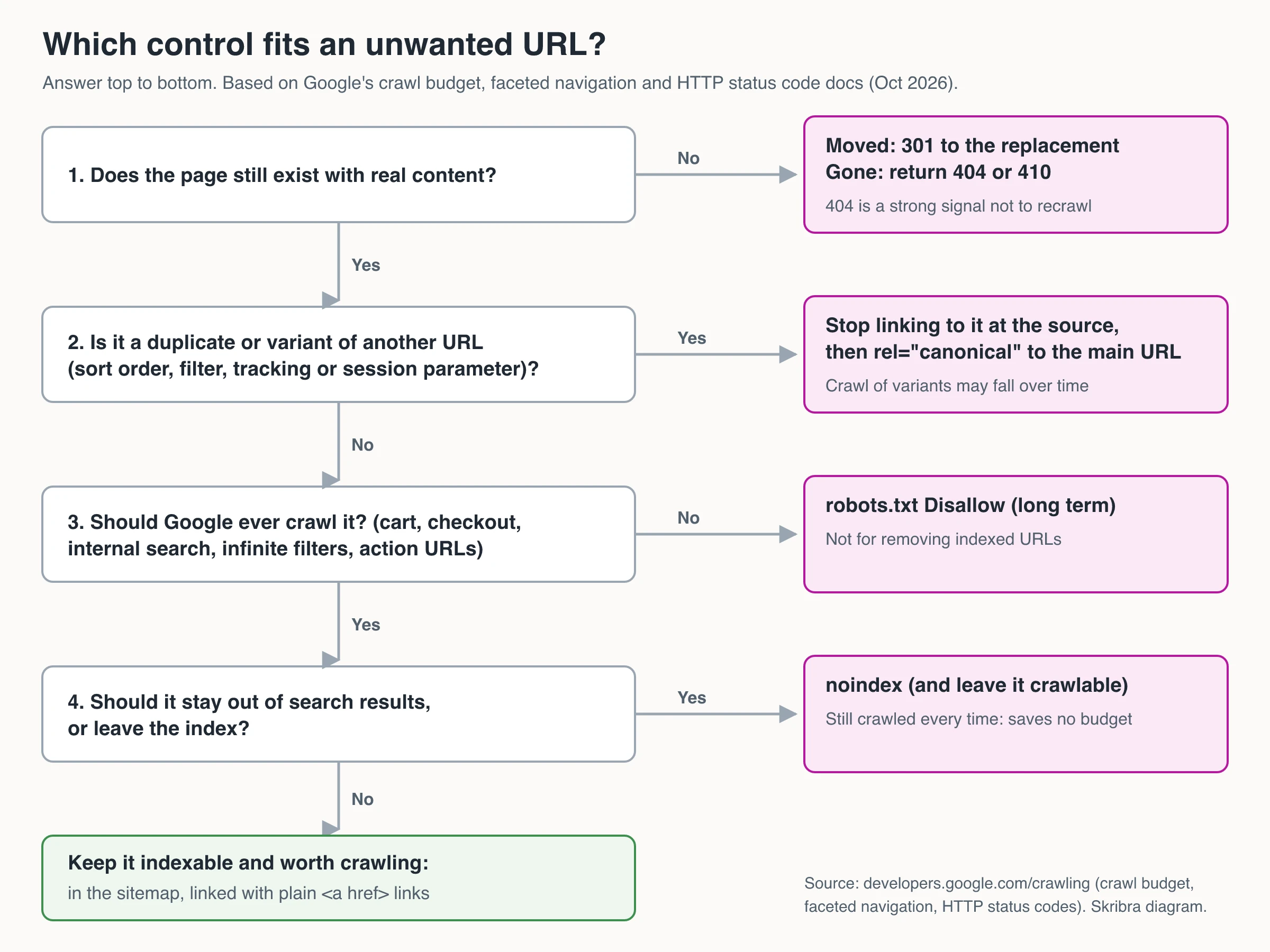
Before shipping any rule, write down which log bucket it should shrink. If you can’t name one, it probably isn’t aimed at the real leak. And if these fixes span several teams with no clear owner, the bigger question is whether to hire an agency or build in-house.
Fix order and how to validate it
- Prove the waste. Bucket a few weeks of verified Googlebot requests and record the Crawl Stats baseline: host status, response mix, discovery vs. refresh, response time.
- Close the biggest URL generators first. Facets, parameters and internal search create URLs by the thousand. Then fix noindex-but-linked pages and soft 404s, then redirects and canonicals.
- Fix capacity if host status isn’t green. Server errors and slow responses cap everything else.
- Ship one change at a time and re-measure. Expect the response mix and discovery crawls to move over weeks, not hours.
- Lock it in. Turn every fix into a check that fails a release: unexpected noindex, new disallow rules, redirect chains, non-canonical URLs in sitemaps. Assigning who owns those checks across teams is an SEO governance job. For the broader site checks, see the technical SEO audit setup guide, and for the fundamentals of crawlability and indexing, Skribra’s SEO guide.
Frequently Asked Questions
- What is crawl budget in SEO?
- Crawl budget is the set of URLs on a hostname that Google can and wants to crawl. It combines the crawl capacity limit (how much crawling your server handles without slowing down) with crawl demand (how much Google wants your content, based on things like popularity, freshness and how many URLs it knows about).
- Does my site need to worry about crawl budget?
- Usually not. Google's guide targets sites with roughly 1 million+ pages that change weekly, 10,000+ pages that change daily, or a large share of URLs stuck in "Discovered - currently not indexed". If new pages are typically crawled the day they're published, an up-to-date sitemap and regular Page Indexing checks are enough.
- Does noindex save crawl budget?
- No. Google still requests a noindexed page and only drops it after reading the tag, so the crawl is spent anyway. To cut that crawling, block the URL in robots.txt if the page should exist but never be crawled, or return a 404 or 410 if it's gone, which Google treats as a strong signal not to crawl it again.
- Does blocking URLs in robots.txt give other pages more crawl budget?
- Not automatically. Google says blocked or hidden URLs won't shift budget to other parts of the site unless Google is already hitting your crawl capacity limit. Blocking still stops waste on those URLs, but don't toggle robots.txt rules to reallocate crawling.
- How do I check crawl budget in Google Search Console?
- Open Settings, then Crawl stats, on a Domain property or a root URL-prefix property. It shows total requests, download size, response time, host status, and breakdowns by response code, file type, crawl purpose and Googlebot type. Use server logs for per-URL detail, since the report only lists example URLs.
Keep Your Blog Easy to Crawl
If a blog is one of the hosts you manage, Skribra researches keywords, writes and publishes SEO articles, and adds internal links between related posts, with a map that shows which articles nothing links to yet. Its Search Console integration shows clicks, impressions, indexing status and the last crawl date for every article.
Plans start at $19/month for 5 articles, and every plan comes with a 3-day free trial.
Written by
Skribra
This article was crafted with AI-powered content generation. Skribra creates SEO-optimized articles that rank.
Share: