October 11, 2026
·
Updated October 28, 2026
·
18 min read
CTR Drop in Google Search? 11 SERP Issues to Check
A troubleshooting guide for a falling organic click-through rate in Google Search: how to confirm it is a display problem, then 11 fixable results-page issues covering title links, snippets, structured data, dates, site names, favicons, sitelinks, canonical URLs and warnings.
If your impressions and average position held steady but clicks fell, the problem is usually how Google is showing your result, not how well the page ranks. Google may have rewritten your title link, swapped your description for a random sentence, dropped a rich result, shown the wrong URL or a generic site name, or put a featured snippet above you. Most of these are fixable, and each one leaves a trace you can check in Google Search Console before you change a word of copy.
This guide starts with a four-question triage that tells you which kind of CTR drop you have, then works through the 11 results-page issues one at a time: what you see on the results page, the cause according to Google's own documentation, where to check, and what to change. If the drop came from the layout itself (AI Overviews, ads, shopping grids), our guide to SERP features vs on-page SEO covers what each layout leaves for organic clicks.
First, confirm it’s a display problem
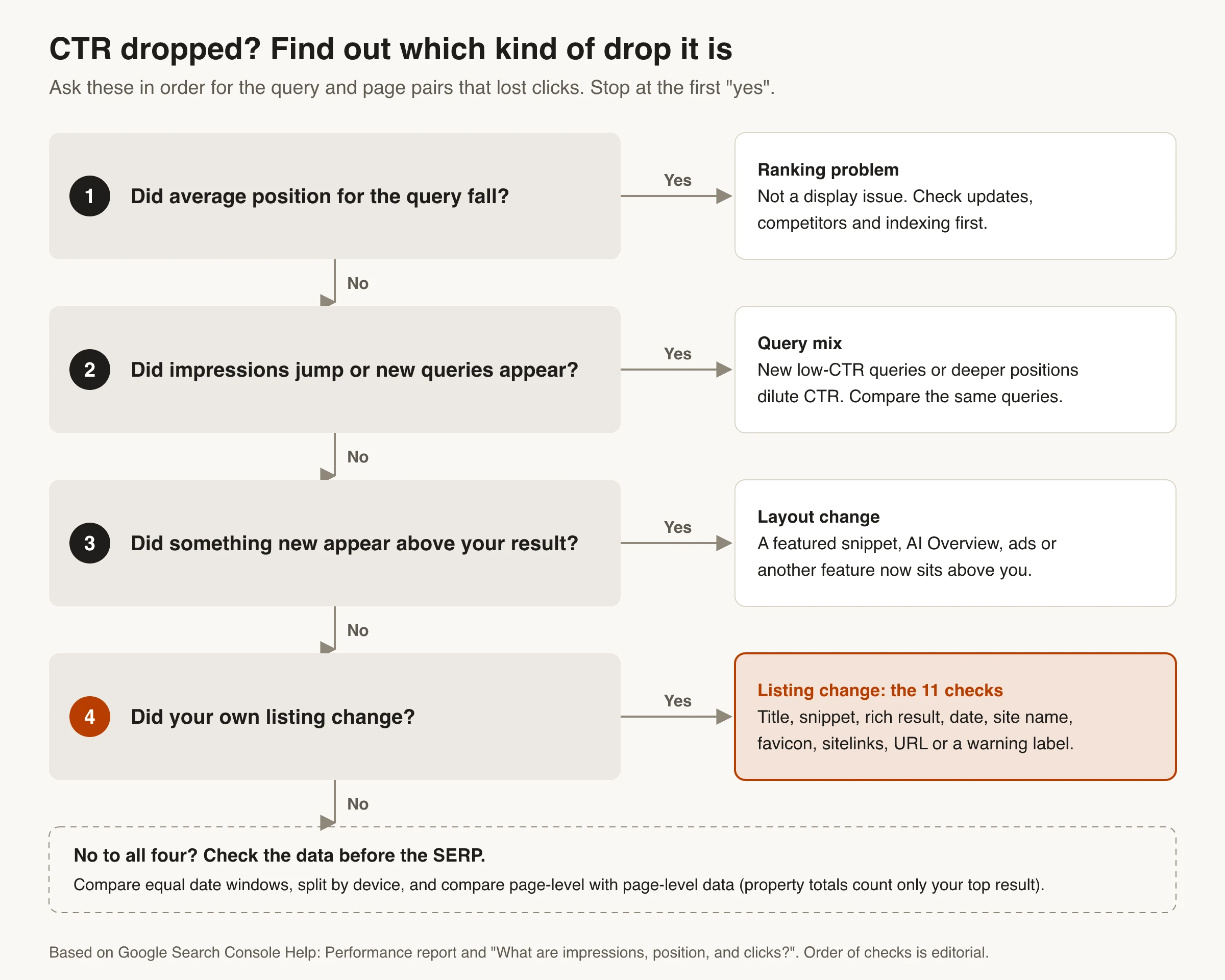
Click-through rate is clicks divided by impressions, so it can fall for reasons that have nothing to do with your listing. Before you blame a title, rule out the three other kinds of drop. The order below is the one that saves the most time.
Isolate the queries and pages that lost clicks
- Open the Performance report and use Compare to put two equal windows side by side, for example the 28 days before the drop and the 28 days after. Keep the same weekdays in both.
- On the Queries tab, sort by the change in clicks. Look for rows where impressions held but CTR fell. Google’s own help suggests this view for finding “queries with high impressions and low CTR.”
- Click one of those queries, then switch to Pages to see which URL Google showed. The unit you diagnose is a query and page pair, because Google can show a different snippet for each query.
- Split by Devices. Titles and snippets are truncated to fit the screen width, so a problem can exist on mobile and not on desktop.
- If the site has enough traffic, apply the branded and non-branded query filter. A drop limited to brand searches points to site name, favicon or sitelinks issues. A drop on non-brand queries points to titles, snippets and features.
Rule out ranking, query mix and data effects
Ranking. If average position for the same query fell by more than the one place a new featured snippet can account for (see below), you have a ranking problem, and the 11 checks below won’t fix it.
Query mix. If impressions jumped, the page probably started showing for broader queries or at deeper positions, and those new impressions convert worse. Compare only the queries that appear in both windows.
How position is counted. Search Console records the topmost position any of your links held, and a featured snippet usually occupies position 1. So if another site wins a featured snippet above you, your reported position can slip by one even though the blue-link ranking order didn’t change.
Aggregation. Totals grouped by property count only your top result per query, so CTR and position usually look better by property than by page. Compare page-level data with page-level data. The SERP metrics guide covers how to measure a CTR gap against your position properly.
The 11 SERP issues at a glance
Once position and query mix are ruled out, compare the live result for the affected query with what you expect to see. Use this table to match the symptom to the check.
| # | What you see on the results page | Likely cause | Where to check | First fix to try |
|---|---|---|---|---|
| 1 | Title link isn’t the title you wrote | Weak, boilerplate or conflicting title signals | Live SERP vs page <title> and H1 |
Align <title>, H1 and og:title |
| 2 | Description isn’t your meta description | Meta description is generic or doesn’t match the query | Live SERP for several queries | Rewrite the meta and the passage Google quotes |
| 3 | No snippet, or a very short one | nosnippet or max-snippet in a meta tag or header |
URL Inspection, response headers | Remove or raise the rule |
| 4 | Your best summary never appears | data-nosnippet on that block |
Rendered HTML | Remove the attribute from that block |
| 5 | Stars, prices or other rich details vanished | Invalid markup, policy issue, manual action or a retired feature | Rich result reports, Search appearance | Fix markup that matches visible content |
| 6 | Old or wrong date next to the result | Conflicting dates on the page or in markup | Page source and Article markup | One visible date that matches datePublished/dateModified |
| 7 | Wrong or generic site name | Missing or inconsistent WebSite markup | Home page source, Schema Markup Validator | WebSite name + alternateName on the home page |
| 8 | Generic globe icon instead of your favicon | Favicon blocked, wrong format or not square | Home page <link rel="icon">, robots.txt |
Crawlable square PNG/ICO at a stable URL |
| 9 | Sitelinks disappeared on brand searches | Site structure or anchor text unclear | Brand queries in Performance | Clear navigation, titles and internal anchors |
| 10 | A different URL or language version shows | Google chose another canonical, or hreflang is missing | URL Inspection: Google-selected canonical | Consistent canonical signals, hreflang |
| 11 | Warning label, or pages missing from results | Security issue or manual action | Security issues and Manual actions reports | Clean up, then request review |
Title and snippet issues (1 to 4)
Google writes both parts of a standard text result automatically. Its documentation says it can’t manually change title links or snippets for individual sites. What you can do is give it consistent, accurate inputs and stop blocking the text you want it to use. Check every fix on the exact query that lost clicks, since the snippet can change from one query to the next. The title link generally doesn’t: since a 2021 update, Google builds it to describe the page regardless of the query.
1. Google rewrote your title link
Google builds the title link from several sources: the <title> element, the main visual title, heading elements such as the H1, og:title, other large and prominent text, anchor text on the page and in links pointing to it, and WebSite structured data. In 2021 Google said it uses the title element about 87% of the time. When it doesn’t, its documentation says it has usually detected an issue with the title and generated a better one from other text. These are the common issues it lists:
- Half-empty titles, such as
<title>| Site Name</title>. - Obsolete titles: the
<title>says 2025 while the visible heading says 2026. - Inaccurate titles that no longer describe what the page shows.
- Boilerplate: the same title on many pages, or long titles that differ by one word.
- No clear main title: several headings with the same visual weight. Google may use the first one.
- Language or script mismatch between the title and the body.
- Repeated site name: Google may drop it from the title link when the site name is already shown above the result.
If robots.txt blocks crawling, Google can still index the URL but can’t read the page, so it builds the title link from links pointing to the page. Those anchors are often short or generic.
Fix: make the <title>, the first visible H1 and og:title describe the same page in the same words. Keep the brand to a short suffix after a separator, and use the words people actually search for in the title itself (more on that in keywords in URLs vs titles). Expect a few days to a few weeks before Google recrawls and the title link updates. You can request a recrawl in URL Inspection. To see how a draft title and description will be cut off, run them through the SERP preview tool.
2. Google ignores your meta description
Google says snippets come primarily from page content, and that it uses the meta description when that gives “a more accurate description of the page” than the content would. Because snippets are matched to the query, one page can show different snippets for different searches. An Ahrefs study of 20,000 keywords (updated October 2020) found Google showed a different snippet from the meta description 62.78% of the time.
So a replaced description isn’t a fault in itself. It becomes a CTR problem when the replacement is worse: a cookie notice, a date line, a navigation label, or a sentence that doesn’t answer the query.
Fix: write a unique, specific meta description for each important page. Google’s examples favor descriptions that summarize the whole page, not a list of keywords or one sitewide sentence. Then find the passage Google is actually quoting for the lost query and rewrite that passage so it answers the query directly.
3. A nosnippet or max-snippet rule is hiding your snippet
If the result shows a title and URL with no description, or a description cut to a few words, look for a snippet rule. Per Google’s robots meta tag specification:
nosnippetremoves the text snippet and video preview completely.max-snippet:[number]caps the snippet at that many characters.max-snippet:0is the same asnosnippet, andmax-snippet:-1lets Google choose the length.- When rules conflict, the more restrictive one applies, so
nosnippetbeatsmax-snippet:50. - The same rules can arrive in an
X-Robots-TagHTTP header, which is easy to miss because it isn’t in the HTML.
Both rules now also apply to AI Overviews and AI Mode, so they sometimes get added on purpose to keep content out of AI features. The side effect is a blank or truncated snippet in regular results too, which costs clicks across every query the page ranks for. If AI features are the concern, look at the separate Search generative AI control in Search Console settings before reaching for nosnippet.
Check: open URL Inspection, view the crawled page’s HTML and HTTP response, and search for nosnippet, max-snippet and X-Robots-Tag. CDN rules, SEO plugins and staging settings that were never removed are the usual sources. After removing the rule, run a live test to confirm Google sees the change.
4. data-nosnippet is hiding your best text
data-nosnippet is the selective version: text inside an element with this attribute won’t appear in regular snippets or featured snippets. It’s useful for boilerplate, legal text or comments. It hurts CTR when a template applies it to the article body or to the summary block at the top, because Google then has to build the snippet from whatever text is left.
Check: search the rendered HTML for data-nosnippet and look at which containers carry it. If both nosnippet and data-nosnippet are present, nosnippet wins and no snippet shows at all.
Rich result and date issues (5 and 6)
These issues don’t change your title or snippet text. They remove or distort the extra details shown around it, which are often what made your result stand out from the ones next to it.
5. Your rich result disappeared
Review stars, prices, recipe times and similar details come from structured data. Google’s structured data guidelines say valid markup makes a page eligible but doesn’t guarantee a rich result. When one vanishes, work through the causes in this order:
- The feature was retired. Google stopped showing FAQ rich results on May 7, 2026, and How-to rich results ended in 2023, according to its Search documentation updates. Several more types were phased out in 2025. If yours is on that list, no fix will bring it back. The SERP features guide linked in the introduction lists the types still supported.
- The markup broke. A template change, a plugin update or a client-side render that no longer outputs JSON-LD will do it. Run the page through the Rich Results Test and check the matching rich result report in Search Console.
- The markup no longer matches the page. Prices, ratings or other values in markup must match what visitors can see. If they don’t match, the result can lose eligibility.
- A structured data manual action. Check the Manual actions report. Google says this kind of action removes rich result eligibility but “doesn’t affect how the page ranks.” That’s why it often shows up as a pure CTR drop at a stable position.
Measure it: filter the Performance report by Search appearance for the rich result type. If impressions for that type fell to zero on a specific date, you have your timeline.
6. The result shows an old or wrong date
A date in front of the snippet can help or hurt. A recent date on a fresh guide attracts clicks. A date from three years ago, or the date of an event the page mentions, makes the page look stale. Google’s byline date guidance says its systems estimate the date from several signals rather than trusting one.
Fix:
- Show one prominent, labelled date on the page, such as “Published” or “Last updated”.
- Add
datePublishedanddateModifiedto your Article or BlogPosting markup, and make them match the visible date. If you include a time zone in the markup, make sure it’s the correct one. - Don’t use future dates, and don’t use the date of the event the page describes.
- Remove other dates that compete for attention: “related posts” dates, archive widgets and comment timestamps near the top of the page.
- Only change
dateModifiedwhen the page has actually changed. Bumping the date without real edits doesn’t match the guidance, which says dates must describe when the page was published or updated.
Site name, favicon and sitelinks issues (7 to 9)
These three control whether searchers recognize your result before they read it. They matter most on brand searches and on results pages crowded with similar-looking listings. All three are set at site level, so one fix applies to every page.
7. Google shows the wrong site name
The site name is the source label above the title link, separate from the title itself. Google generates it automatically and considers WebSite structured data, og:site_name, the <title>, headings and other text on the home page. Google says the WebSite markup “is most important” if you want to state a preference.
Fix:
- Add WebSite structured data with
nameandurlto the home page only. Use the same name in og:site_name and in the home page title. - Add
alternateNamewith an acronym or short form, and your domain in lowercase as a fallback. - Avoid generic names like “Best Dentists In Iowa”. Google says it’s unlikely to select those unless they’re a well-known brand.
- Site names work per domain or subdomain, not per subdirectory.
example.com/blogcan’t have its own name. - If you have duplicate home pages (http and https, www and non-www), put the same markup on all of them.
- The Rich Results Test doesn’t support site names. Validate the markup with the Schema Markup Validator and use URL Inspection to confirm Google can crawl the home page.
8. Your favicon is missing or generic
A missing favicon shows a generic icon, which makes your result look less established than its neighbors. Google’s favicon guidelines, updated October 27, 2026, require:
- A
<link rel="icon">(orapple-touch-icon) tag on the home page. - Googlebot able to crawl the home page and follow its redirects, and Googlebot-Image able to crawl the favicon file. A robots.txt rule that blocks your image or asset folder is a common cause.
- A square image (1:1) of at least 8x8 px. Google recommends larger than 48x48 px.
- A supported format. The current list is BMP, GIF, ICO, PNG, JPEG, PPM and TIFF. SVG and WebP aren’t on it, so if your only icon is an SVG or WebP file, add a PNG or ICO as well.
- A stable URL that you don’t change often.
One favicon applies per hostname, so subdirectories share the root’s icon. Even with every guideline met, Google doesn’t guarantee a favicon will show. After fixing, request indexing of the home page and allow days to weeks for it to update.
9. Sitelinks disappeared
Sitelinks are the extra links grouped under a result, most often seen on brand and navigational searches. Google says they’re automated and shown only when its systems think they’re useful. There’s no setting to choose them.
What helps, per Google: informative and compact page titles and headings, a logical site structure that links to your important pages, and concise internal anchor text that’s relevant to the target page. If a sitelink you don’t want keeps appearing, the only documented route is to remove the page or noindex it.
If sitelinks disappeared after a redesign, compare old and new navigation. Menus that load only after a click, vague labels like “Solutions” or “Learn more”, and important pages that lost their links from the home page are the usual changes.
Wrong URL, warning and penalty issues (10 and 11)
The last two issues decide which page people land on, and whether they trust the result enough to click at all.
10. Google shows a different URL or language version
If the result shows a parameter URL, an old URL, the http version or the wrong country version, Google has picked a different canonical URL or is serving an alternate. Google’s canonicalization documentation calls your canonical a “hint, not a rule” and lists the signals it weighs: HTTPS vs HTTP, redirects, sitemap URLs and rel="canonical".
Check: inspect the URL in URL Inspection and compare User-declared canonical with Google-selected canonical. You can only see Google’s choice in the indexed result, not in a live test.
Fix: make every signal point the same way. That means a 301 from the duplicates, only canonical URLs in the sitemap, internal links to the canonical, and a self-referencing rel="canonical". If the duplicates are near-identical, make the content clearly different or consolidate the pages. Google’s troubleshooting guide says it may hold pages in a duplicate cluster for up to two weeks after a fix.
For regional or language versions, add hreflang annotations across the whole set, with return links and an x-default, as described in Google’s localized versions guide. Google can treat same-language pages for different countries as duplicates of each other, so hreflang is what tells it which version to show in each country.
11. A warning label or manual action
If Google finds hacked content, malware or phishing on your site, the Security issues report lists it. Affected pages “can appear with a warning label in search results,” or show a browser warning page when people click. Few searchers click past either one. Clean the site, close the hole that let it in, then request a review from the report.
Most manual actions rank pages lower or leave them out of results, which shows up as lost impressions and position rather than a pure CTR drop. The exception is a structured data action, which removes only rich results (see issue 5). The Manual actions report shows which pages are affected. Fix every listed issue on every affected page, then use Request review and explain what you changed.
Both reports are worth checking first when CTR falls across many unrelated pages on the same day, since nothing on a single page explains that pattern.
Did a featured snippet cause the CTR drop?
A featured snippet can cut your CTR in three different ways, and each one has a different fix. Check the live results page for the query and work out which case you’re in.
| What happened | What you see in Search Console | What to do |
|---|---|---|
| Another site won a snippet above you | Position slips by about one (the snippet usually takes position 1), CTR falls | Make the answer block on your page the clearest one for the query: question-style heading, direct answer right under it, list or table where it fits |
| You lost a snippet you held | Clicks and CTR fall on that query, position drops | Compare your answer passage with the new winner’s. Check that max-snippet or data-nosnippet isn’t blocking it |
| You won the snippet, but CTR fell | Position about 1, clicks flat or down | The snippet may answer the question on the results page. Expand the page toward the follow-up questions a snippet can’t settle |
Two details matter here. Google says you can’t mark a page as a featured snippet, because its systems choose which page to show. And Google said in January 2020 that a page shown in the featured snippet isn’t repeated as a regular result on the first page, so winning one doesn’t add a second listing.
If a snippet sends you fewer clicks than the plain result did, Google’s documented way out is to lower max-snippet until the page stops appearing as a featured snippet. That doesn’t always work, and the only guaranteed opt-out, nosnippet, also removes your regular snippet. Test it on one page and compare equal windows before rolling it out.
For the tools that handle CTR, refreshes and AI search tracking, see our guide to tools for each organic traffic lever.
Fix the display before you rewrite the copy
A CTR drop at a stable position usually means something changed in how Google shows your result. Fix the inputs Google relies on first: consistent titles and headings, snippet rules that don’t block your text, markup that matches the page, and clean site-level signals. Then rewrite copy where the listing is still weaker than its neighbors.
Your first move: find the query with the biggest CTR fall and steady impressions, look at its live result next to the table above, and inspect that URL before you edit anything.
Frequently Asked Questions
- Why is my CTR dropping when my rankings are the same?
- Usually because your result looks different or something new appeared above it. Google may have rewritten your title, replaced your description, dropped a rich result, or added a featured snippet, AI Overview or ads. Compare equal date windows in Search Console for the same queries, then check the live results page for the query that lost the most clicks.
- Can a featured snippet lower my organic CTR?
- Yes. If another site's featured snippet appears above your result, it usually takes position 1 and pushes you down. If you hold the snippet, the answer may be read on the results page without a click. Check which case applies on the live result before deciding whether to compete for the snippet or limit it with max-snippet.
- Why does Google rewrite my title tag?
- Google builds title links from several sources and replaces the title tag when it finds a problem, such as a half-empty, outdated, boilerplate or inaccurate title, or several headings competing to be the main title. Make the title tag, the first visible H1 and og:title describe the page the same way, then wait for a recrawl.
- Why isn't Google using my meta description?
- Google creates snippets mainly from page content and uses the meta description only when it describes the page better for that specific query. A unique, specific description for each page helps, and so does rewriting the on-page passage Google is quoting for the query that lost clicks.
- How long does it take for a new title, site name or favicon to show in Google?
- Google has to recrawl and reprocess the page first. Its documentation says this can take from a few days to a few weeks. You can speed up discovery by requesting indexing in the URL Inspection tool, but it doesn't guarantee when the change appears.
- Does FAQ schema still help CTR in 2026?
- Not through rich results. Google stopped showing FAQ rich results on May 7, 2026, so FAQPage markup no longer adds expandable questions under your listing. If clicks dropped around that date on pages that had them, that's the cause. Keep useful questions on the page for readers.
Keep Titles and Descriptions Earning Clicks
Skribra connects to Google Search Console and shows clicks, impressions, CTR and average position for every article it publishes, with up to 16 months of history. Its Hook agent looks for pages at position 6 or beyond with plenty of impressions and a CTR well below what their position should earn, then rewrites only the title and meta description. It never touches pages already earning healthy traffic and waits 60 days before changing the same article again.
Plans start at $19/month, the $75 Pro plan runs all five maintenance agents on every article, and every plan comes with a 3-day free trial.
Written by
Skribra
This article was crafted with AI-powered content generation. Skribra creates SEO-optimized articles that rank.
Share: