January 23, 2026
·
Updated October 28, 2026
·
16 min read
AI SEO Content Checklist: 25 Checks Before You Publish
This checklist is for anyone publishing articles drafted with ChatGPT, Claude, Gemini or an AI writing platform. It also covers what a content score from a tool like Surfer can and can't tell you, and what Google says about AI-generated content. Every Google reference links to Search Central documentation as it stood in October 2026.

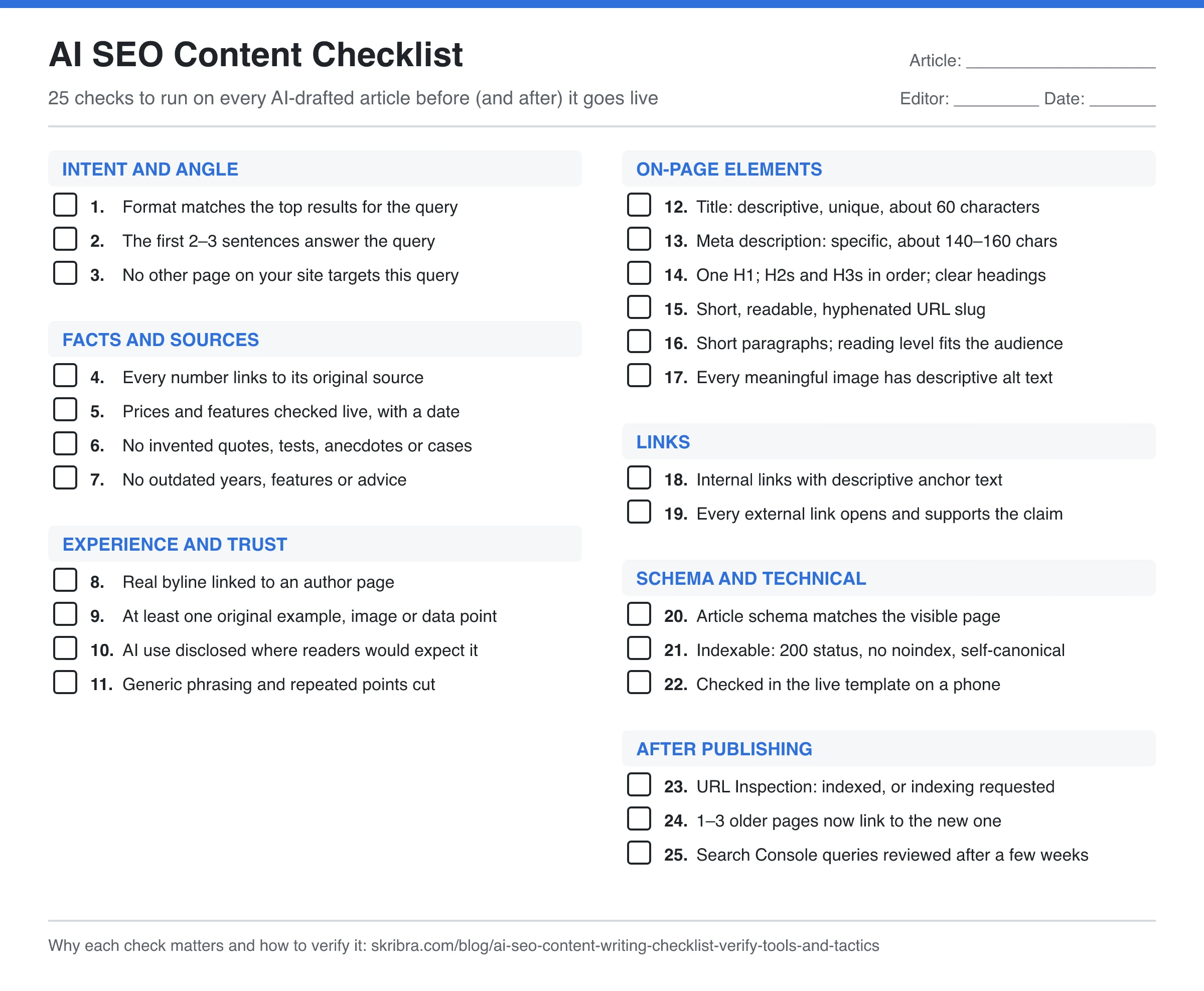
An AI SEO content checklist is the set of checks an editor runs on an AI-drafted article before it goes live: does it match search intent, is every fact sourced, does it show real experience, are the title, headings and links right, and is the page indexed afterward. Below are 25 checks in seven groups. Each one says why it matters and how to verify it, usually with a free tool. Copy the plain-text version into your editor or doc, or print the sheet at the top of this page.
The 25-Point AI SEO Content Checklist (Copy or Print)
Copy the block below into your CMS notes, a Google Doc or your project tool and tick items off per article. The image at the top of this page is the same list as a printable sheet (open it in a new tab to print or save it).
AI SEO CONTENT CHECKLIST (25 checks)

INTENT AND ANGLE
[ ] 1. Format matches the top results for the query
[ ] 2. The first 2-3 sentences answer the query
[ ] 3. No other page on your site targets this query

FACTS AND SOURCES
[ ] 4. Every number links to its original source
[ ] 5. Prices and features checked on the live site, with a date
[ ] 6. No invented quotes, tests, anecdotes or case studies
[ ] 7. No outdated years, features or advice

EXPERIENCE AND TRUST
[ ] 8. Real byline linked to an author page
[ ] 9. At least one original example, image or data point
[ ] 10. AI use disclosed where readers would expect it
[ ] 11. Generic phrasing and repeated points cut

ON-PAGE ELEMENTS
[ ] 12. Title: descriptive, unique, about 60 characters
[ ] 13. Meta description: specific, about 140-160 characters
[ ] 14. One H1; H2s and H3s in order; descriptive headings
[ ] 15. Short, readable, hyphenated URL slug
[ ] 16. Short paragraphs; reading level fits the audience
[ ] 17. Every meaningful image has descriptive alt text

LINKS
[ ] 18. Internal links with descriptive anchor text
[ ] 19. Every external link opens and supports the claim

SCHEMA AND TECHNICAL
[ ] 20. Article schema matches the visible page
[ ] 21. Indexable: 200 status, no noindex, self-canonical
[ ] 22. Checked in the live template on a phone

AFTER PUBLISHING
[ ] 23. URL Inspection: indexed, or indexing requested
[ ] 24. 1-3 older pages now link to the new one
[ ] 25. Search Console queries reviewed after a few weeks
Run the groups in order. The first three groups need a person who knows the topic, and no tool can do them for you. Groups four to six are mostly tool-assisted and take minutes. The last group happens after the article is live.
Intent and Angle Checks (1–3)
Fix these first. If the angle is wrong, polishing the prose and metadata is wasted work.
1. The format matches what already ranks for the query.
Why it matters: If the top results are step-by-step guides and your draft is an opinion essay, no amount of editing closes the gap. AI drafts tend to default to a generic “ultimate guide” whatever the query.
How to verify: Search the primary keyword in a private window. Note the format of the top five results (list, how-to, comparison, tool, definition) and the subtopics most of them cover. Your draft should use the same format and cover those subtopics, or have a clear reason not to. If your briefs are generated automatically, see our guide to content brief automation for which fields still need a person.
2. The first two or three sentences answer the query.
Why it matters: Readers decide quickly whether a page has what they came for, and content tools now measure this too: Surfer’s AI Search Score includes an “Upfront Intent Alignment” component that rates how early and clearly a page answers the main question.
How to verify: Read only the first paragraph. If someone stopped there, would they have the answer? Delete warm-up lines such as “In this article, we’ll explore…” and lead with the answer.
3. No other page on your site targets the same query.
Why it matters: Two pages chasing one query split clicks and links between them, which is keyword cannibalization. Pipelines that generate articles from a keyword list produce near-duplicates easily, because similar keywords often share one intent.
How to verify: Search site:yourdomain.com "primary keyword". In Search Console, open Performance, filter Query by the keyword and check the Pages tab. If an existing page already gets impressions for it, update that page or give the new draft a clearly different angle. A keyword map, part of any SEO content strategy, helps you catch this before drafting.
Fact and Source Checks (4–7)
Language models write fluent text whether or not it’s true. These four checks are where AI drafts most often fail, and no content score catches them.
4. Every number links to its original source.
Why it matters: Models produce plausible statistics that don’t exist or misattribute real ones. Google’s helpful content self-assessment asks directly: “Does the content have any easily-verified factual errors?”
How to verify: Highlight every number, percentage, price, date and named study. Each should link to the page where it originated, not a blog that repeats it. Open the link and find the number on the page. If you can’t, cut the sentence or replace it with a sourced one.
5. Prices and product features are checked on the live site and dated.
Why it matters: A model’s training data is months or years old, and pricing pages change often. Stale prices quickly cost a comparison its credibility.
How to verify: Open each vendor’s pricing or feature page, compare it with the draft, and add the date you checked (“as of October 2026”). If a fact can’t be verified, say so or remove it.
6. There are no invented quotes, tests, anecdotes or case studies.
Why it matters: AI drafts often add first-person stories (“When I tested this…”, “one of our clients saw…”) that never happened. Google’s guidance is blunt: “Any form of deception makes a page untrustworthy to both users and our automated quality systems.” Invented experience is also the easiest thing for a knowledgeable reader to spot.
How to verify: Search the draft for "I ", "we ", “our”, “tested”, “client”, “study”, “survey” and “according to”. Every hit must be true and attributable. If it isn’t, delete it or replace it with something you actually did.
7. No outdated years, features or advice.
Why it matters: Models repeat advice that was right when they were trained. For example, many AI drafts still recommend FAQ schema to win FAQ rich results, but Google stopped showing that feature in Search on May 7, 2026, according to the Search Central changelog.
How to verify: Search the draft for years and for words like “currently”, “latest” and “new”. Check any Google feature it mentions against the Search Central changelog, and any tool feature against the vendor’s own docs.
Experience and Trust Checks (8–11)
These checks map to Google’s “Who, How and Why” questions and to E-E-A-T (experience, expertise, authoritativeness and trustworthiness). They are also where human writers still add the most over a model, as we cover in AI content vs human writers.
8. A real byline links to an author page.
Why it matters: Google “strongly encourage[s] adding accurate authorship information, such as bylines” where readers expect them. The same page calls fabricated creator profiles, such as made-up names, AI-generated headshots or false credentials, a form of deception.
How to verify: On the published page, the byline names a real person and links to a bio that explains their relevant experience. If you use Article structured data, its author URL should point to the same bio.
9. The article contains at least one thing only you could add.
Why it matters: The first content-quality question in Google’s self-assessment is “Does the content provide original information, reporting, research, or analysis?” A draft built by summarizing the top results can only repeat what already ranks.
How to verify: Point to the paragraph, screenshot, table or worked example that no competing page has. If there isn’t one, add it: a screenshot of the process in your own account, an example with your own numbers, or the decision you would make and why.
10. AI use is disclosed where readers would expect it.
Why it matters: Google’s guidance says AI or automation disclosures are useful for content where someone might think “How was this created?”, and suggests adding them when readers would reasonably expect them. It doesn’t require a label on every page.
How to verify: Write a short policy by content type (for example, a line in the author box or an editorial-policy page) and check this article follows it. Never publish AI-written text under an invented human expert.
11. Generic phrasing and repeated points are cut.
Why it matters: Filler makes an article longer without making it more useful, and stock AI phrases tell readers nobody edited the page. Repetition across sections is common because models draft each section separately.
How to verify: Paste the draft into Skribra’s free cliché finder to flag overused phrases. Then read each section and ask what it adds that the previous one didn’t. Delete any sentence that could appear unchanged in a competitor’s article.
On-Page SEO Checks for AI Content (12–17)
These are quick to check with tools and easy to get wrong when an AI plugin fills them in automatically.
12. The title is descriptive, unique and about 60 characters.
Why it matters: The title is usually the first thing a searcher sees. Google’s title link guidelines set no length limit, but titles are truncated to fit the device width. Google also warns against keyword stuffing and boilerplate titles. Around 60 characters is a common rule of thumb, not a Google rule.
How to verify: Put the primary keyword near the start. Paste the title into a SERP preview to see what stays visible, and run it through a headline analyzer for a second opinion on clarity. Make sure no other page on your site uses the same title.
13. The meta description is specific to the page and about 140 to 160 characters.
Why it matters: Google may use the meta description for the snippet under your title. Its snippet documentation says there’s no length limit, but snippets are truncated as needed. A description that summarizes this specific page gives searchers a reason to click.
How to verify: Check length and keyword use with a meta description checker. Then confirm it describes this page and no other: AI tools often reuse the same template sentence across posts.
14. There’s one H1, H2s and H3s are in order, and headings say something.
Why it matters: Headings are the outline for readers who scan and for people using screen readers. AI drafts often skip levels or use vague headings such as “Key Considerations” or “Final Thoughts”.
How to verify: Paste the HTML or Markdown into a heading structure checker. It maps the H1 to H6 outline and flags a missing H1, multiple H1s and skipped levels. Then read only the headings: they should tell someone what the article covers.
15. The URL slug is short, readable and hyphenated.
Why it matters: A short slug is easier to read and share, and it still makes sense if you update the title later. Auto-generated slugs often copy the full title or append numbers.
How to verify: Use lowercase words separated by hyphens, drop dates and filler words, and keep the main keyword. Don’t change the slug of a published post without a 301 redirect from the old URL.
16. Paragraphs are short and the reading level fits the audience.
Why it matters: Most readers scan. Long paragraphs and stacked clauses lose them, especially on a phone.
How to verify: Run the text through a readability score checker to get the Flesch Reading Ease score and Flesch-Kincaid grade. Compare it with your best-performing posts rather than chasing a single number, and rewrite the hardest paragraphs first.
17. Every meaningful image has descriptive alt text.
Why it matters: Google’s image SEO guidance calls alt text “the most important attribute” for image metadata, notes it improves accessibility, and warns against stuffing it with keywords.
How to verify: In your CMS’s media fields, or with your browser’s Inspect tool on the preview, check the alt attribute of every image. For each image, the alt text should say what it shows in the context of the page. Purely decorative images can use an empty alt attribute.
Link Checks (18–19)
18. Internal links point to related pages with descriptive anchor text.
Why it matters: Links from your own related pages help readers go further and help search engines discover and understand the new page. Anchor text that describes the destination tells both what to expect.
How to verify: Add links to the few pages on your site that genuinely help with the topic, using anchors like “meta description length” rather than “click here”. Confirm none point to retired or redirected URLs.
19. Every external link opens and supports the claim next to it.
Why it matters: Models invent URLs that look plausible and return 404, or cite a real page that doesn’t say what the draft claims.
How to verify: Click every link, or run a link checker on the preview. Each should load and contain the fact it supports. Prefer primary sources such as official documentation, original research and vendor pages.
Schema and Technical Checks (20–22)
20. Article schema matches the visible page.
Why it matters: Structured data helps search engines read the headline, author and dates. Google’s guidance on AI features in Search asks that structured data match the visible text, and says no special schema or AI text files are needed to appear in AI Overviews or AI Mode. FAQ markup no longer produces FAQ rich results either.
How to verify: If your CMS doesn’t add Article markup, build the JSON-LD with a schema generator. Test the live URL in Google’s Rich Results Test and check that the headline, author and dates match what readers see.
21. The page is indexable.
Why it matters: A noindex tag or wrong canonical left over from staging will keep a good article out of Google without any visible error.
How to verify: Run a live test of the published URL in Search Console’s URL Inspection tool (check 23), or view the page source and response headers. You want a 200 status, no noindex in the meta robots tag or X-Robots-Tag header, and a canonical that points to the page itself. For site-wide causes, such as robots.txt blocking or a stray X-Robots-Tag, Skribra’s free technical SEO audit checks your homepage and robots.txt.
22. The article works in your live template on a phone.
Why it matters: Tables, code blocks and embeds from AI drafts can break in some themes. Wide tables overflow, images stretch, and Markdown sometimes shows up as raw ## symbols.
How to verify: Open the preview or published URL on a phone and scroll the whole page. Check that tables scroll, images load, links are easy to tap, and no formatting leaked through.
After You Publish (23–25)
23. URL Inspection shows the page is indexed, or you requested it.
Why it matters: Publishing a page doesn’t mean Google has indexed it, and a page that isn’t indexed can’t rank.
How to verify: Paste the URL into Search Console’s URL Inspection tool. If it isn’t on Google yet, request indexing and make sure the URL is in your sitemap. Our guide to request indexing vs XML sitemaps explains when each helps.
24. One to three older pages now link to the new one.
Why it matters: A new article that nothing links to is harder for readers and crawlers to find. Links from established pages also give it context.
How to verify: Search site:yourdomain.com "topic" for older posts that mention the subject, and add a contextual link from the most relevant ones.
25. You reviewed the page’s Search Console queries after a few weeks.
Why it matters: The queries a page earns impressions for show what Google actually associates it with. A mismatch with your target points to a gap in the article.
How to verify: In Performance, filter Page by the URL and open the Queries tab. If it shows impressions for questions the article answers poorly, add a section or FAQ. For example, a checklist page that earns impressions for “seo content scoring tool vs manual checklist” but never compares the two needs a section like the next one.
SEO Content Scoring Tool vs Manual Checklist
Content optimizers such as Surfer, Clearscope, Frase and NeuronWriter score or grade a draft based on what the top-ranking pages for the keyword cover. They’re good at showing what you haven’t covered. They don’t check whether what you wrote is true, original or yours. (For how these tools compare, see our roundup of AI SEO content tools.)
Surfer documents its scoring publicly, so it makes a useful example. As of October 2026, its help center describes the Content Score as a 0 to 100 metric that combines an SEO Score (relevance, topical coverage, keyword usage, structure and alignment with top results) with an AI Search Score made of Facts Coverage and Upfront Intent Alignment. The Content Editor benchmarks a draft against the top 20 pages for the query. Facts Coverage rates how fully you cover facts commonly found in AI answers. It doesn’t verify that your facts are correct.
| What you need to know | Content score (Surfer, per its docs) | Manual checklist |
|---|---|---|
| Covers the subtopics and terms top pages cover | Yes, its core job | Partly (check 1) |
| Answers the query early | Yes (Upfront Intent Alignment) | Check 2 |
| Title, headings and metadata in place | Yes, they’re scoring inputs | Checks 12 to 14 |
| Facts are true and sourced | No | Checks 4 to 7 |
| Real experience and original examples | No | Checks 8 and 9 |
| Competes with another page on your site | No, it compares against the SERP | Check 3 |
| Links load and support their claims | No | Check 19 |
| Page is indexable and renders on mobile | No | Checks 21 and 22 |
Use both, in that order. Run the score while drafting to find coverage gaps, then run the checklist before you publish. Don’t chase 100: Surfer’s own FAQ calls 70 or higher a realistic goal for most articles, suggests aiming 10 to 20 points above your main competitors instead, and warns that applying suggestions mechanically can lower the score. For a wider look at automated audits versus human review, see page optimization tools vs a manual on-page audit.
What Google Says About AI-Generated Content
There’s no “run an AI detector” item on this checklist, because Google judges what a page offers, not how it was produced.
- AI use itself isn’t the problem. Google’s 2023 guidance on AI-generated content says: “Appropriate use of AI or automation is not against our guidelines.”
- Mass-producing pages without value is. Google’s spam policies define scaled content abuse as generating many pages “for the primary purpose of manipulating search rankings and not helping users”, “no matter how it’s created”. Using generative AI to create many pages without adding value is one of the listed examples.
- AI Overviews don’t need special tricks. Google says there are no additional requirements or special optimizations for AI Overviews or AI Mode. The same SEO basics apply.
In practice, an AI draft that passes checks 1 to 11 is in line with Google’s guidance. A hundred unedited drafts published in a week aren’t, however well they score.
How to Run the Checklist in Three Passes
Editing an AI draft in one sweep tends to mean polishing sentences you’ll later delete. Three passes avoid that:
- Substance pass (checks 1 to 11). Done by someone who knows the topic. Confirm the angle, verify every fact, remove anything invented and add the original example. Rewrite before you polish.
- Tool pass (checks 12 to 22). Run the title, meta description, headings, readability and schema through the tools linked above, then check the preview on a phone. This is where a content score fits if you use one.
- Live pass (checks 23 to 25). Confirm indexing, add links from older posts, and put a reminder in your calendar to review the page’s queries in a few weeks.
On a team, the subject expert owns the first pass, an editor or SEO the second, and whoever manages Search Console the third. Keep the copy-paste list in your brief template so every article gets the same checks.
Frequently Asked Questions
- Does Google penalize AI-generated content?
- Not for being AI-generated. Google says appropriate use of AI or automation is not against its guidelines. What breaks its spam policies is scaled content abuse: generating many pages mainly to manipulate rankings without adding value for users, however they were created.
- Is a content score tool enough to check AI content before publishing?
- No. A content score compares your draft's topics, terms and structure with pages that already rank, which is useful for finding gaps. It doesn't verify facts, spot invented anecdotes, check that links work or tell you whether another page on your site targets the same query. Use the score while drafting and a manual checklist before publishing.
- Should I disclose that an article was written with AI?
- Google suggests adding AI or automation disclosures where readers might reasonably ask how the content was created, and explaining how and why AI was used. It doesn't require a label on every page. Whatever you decide, never present AI-written text as the work of an invented human expert.
- Do I need FAQ schema or an llms.txt file to appear in AI Overviews?
- No. Google says there are no additional requirements or special optimizations for AI Overviews or AI Mode, and no need for new machine-readable files, AI text files or special schema. FAQ markup also no longer produces FAQ rich results, which Google stopped showing in Search on May 7, 2026.
- How long should the title tag and meta description be?
- Google sets no length limit for either, but it truncates both to fit the device width. As rules of thumb, keep titles around 60 characters with the main keyword near the start, and meta descriptions around 140 to 160 characters. Check both in a SERP preview before publishing.
- Which checks matter most if I'm short on time?
- The intent checks (1 and 2) and the fact checks (4 to 7). They're the ones no tool can do for you, and getting them wrong costs reader trust in a way a slightly long title never will. The tool-based checks take a few minutes once the substance is right.
Automate the Drafting, Keep the Checklist
Skribra researches each keyword, outlines the article to match search intent, drafts it with internal and external links, adds a meta description and, where it fits, an FAQ, then publishes to your site. After that, its agents keep watch: one flags articles on your site that compete for the same search, and another catches outdated year references.
You still own the parts this checklist puts first: your experience, your examples and a final fact check. Plans start at $19/month, with a 3-day free trial.
Written by
Skribra
This article was crafted with AI-powered content generation. Skribra creates SEO-optimized articles that rank.
Share: