June 5, 2026
·
Updated October 28, 2026
·
14 min read
AI SEO Platform vs SEO Suite: How to Choose (2026)
A comparison of AI SEO platforms and SEO suites, including enterprise SEO suites: named products, October 2026 entry prices from each vendor's own site, a capability overlap matrix, what each can and can't do for crawling and indexing, and a weighted scorecard for a fair trial.

Short answer: an SEO suite such as Semrush, Ahrefs, SE Ranking or Moz Pro tells you what to fix. It gives you keyword data, site crawls, rank tracking and backlink research. An AI SEO platform does part of the work itself: it writes and publishes articles (Skribra, SEObot, Outrank) or pushes changes to your live pages (Search Atlas OTTO, Alli AI). If your bottleneck is knowing what to do, buy a suite. If it's getting the work shipped, add a platform. Most teams that publish every week end up with one of each.
On crawling and indexing: a suite's site audit covers crawl diagnostics for most sites, and an enterprise crawler only earns its price on very large or fast-changing sites. Neither kind of tool decides what Google indexes. You check that in Search Console's Page indexing report, which is free.
Below: what each category includes, what it costs as of October 2026, where the two overlap, and a weighted scorecard you can copy for a two-week trial. Skribra, which publishes this guide, is included with its limits.
What is an AI SEO platform?
An AI SEO platform is software that uses language models to carry out SEO tasks, not just report on them. Vendors use the label loosely, and it covers three different kinds of product. Pin down which one you’re evaluating before you compare prices.
| Type | What it does | Examples | Entry price (October 2026) |
|---|---|---|---|
| AI content platform | Picks keywords, writes articles with links and images, publishes them to your CMS on a schedule | Skribra, SEObot, Outrank | $19/mo (Skribra), $49/mo (SEObot), $99/mo (Outrank) |
| AI on-site automation | Changes titles, meta tags, schema and links on your live pages through a plugin, script or tag manager | Search Atlas OTTO, Alli AI | $99/mo (Search Atlas Starter), $299/mo (Alli AI Business) |
| AI visibility tracker | Tracks whether ChatGPT, Perplexity or Google’s AI features mention and cite your brand | Otterly, Semrush AI Visibility Toolkit | $29/mo (Otterly), $99/mo per domain (Semrush) |
Content optimizers such as Surfer and Frase sit next to the first group. They score and help draft content your team writes instead of running the whole process. Both start at $49 a month (Surfer’s price is for yearly billing).
For Google specifically, Search Console’s free Generative AI performance report shows how often your pages appeared in AI Overviews and AI Mode, by page, country and device. Google rolled it out to all sites on August 31, 2026. It reports impressions only, so it complements a third-party tracker rather than replacing one for ChatGPT or Perplexity.
Most products in the first two groups now describe themselves as running AI agents: software that takes a goal, plans the steps and acts on your site with little hand-holding. That’s the real difference from a suite, and also the real risk. A tool that can publish or edit pages needs review rules, which the scorecard below covers.
What AI SEO platforms don’t do
Most don’t replace the data layer. AI content platforms don’t sell backlink indexes or sitewide technical crawls. Skribra, for example, covers keyword research, writing, publishing, internal linking and refreshing articles after they go live, and it reads your Search Console data for the articles it publishes. It isn’t a site crawler or a backlink tool.
On-site automation tools change pages, but they still need an audit to decide what to change. That’s why Search Atlas bundles a site auditor (50,000 pages on its $99 Starter plan) and keyword tracking with OTTO.
What is an SEO suite?
An SEO suite bundles the research and measurement tools: a keyword database, competitor and backlink data, a site audit crawler, rank tracking and reporting. It tells you what’s happening and what to fix. You, your writers or your developers do the fixing.
Self-serve SEO suites
These are the suites you can buy with a card. Prices are monthly billing from each vendor’s pricing page in October 2026.
| Suite | Entry plan | Notable for this comparison | Trial |
|---|---|---|---|
| Semrush | SEO plan, $139/mo ($117.33 billed yearly) | Site Audit included; content optimization from Pro+ ($299/mo); AI search tracking in the SEO + AI Search plans from $199/mo | 7-day free trial; free account with 10 reports a day |
| Ahrefs | Lite, $129/mo ($29 Starter is a keyword and competitor research plan) | Lite includes 100,000 site audit crawl credits and 150 AI prompt checks; Brand Radar AI starts at $199/mo; the Content Kit add-on (AI Content Helper and Grader) starts at $99/mo | No trial; Ahrefs Free for sites you verify |
| SE Ranking | Core, $129/mo ($103.20 billed yearly) | 250,000 audit pages a month and 25 AI-written articles included | 14 days, no card |
| Moz Pro | Starter, $49/mo for one site; Standard $99/mo | Standard crawls 400,000 pages a month and includes AI prompt tracking and 2 AI content briefs | Free trial on the Medium plan ($179/mo) |
The overlap is growing. SE Ranking now includes AI article writing and can publish a finished article to WordPress, and all four suites track AI search visibility in some form (SE Ranking Core includes 100 daily prompts). But none of the four advertises a keyword-to-published-article schedule the way AI content platforms do, or changes to your live pages. If you’re an agency weighing suites on cost per client, the guide to paid vs free SEO tools for agencies does that math.
Enterprise SEO suites
An enterprise SEO suite does the same jobs at a scale self-serve plans don’t reach: millions of URLs, many domains, log file analysis, user roles, and support with SLAs. Most sell by quote:
- Conductor doesn’t publish prices. Its plans (Essentials, Growth, Enterprise) are usage-based, and its products cover AI and search visibility (Intelligence), 24/7 site monitoring (Monitoring) and AI content creation (Creator). Essentials lists 500 tracked keywords, 100,000 monitored pages and 3 websites.
- Botify doesn’t publish prices either: its pricing URL redirects to a demo request form. Its product list covers website, keyword, GEO and AI-bot analytics, plus automation that deploys changes to your site.
- seoClarity is one of the few that lists figures: Research & Content from $2,500/mo, Technical SEO from $3,200/mo (site audit, log file analysis, unlimited crawl pages) and Enterprise from $4,500/mo. The page calls these prices “representative as of October 11, 2022,” so confirm them in a quote.
- Semrush Enterprise is custom-priced and advertises multi-million-page crawling.
For a budget range, Conductor’s own buyer’s guide puts full-suite enterprise platforms at $75,000 to $200,000+ a year. That’s a vendor’s estimate, but it gives you the order of magnitude for a business case.
Where AI SEO platforms and SEO suites overlap
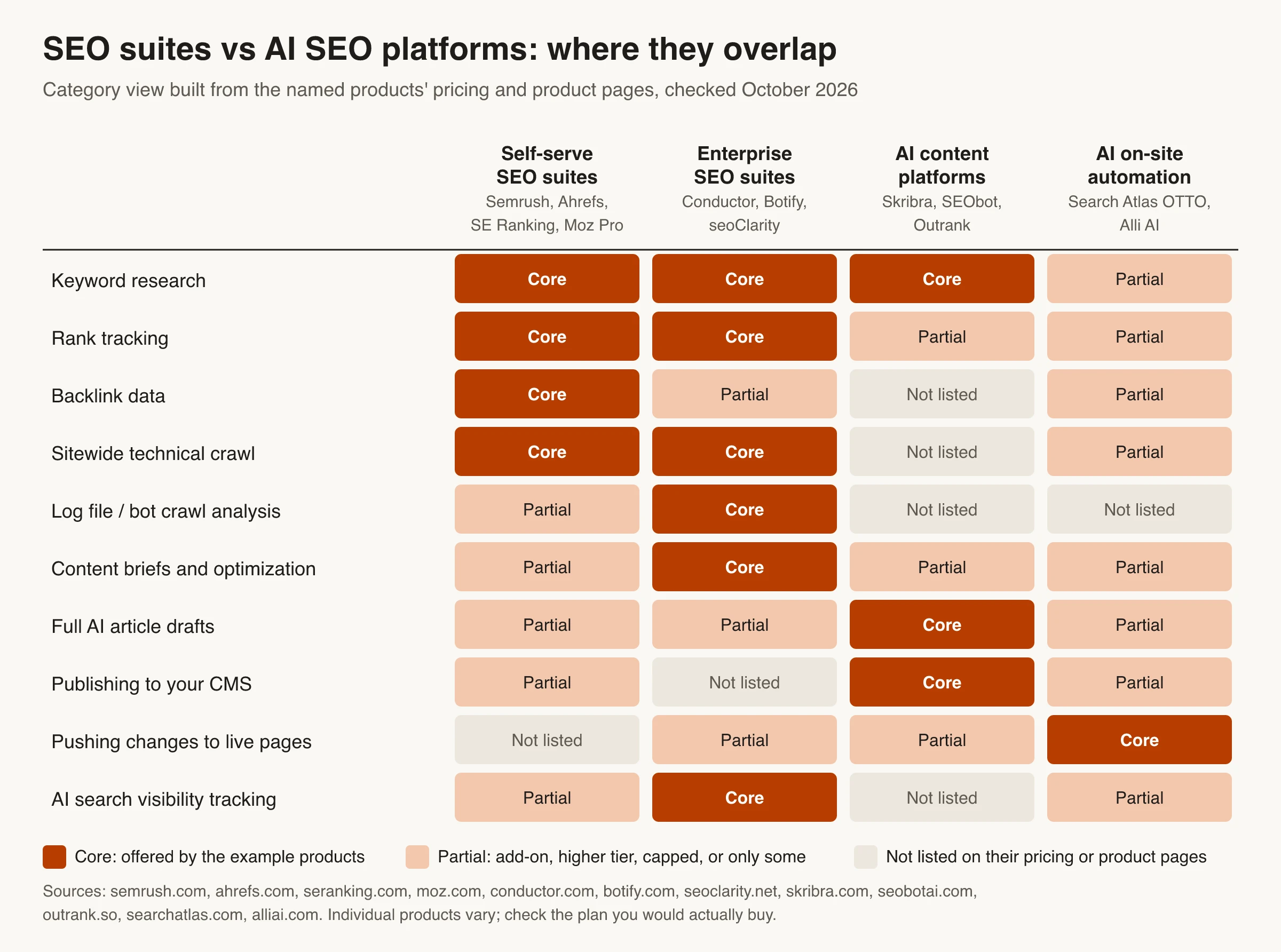
The matrix maps each category against the jobs in an SEO program. Read across a row to see who does a job, or down a column to see what a category leaves to you.
Three patterns stand out:
- Suites own the data layer. Backlinks, sitewide crawls and rank history come from suites. None of the AI content platforms here sells them.
- Only AI platforms act on your site by themselves. Content platforms publish on a schedule; on-site tools change live pages. A suite mostly hands you a list.
- Enterprise suites cover the most rows, including log analysis and AI visibility, and they’re priced to match.
So “platform vs suite” is usually the wrong question. The useful one is which jobs you want a tool to do for you, and which ones you only want it to tell you about.
Is an SEO suite enough for crawling and indexing?
For crawling, usually yes. For indexing, no tool can do the job for you, suite or platform. Here’s how the work splits.
What a suite’s crawler tells you
A site audit crawls your pages the way a search engine bot would and flags broken links, redirect chains, missing or duplicate tags, blocked resources and canonical conflicts. Self-serve limits cover most sites: SE Ranking Core includes 250,000 audit pages a month, and Ahrefs Lite comes with 100,000 crawl credits. If a crawler is all you need, Screaming Frog is free up to 500 URLs and £199 a year per license beyond that. For a quick check of one page, Skribra’s free technical SEO audit runs 30 checks with no sign-up.
What a crawler can’t tell you is what Google did with those pages. It simulates a bot; it doesn’t see Google’s index.
What only Search Console can tell you
Google’s Page indexing report shows how many of your URLs Google has crawled and indexed, and why the rest were left out. The URL Inspection tool shows, for one URL, whether it’s on Google, when Google last crawled it and which canonical Google chose, which may not be the one you declared. You can request indexing there, but Google says a request doesn’t guarantee the page will be indexed, and there’s a daily limit on requests.
So the practical setup for most sites is a suite or a crawler to find problems, plus Search Console to confirm what Google indexed. If pages are crawled but still not indexed, the guide to why CMS pages aren’t getting indexed walks through the usual causes.
When you need an enterprise crawler
Google’s crawl budget guide is written for large sites (1 million+ unique pages) whose content changes about weekly, medium or larger sites (10,000+ pages) whose content changes daily, and sites with many URLs stuck as “Discovered - currently not indexed.” Google says other sites can skip it: keeping the sitemap current and checking the Page indexing report is enough.
Past those sizes, an enterprise crawler and log file analysis start to pay for themselves, because server logs show what Googlebot actually requests, not what a simulated crawl predicts. seoClarity’s Technical SEO tier (crawling plus log file analysis), Botify (website and AI-bot analytics) and Semrush Enterprise (multi-million-page crawling) are examples. This list of enterprise SEO mistakes that waste crawl budget covers what to look for in the logs.
What an AI SEO platform adds for indexing
AI platforms can help search engines find new pages, but they don’t decide indexing either. Skribra pings IndexNow when it publishes, which notifies Bing, Yandex, Naver, Seznam.cz, Amazon and Yep. Google isn’t an IndexNow participant, so for Google, discovery still comes from your sitemap and internal links. Skribra’s Search Console insights show the indexing status and last crawl date of each article it published, not of the rest of your site.
On-site automation tools can fix what an audit finds. When a fix is applied by JavaScript, as with Alli AI’s snippet option, check the rendered HTML in URL Inspection: Google processes JavaScript in a separate rendering step, and that’s the version it indexes.
AI SEO platform or SEO suite: which should you choose?
Start with your bottleneck, not the feature list.
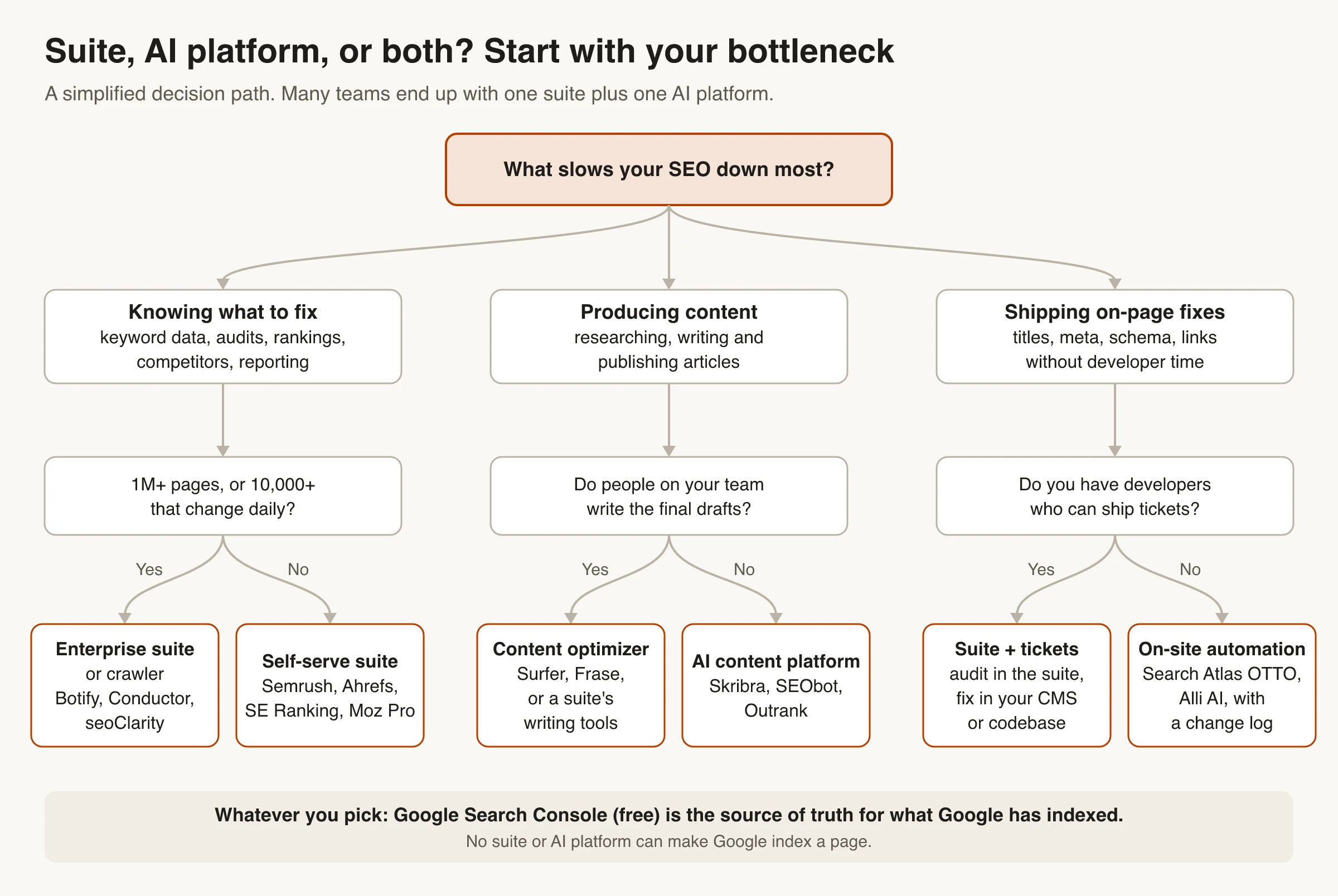
Choose an SEO suite when
- You need keyword, competitor and backlink data to decide what to do.
- Your problems are technical: crawl errors, migrations, site architecture.
- You report rank history to clients or leadership.
- People on your team write and publish the content.
Choose an AI SEO platform when
- You know what you should publish, but nobody has time to write it. That’s an AI content platform.
- Your audit list keeps growing and developer time doesn’t. That’s on-site automation.
- Your site is small enough that Search Console and a free crawler cover the data side.
Use both when you publish every week
This is the common setup for teams that publish weekly or more. Some example stacks at October 2026 list prices, monthly billing:
| Situation | Stack | Monthly cost |
|---|---|---|
| Small site, no writers | Search Console + Screaming Frog free + Skribra Starter (5 articles) | $19 |
| Content team with writers | SE Ranking Core or Semrush SEO + Surfer Discovery (yearly) | $178 to $188 |
| Research plus hands-off publishing | Ahrefs Lite + Skribra Pro (30 articles) | $204 |
| Enterprise program | Enterprise suite on contract + an AI content platform or optimizer, with approvals | Quote-based |
Compare AI content platforms on cost per published article, not plan price. At entry prices, Skribra works out to $3.80 an article ($19 for 5), SEObot about $5.44 ($49 for 9) and Outrank $3.30 ($99 for 30). This roundup of AI tools for SEO content writing compares ten of them, and the Skribra comparison pages cover individual matchups.
A weighted scorecard for your trial
Demos are built to impress. A short trial on your own site tells you more, as long as it’s fair: same site section, same tasks, same reviewers, two weeks. Score each tool from 1 to 5 on each criterion, then weight the scores. Change the weights to fit your bottleneck, but keep them adding up to 100 so you’re forced to trade off.
| Criterion | Example weight | What to test | What a 5 looks like |
|---|---|---|---|
| Fit to your main job | 25 | Your two most common tasks, such as a brief plus an audit fix, or a published article | Finishes both without workarounds |
| Output quality and accuracy | 20 | Fact-check three outputs and count the errors | No factual errors; edits are style, not substance |
| Data and crawl coverage | 15 | Crawl the same section and compare it with Search Console | Matches Search Console, or explains the gaps |
| Workflow and approvals | 15 | Who can publish or change pages, and whether there’s a review step and a change log | Roles, approvals and rollback |
| Integrations and exports | 10 | Connect your CMS, Search Console and GA4, then export raw data | Everything exportable as CSV or via API |
| Total cost at your volume | 10 | Price at the volume you’ll run, with add-ons and seats | Cost per page or article known up front |
| Security and support | 5 | SSO, roles, data retention, support terms | Documented and in the contract |
Copy this into a spreadsheet. For each tool, weighted = weight × score ÷ 5, so a perfect tool totals 100.
Criterion,Weight,Tool A score (1-5),Tool A weighted,Tool B score (1-5),Tool B weighted
Fit to your main job,25,,,,
Output quality and accuracy,20,,,,
Data and crawl coverage,15,,,,
Workflow and approvals,15,,,,
Integrations and exports,10,,,,
Total cost at your volume,10,,,,
Security and support,5,,,,
Total,100,,,,
How to run a two-week trial
- Pick one segment: a product category, a country folder or a 20 to 50 page blog section.
- Write one “done” sentence per task, such as “a published article that needs under 30 minutes of editing” or “a fix list engineers accept without pushback.”
- Set the weights with everyone who pays for failure. Give SEO, content, engineering and whoever signs the contract one must-not-break criterion each, and write down who makes the final call.
- Run both tools with the same inputs and reviewers, in the same timebox.
- Score what shipped, not the editor preview. Check the published HTML for links, metadata and schema.
- Keep watching Search Console for 4 to 8 weeks for indexing and impressions on the pages you published or changed. Two weeks isn’t long enough to judge rankings.
If each tool wins a different task, that’s your answer too: you’re looking at a suite plus a platform.
Demo traps to watch for
- Polished sample projects instead of your messy real data.
- Add-ons, seats and usage caps that only show up at the contract stage.
- Automation shown without the review step or the rollback.
- A handful of friendly keywords instead of the ones you actually struggle with.
Mistakes to avoid when buying an AI SEO platform
- Buying a platform to solve a data problem, or a suite to solve a production problem. Name the bottleneck first. If you’re not sure which one it is, our guide to tools grouped by the traffic lever they move can help.
- Turning on auto-publish on day one. Google’s scaled content abuse policy targets pages generated at scale mainly to manipulate rankings, however they’re made. Start with an approval step (SEObot, Outrank and Skribra all offer one) and loosen it once the output holds up. This breakdown of what SEO automation can and can’t do covers where to keep a person in the loop.
- Switching on automated link building without reading the policy. Some content platforms build links for you: Outrank’s plan includes automated backlink building that places links to your site inside articles on other blogs, and its customers describe it as a backlink exchange. The same spam policies list excessive link exchanges and “using automated programs or services to create links to your site” as link spam, so read them before you turn such a feature on.
- Letting a tool change live pages without a log. Ask an on-site automation vendor how you see each change and undo it, and spot-check changed pages in URL Inspection. If every change must be approved first, approval-first tools like XeoRank work differently from article autopilots.
- Expecting the tool to get pages indexed. It can help with discovery. Google still decides what to index.
- Comparing plan prices instead of total cost. Add seats (Semrush extra users start at $45/mo), add-ons and usage caps, then divide by the pages or articles you’ll actually ship.
- Skipping the exit test. Make sure you can export content, briefs, tags and rank history before you commit to a yearly plan.
Governance questions for enterprise buyers
Once a tool can publish or change pages, it’s part of your production system. Get answers to these in writing before you sign:
- Access: Is there SSO and role-based access? Who can publish, deploy fixes, or change integrations?
- Audit trail: Can you see who approved and shipped each change, and roll it back?
- Security documentation: Does the vendor provide SOC 2 or ISO documentation?
- Data use: How long is your data kept, and is it used to train models?
- Model changes: Will you be told when the underlying model changes, since that can shift tone and output?
- Failure handling: What happens when a publish fails or the tool is down during a release: queued jobs, retries, alerts?
- Support: What SLA and escalation path come with your tier?
If a vendor can’t answer these, assume your team will own the incident when something goes wrong.
AI SEO Platform or SEO Suite: The Verdict
- Buy an SEO suite if your bottleneck is knowing what to fix. Self-serve suites (Semrush, Ahrefs, SE Ranking, Moz Pro) cover most sites. Move to an enterprise suite (Conductor, Botify, seoClarity) when you’re past roughly 1 million pages, or 10,000 that change daily.
- Add an AI content platform (Skribra, SEObot, Outrank) if your bottleneck is producing and publishing articles.
- Add on-site automation (Search Atlas OTTO, Alli AI) if fixes pile up faster than developers can ship them.
- Use Search Console for indexing, whatever else you buy. It’s free, and it’s the only place Google reports what it indexed.
Then score two candidates on the same real tasks for two weeks, and let the scorecard make the call.
Frequently Asked Questions
- Is an SEO suite sufficient for indexing and crawling, or do I need an SEO platform?
- For crawling, a suite's site audit is enough for most sites. An enterprise crawler matters mainly past about a million pages, or 10,000 pages that change daily. For indexing, neither a suite nor an AI platform can get a page indexed. Use Search Console's Page indexing report and URL Inspection tool to see what Google actually indexed.
- What is an enterprise SEO suite?
- It's an SEO suite built for very large sites and teams: crawling millions of URLs, log file analysis, many domains, user roles and SLAs. Conductor, Botify, seoClarity and Semrush Enterprise are examples. Most are sold on custom contracts rather than self-serve plans.
- How much does an enterprise SEO suite cost?
- Most vendors don't publish prices. seoClarity lists plans from $2,500 a month (labeled representative as of 2022), and Conductor's own buyer's guide estimates $75,000 to $200,000+ a year for full-suite platforms. Self-serve suites list entry plans from $29 (Ahrefs Starter) to $139 a month (Semrush SEO).
- Can an AI SEO platform replace Semrush or Ahrefs?
- Only if you don't need their data. AI content platforms don't sell backlink indexes, sitewide crawls or full rank tracking. A small site can get by with Search Console, a free crawler and an AI content platform; larger programs usually keep a suite.
- Do AI SEO platforms get pages indexed faster?
- They can speed up discovery on some search engines. Tools that ping IndexNow notify Bing, Yandex and others when a page goes live, but Google doesn't use IndexNow. For Google, a current sitemap and good internal links are what help it find new pages, and Google decides what to index.
- Are SEO suites adding AI features?
- Yes. As of October 2026, SE Ranking's Core plan includes 25 AI-written articles and 100 daily AI prompts, Semrush, Ahrefs and Moz also track AI search visibility, and Conductor offers an AI content tool called Creator. None of them advertises the scheduled, keyword-to-published-article workflow that AI content platforms are built around.
Add an AI Content Platform to Your Stack
If your suite already tells you what to write, Skribra can handle the writing. It researches keywords, writes long-form articles with internal links and images, publishes them to your CMS, and keeps them updated using your Search Console data.
Plans start at $19/month for 5 articles, and every plan comes with a 3-day free trial.
Written by
Skribra
This article was crafted with AI-powered content generation. Skribra creates SEO-optimized articles that rank.
Share: