January 12, 2026
·
Updated October 28, 2026
·
14 min read
AI Tools to Increase Organic Traffic (By Growth Lever)
A guide to AI and AI-assisted tools that increase organic traffic, organized by the six levers that actually move it: research, content, technical fixes, click-through rate, refreshes and AI search visibility. Pricing and features were checked on each vendor's site in October 2026.

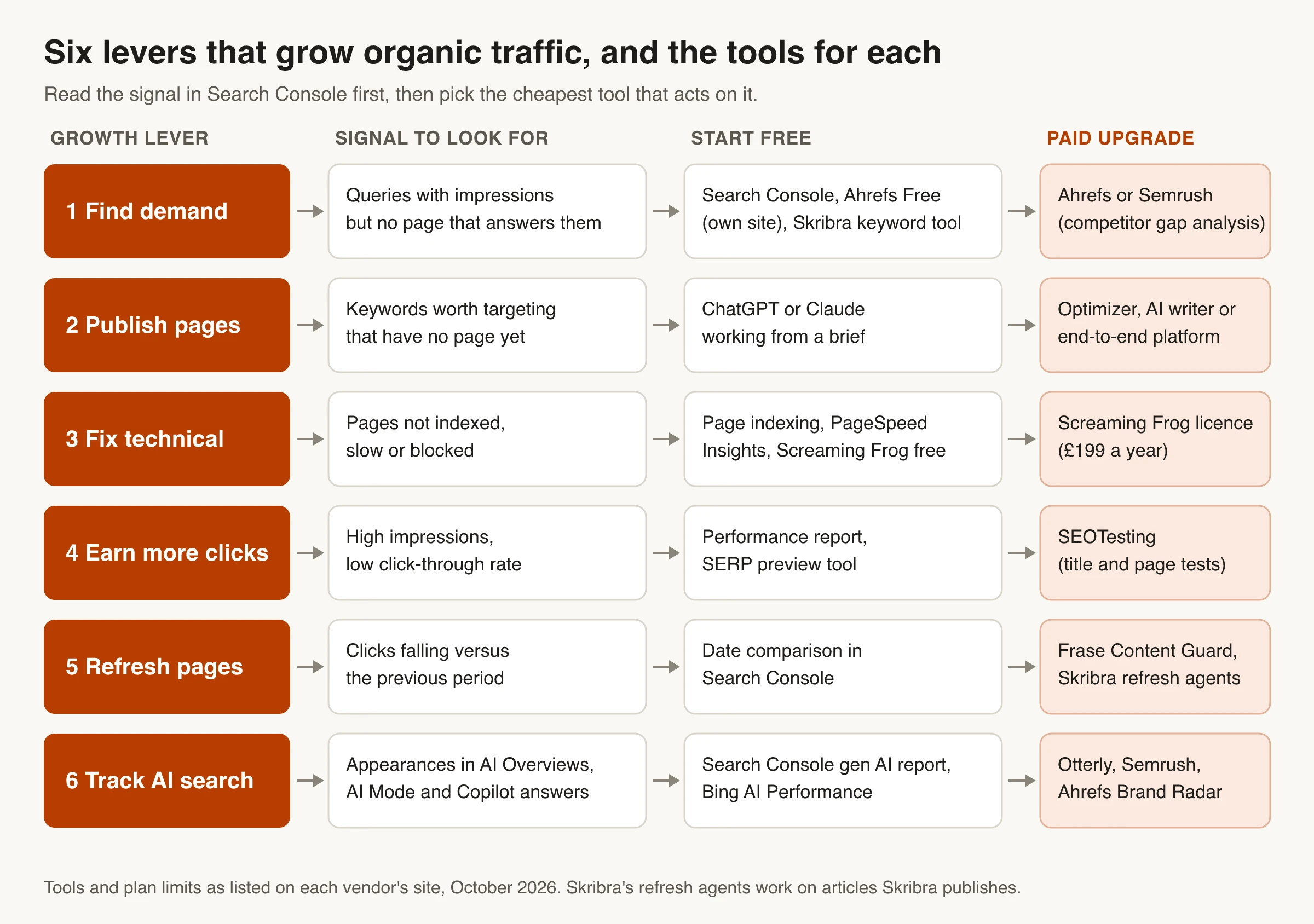
Short answer: no single AI tool increases organic traffic on its own. Traffic grows when you pull one of six levers: find demand you're missing, publish pages for it, fix technical blockers, win more clicks from rankings you already have, refresh pages that are slipping, and show up in AI search answers. Each lever has a free starting point, usually Google Search Console, and one paid tool worth adding once you outgrow it.
Below is one honest pick per lever, with prices checked on each vendor's site in October 2026. If you mainly want a tool that writes SEO articles, our separate roundup of AI tools for SEO content writing covers that in depth (it's linked in Lever 2); this page covers everything around the writing. Skribra is our product. Where it fits a lever we say so, and where it doesn't (it doesn't track AI search visibility, for example), we say that too.
Which AI tools actually increase organic traffic?
Organic traffic is the visits you get from unpaid search results. Tools don’t create it. They help you do one of a few things faster or better, and each of those things leaves a different trace in Search Console. That’s why this guide is organized by lever, not by brand: a crawler can’t fix a click-through problem, and a content writer can’t fix pages Google never indexed.
Here’s the short version. Prices are the lowest relevant paid plan, billed monthly unless noted, as listed in October 2026. Plans change often, so confirm before you buy.
| Lever | Start free | Paid pick | Entry price (Oct 2026) |
|---|---|---|---|
| Find demand | Search Console, Ahrefs Free, Skribra keyword tool | Ahrefs or Semrush | Ahrefs Starter $29/mo; Semrush SEO $139/mo |
| Publish pages | ChatGPT or Claude with a brief | Optimizer, AI writer or end-to-end platform | See our content tools roundup |
| Fix technical issues | Page indexing report, PageSpeed Insights, Screaming Frog (500 URLs) | Screaming Frog license | £199/year ($279) |
| Earn more clicks | Performance report, SERP preview | SEOTesting | $50/mo (1 site) |
| Refresh decaying pages | Date comparison in Search Console | Frase (Content Guard) or Skribra | Frase $49/mo; Skribra $19/mo |
| Track AI search | Search Console generative AI report, Bing AI Performance | Otterly or Semrush AI Visibility Toolkit | Otterly $29/mo; Semrush $99/mo |
If you’re starting from zero, work the levers roughly in this order: technical blockers first (nothing else matters if pages aren’t indexed), then clicks and refreshes on pages that already rank, then new content. Most sites get faster wins from pages Google already shows than from new ones.
Lever 1: Find the demand you’re missing
Research tools answer one question: which searches could bring you visitors that you don’t serve yet? AI shows up here mostly as clustering and intent labeling, which saves time but doesn’t replace the underlying keyword data.
Start with Search Console (free)
Google Search Console’s Performance report shows the queries you already appear for, with clicks, impressions, click-through rate and average position per query and per page. Two filters do most of the work:
- Queries at positions 8 to 20 with real impressions. Google already associates these with your site. A focused section or a dedicated page often moves them up.
- Queries a page ranks for but never answers. Open a page, switch to the Queries tab, and look for questions the page doesn’t address. Those are content gaps with proven demand.
For seed ideas beyond your own data, Skribra’s free keyword research tool returns up to 50 related terms for one seed keyword, each with monthly search volume, difficulty, cost per click and search intent.
Paid pick: Ahrefs or Semrush for competitor gaps
Search Console only shows queries you already appear for. To see what competitors rank for that you don’t, you need a third-party index.
- Ahrefs (pricing, October 2026): Starter $29/mo, Lite $129/mo, Standard $249/mo. Lite includes Keywords Explorer, Site Explorer, Site Audit, Rank Tracker and competitive analysis, with 750 tracked keywords. Ahrefs Free covers your own verified sites only: a Site Audit that checks 170+ issues and up to 1,000 of your ranking keywords at a time, but no competitor analysis.
- Semrush (pricing, October 2026): the SEO plan is $139/mo ($117.33/mo billed annually) with 5 websites, 500 tracked keywords, keyword research and competitor analysis. There’s a limited free plan (10 reports a day) and a 7-day trial.
Pick one, not both. If AI search tracking matters to you as well, compare their AI add-ons in Lever 6 before you choose.
Lever 2: Publish pages that deserve to rank
Once you know what’s missing, someone has to write it. AI writing tools fall into three groups: optimizers that score a draft your team writes (Surfer, Frase, Clearscope, NeuronWriter), AI writers that draft for you to edit (Koala, Jasper), and end-to-end platforms that research, write and publish on a schedule (Skribra, Outrank, SEObot, Byword). We compare all ten, with pricing and a feature matrix, in our guide to the best AI tools for SEO content writing, so we won’t repeat it here.
Two things matter for traffic whichever tool you use:
- Volume isn’t the goal. Google’s spam policies treat publishing many pages mainly to manipulate rankings, without adding value for readers, as scaled content abuse, however those pages are made. Publish for keywords you found in Lever 1, not for every keyword a tool suggests.
- Each page needs something a reader can’t get from the current top results: your data, a worked example, a clearer comparison. That’s also what Google says helps in AI search (see Lever 6).
Lever 3: Fix technical issues that cap your traffic
Technical problems don’t grow traffic when you fix them so much as stop losing it: pages that aren’t indexed get no clicks at all. This lever is mostly non-AI tooling, and that’s fine. The checks are deterministic; you want a crawler, not a language model.
Free: Search Console, PageSpeed Insights and a quick audit
- Page indexing report (Search Console): lists which URLs aren’t indexed and why. Fix anything important here before you touch content.
- PageSpeed Insights: Google’s free speed test. Run it on your top templates (home, a blog post, a product or category page), not every URL.
- Skribra’s free technical SEO audit: runs 30 checks on a URL across titles, meta tags, canonicals, headings, images, security headers, robots.txt and structured data.
- Ahrefs Free Site Audit: crawls verified sites with 5,000 crawl credits per project per month.
For a full walkthrough, see how to run a technical SEO audit.
Paid pick: Screaming Frog SEO Spider
Screaming Frog’s crawler is free up to 500 URLs. The paid license costs £199 a year ($279 in US dollars) and removes the limit (pricing, October 2026). It’s a desktop crawler that checks every URL on your site for issues like broken links, redirects and duplicate titles. Most small sites can stay on the free tier; buy the license once your site passes 500 URLs.
Lever 4: Win more clicks from rankings you already have
Raising click-through rate is often the cheapest traffic you’ll find, because the page already ranks. The signal is simple: high impressions and a low click-through rate for the position. In the Performance report, sort pages by impressions and look for ones whose CTR is well below your other pages at a similar average position.
Rewrite titles with AI, then test the change
AI assistants are good at drafting title and meta description options. Give the model the query, the page’s actual content and the current top results, and ask for five variants that promise exactly what the page delivers. Check each one in a SERP preview tool for length and truncation.
Keep expectations realistic. Google says it uses several sources to generate title links, not just your title element, so a rewritten title may not show exactly as written. SERP features also change how many clicks any result can get; our comparison of on-page SEO and SERP features covers that trade-off.
To test a change properly, SEOTesting (pricing, October 2026) starts at $50/mo for one site with a 14-day free trial and no card required. It pulls your Search Console data and runs time-based tests that compare performance before and after a change, plus split tests.
Where Skribra fits
For articles Skribra publishes, its Hook agent does this automatically. It looks for high impressions with a CTR well below what the page’s position would suggest, then rewrites only the title and meta description and leaves the body untouched. It skips pages that already earn healthy traffic, only acts on pages at position 6 or beyond, and waits 60 days before touching the same article again. It doesn’t work on pages Skribra didn’t publish.
Lever 5: Refresh pages before they lose their rankings
Pages slip as competitors publish newer content and facts go out of date. Refreshing a page that already has links and history is usually faster than ranking a new one.
Find decaying pages for free
In Search Console’s Performance report, compare the last three months with the previous period and sort pages by the change in clicks. Then check why each one dropped:
- Position dropped: competitors overtook you. Compare your page with the new top results and close the gaps.
- Position held, impressions dropped: demand fell or the results page changed. Check the query in an incognito window.
- Impressions held, clicks dropped: a CTR problem. Go back to Lever 4.
If clicks fell sharply across many pages at once, rule out a sitewide cause first; our list of search results page errors that hurt organic CTR is a good checklist.
Paid picks: Frase Content Guard or Skribra’s refresh agents
Frase (pricing, October 2026) starts at $49/mo ($39/mo billed yearly). Its Content Guard watches pages for ranking decay (10 pages on Starter) and helps you ship the fix. It suits teams that edit and publish themselves.
Skribra handles content refresh for the articles it publishes. Its Scout agent reads Search Console data for each article and refreshes pages in striking distance (positions 5 to 15) or with clicks sliding against their own 28-day baseline, one article per run with a 30-day cooldown. Almanac updates stale year references and Keeper refreshes the oldest content. Plans start at $19/mo for 5 articles; the $75/mo Pro plan runs all five maintenance agents on every article. As with Hook, these agents only work on Skribra-published articles.
Lever 6: Adapt your organic strategy for AI search
AI Overviews, AI Mode, ChatGPT and Copilot now answer many queries directly, often with links to the sources they used. The good news is that Google’s advice for these features is mostly the same as for classic search, and the tools to measure them have improved a lot this year.
What Google says about AI Overviews and AI Mode
Google’s guide to AI features and your website is direct: there are no additional requirements to appear in AI Overviews or AI Mode, and no special structured data to add. A page needs to be indexed and eligible to show with a snippet. The usual preview controls (nosnippet, data-nosnippet, max-snippet and noindex) also limit how your content appears in AI features.
Google’s advice on succeeding in AI search adds a few practical points:
- Publish unique, non-commodity content. People ask longer, more specific questions in AI search, so pages that only restate the top results have little to offer.
- Keep pages accessible and fast. Googlebot must not be blocked, pages must return a 200 status, and the main content should be easy to find on any device.
- Make structured data match the visible page.
- Support text with good images and video, and keep Merchant Center and Business Profile details current.
- Judge visits by value, not just clicks. Google says clicks from results pages with AI Overviews are higher quality, so track conversions such as signups or sales alongside clicks.
So the levers above still apply. What changes is measurement: you now want to know how often you appear in AI answers, not just where you rank.
Free AI visibility data: Search Console and Bing
- Search Console generative AI performance reports. Google launched them in June 2026 and says they reached all websites worldwide by August 31, 2026. They show impressions in generative AI features such as AI Overviews and AI Mode, plus Discover, broken down by page, country, device and date. The launch post lists impressions, not clicks. This data is also still counted in the overall Performance report.
- Bing Webmaster Tools AI Performance. In public preview since February 2026, it shows how often Microsoft Copilot, AI summaries in Bing and some partner integrations cite your pages: total citations, average cited pages, page-level citations and a sample of the grounding queries that led to them.
Neither covers ChatGPT, Perplexity or Claude. For those you need a paid tracker.
Paid AI search visibility trackers
These tools run a set of prompts on AI assistants on a schedule and record whether your brand or URLs show up. Prices and coverage as listed in October 2026:
| Tool | Entry price | Prompts included | AI engines covered |
|---|---|---|---|
| Otterly | Lite $29/mo | 15 | ChatGPT, Google AI Overviews, Perplexity, Copilot; AI Mode, Gemini and Claude are paid add-ons |
| Semrush AI Visibility Toolkit | $99/mo per domain | 25 (+50 for $60/mo) | Named on its help page: ChatGPT and Google AI Mode |
| Ahrefs Brand Radar | Add-on from $199/mo | Custom prompt packs from $50/mo (2,500 checks) | Researches brands across Ahrefs’ prompt database and tracks your own prompts |
| Profound | Custom (free 7-day trial) | Trial: 50 prompts | Trial: ChatGPT, Gemini, AI Overviews; up to 9 engines on Enterprise |
Otterly is the cheapest way to start. Semrush or Ahrefs make more sense if you already pay for their SEO toolkit, since your keyword and AI data then live in one place. Semrush also bundles AI tracking into its SEO + AI Search plans, starting at $199/mo with 50 prompts. Profound sells mainly custom Enterprise plans and doesn’t publish a self-serve price.
Frase and Surfer have started adding AI tracking to their content tools too: Frase’s $49/mo Starter plan lists AI visibility on ChatGPT and Google AI, and Surfer includes AI tracking prompts from its Standard plan. Skribra doesn’t offer AI search visibility tracking.
A free-first stack to grow organic traffic
You can cover all six levers without paying for anything:
- Google Search Console: queries, pages, CTR, indexing, and now generative AI impressions.
- Google Analytics 4: what organic visitors do after they land, including conversions.
- Bing Webmaster Tools: Bing data plus Copilot citations.
- PageSpeed Insights and Screaming Frog (up to 500 URLs): technical checks.
- Ahrefs Free: site audit and ranking keywords for your own verified sites.
- Skribra’s free SEO tools: keyword research, technical audit, SERP preview, meta description checker, sitemap validator and more.
- A general AI assistant (ChatGPT, Claude or Gemini) for briefs, outlines and title variants.
Pay for a tool when the free version blocks a decision you need to make, not before. Common triggers: you need competitor keyword data (Ahrefs or Semrush), your site is past 500 URLs (Screaming Frog), you want to publish more than you can write (a content platform), or you need to know whether ChatGPT mentions you (an AI visibility tracker).
How to tell whether a tool is actually adding traffic
Vendors’ case studies can’t tell you what a tool will do on your site. A simple before-and-after check can:
- Write down a baseline. Before you change anything, export clicks, impressions, CTR and position for the pages you’ll touch, covering at least the previous 28 days.
- Change one lever at a time. If you rewrite titles and refresh content on the same pages in the same week, you won’t know which one worked.
- Keep a comparison group. Leave a few similar pages untouched so you can separate your change from seasonality or a Google update.
- Wait long enough. Give changes 4 to 8 weeks, and compare equal-length periods.
- Check value, not just clicks. Look at conversions from organic visits in GA4, which matters more now that AI answers satisfy some queries without a click.
If a paid tool doesn’t change a metric you care about within a quarter, cancel it.
Which AI tool should you start with?
- Not sure where traffic is leaking: Search Console. It’s free and it points to the right lever.
- Pages missing from Google: fix indexing with Search Console and a crawl before anything else.
- Plenty of impressions, few clicks: rewrite titles with an AI assistant and test them with SEOTesting.
- Older pages slipping: a refresh workflow, using Frase if you edit in-house or Skribra if it publishes for you.
- No new content shipping: an AI writer or end-to-end platform from our content tools comparison.
- Need to know if AI answers cite you: Search Console’s generative AI report first, then Otterly or your SEO suite’s AI add-on.
Pull one lever at a time, measure it in Search Console, and only then add the next tool.
Frequently Asked Questions
- What are the top AI solutions for boosting organic traffic to a website?
- There's no single one; pick by the lever you need. Google Search Console (free) shows where traffic is leaking, Ahrefs or Semrush find keyword gaps, an AI writer or content platform covers production, Screaming Frog handles technical audits, SEOTesting measures title changes, and Otterly or Semrush track AI search visibility.
- What are the best tools to adapt an organic traffic strategy for AI search?
- Start with Search Console's generative AI performance reports and Bing Webmaster Tools' AI Performance report, which are both free. Add a paid tracker such as Otterly (from $29/mo) or Semrush's AI Visibility Toolkit ($99/mo) if you need ChatGPT or Perplexity coverage. The content work stays the same: unique, accessible, well-structured pages.
- Do I need special optimization or schema to appear in AI Overviews?
- No. Google says there are no additional requirements and no special structured data for AI Overviews or AI Mode. A page needs to be indexed and eligible to show with a snippet, and standard SEO best practices apply.
- Can AI tools alone increase organic traffic?
- Not on their own. They speed up research, writing, audits and monitoring, but traffic still depends on pages that satisfy the search better than the alternatives. Google's spam policies also target mass-produced pages made mainly to manipulate rankings, so more pages isn't automatically more traffic.
- Is there a free AI tool to increase organic traffic?
- Search Console isn't an AI tool, but it's the most useful free tool for organic traffic. Pair it with a general AI assistant for briefs and title variants, and free tools like PageSpeed Insights, Ahrefs Free and Skribra's free SEO tools.
- How do I see traffic from AI Overviews in Search Console?
- Clicks and impressions from AI features are counted in the Performance report under the Web search type. The generative AI performance reports, available to all sites since August 31, 2026, show impressions in AI Overviews and AI Mode by page, country, device and date.
Grow Organic Traffic Without Adding Headcount
If you want the content and refresh levers handled for you, Skribra researches keywords, writes and publishes long-form articles to your CMS, and then uses your Search Console data to refresh pages and rewrite underperforming titles.
Plans start at $19/month for 5 articles, and every plan comes with a 3-day free trial.
Written by
Skribra
This article was crafted with AI-powered content generation. Skribra creates SEO-optimized articles that rank.
Share: