May 14, 2026
·
Updated October 28, 2026
·
14 min read
On-Page SEO Tools vs Manual Audits: How Reliable Are They?
How reliable on-page SEO tools are compared with a manual on-page audit: what automated checkers measure well, what only a person can judge, seven free and paid tools with October 2026 pricing, and a manual on-page SEO checklist.

Short answer: on-page SEO tools are reliable at measuring what's in a page's HTML: whether the title, meta description, H1, alt text and canonical tag exist, how long they are, and where a keyword appears. They can't tell you whether the page matches search intent, whether its facts are right, or whether it's better than what already ranks. Many of their warnings also rest on rules of thumb rather than Google rules. Use a tool for coverage, then a person for judgment.
Published head-to-head data points the same way. In a February 2025 comparison by the agency NP Digital, 13 SEOs audited five sites by hand: AI audit tools flagged 259 errors, the humans 83, and only 74 were found by both. It's a small sample, run by a company that sells audits, and it counts flags rather than confirmed problems. Still, it shows that tools and people mostly find different things.
Below: what each kind of tool checks well, why checkers flag things that aren't problems, seven tools with October 2026 prices (including Skribra's free ones), a manual on-page SEO checklist, and a workflow that combines both.
What On-Page SEO Tools Check Reliably (and What They Can’t)
Most on-page SEO tools fall into three groups, and each one fails in a different place:
- Rule-based checkers such as Yoast SEO, Rank Math, Lighthouse, SEO Site Checkup and Skribra’s free checkers parse one page and compare it with fixed rules.
- Site crawlers such as Screaming Frog run similar checks across every URL, so they also catch duplicates and broken links between pages.
- Content optimizers such as Surfer compare your text with the pages that already rank for a keyword.
None of them reads the page the way a searcher does.
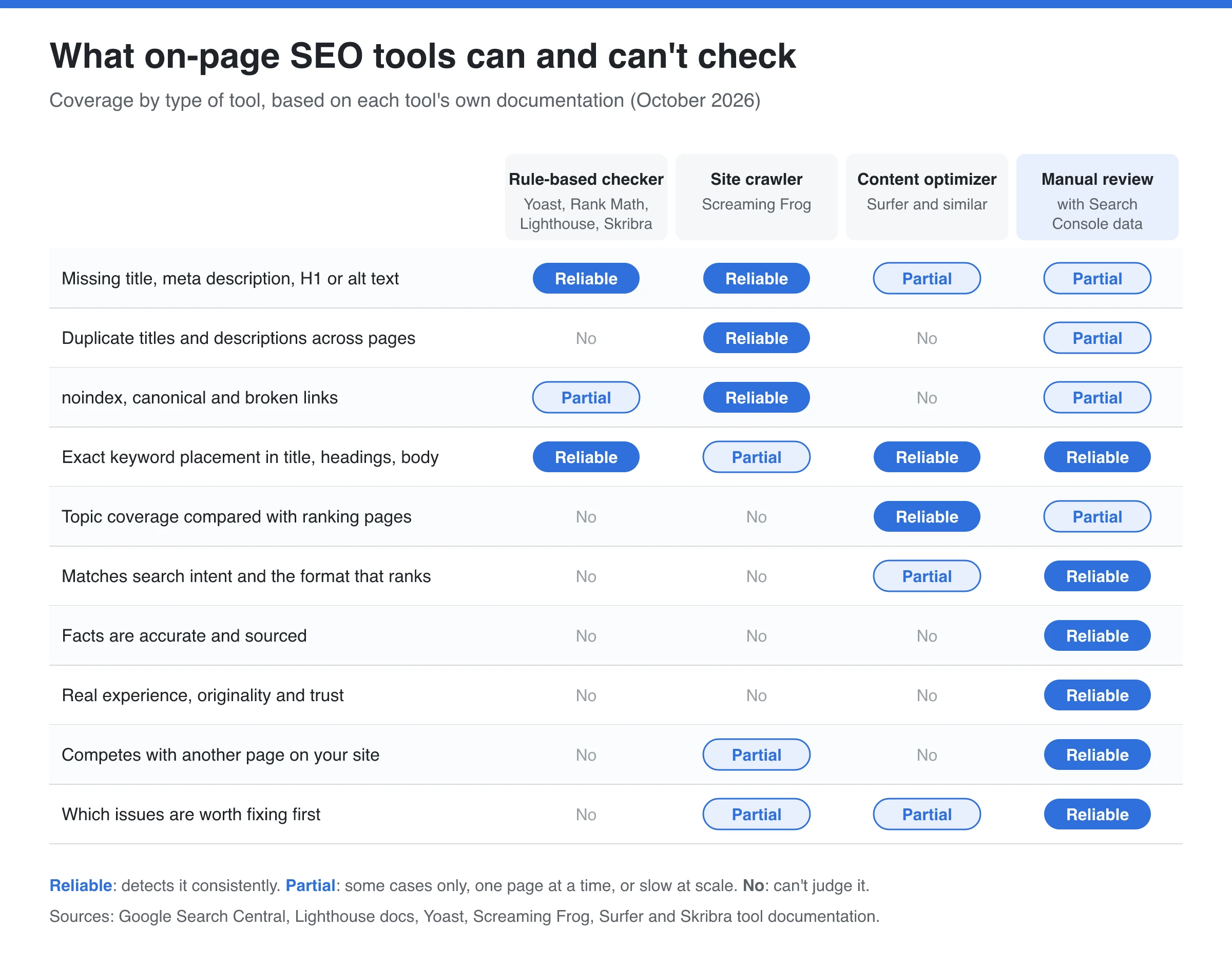
The pattern is consistent. Anything that can be counted or matched in the HTML, tools do well and much faster than a person. Anything that depends on the topic, the reader or the rest of your site needs a human.
| Check | How reliable a tool is | What a person adds |
|---|---|---|
| Title, meta description, H1 and alt text exist | High: it’s a presence test | Whether they describe this page accurately |
| Title and description length | High at measuring; the target is a rule of thumb | Whether the words that matter survive truncation |
| Keyword in title, headings and opening | High for exact matches | Whether it reads naturally and covers close variants |
| Word count, keyword density, readability score | High at counting; none is a Google rule | Whether the page is as long and as simple as the topic needs |
| noindex, canonical, status code | High | Whether that setting was intended |
| Search intent and page format | Low; optimizers infer it from the SERP | Whether the page is the kind of result searchers choose |
| Accuracy, sources, first-hand experience | None | All of it |
| Overlap with your other pages | Low on single-page tools | Which page should own the query |
Why Checkers Flag Problems That Aren’t Problems
Tools have to turn advice into pass-or-fail rules, and Google publishes very few hard numbers. So each vendor picks its own thresholds, and the same page can pass one checker and fail another.
Take the meta description. Google’s snippet documentation says there’s no length limit: snippets are truncated to fit the device, and they’re built primarily from the page content, with the meta description used when it describes the page better. Lighthouse’s audit only fails a missing or empty description; its documentation says Lighthouse “doesn’t evaluate the quality of your description.” Skribra’s free audit passes descriptions of 120 to 160 characters and warns outside that band. All three measure correctly. Only Google’s position is a Google rule, and it has no number in it.
Read these flags as questions, not orders:
- Title length. Skribra’s audit warns outside 50 to 60 characters, and many checkers use a similar band. Google’s title link guidance sets no limit on the title element; long titles are truncated to fit the screen. Check what stays visible in a SERP preview instead of counting characters.
- Word count. Skribra’s audit warns below 300 words of visible copy. Google’s SEO Starter Guide says content length alone doesn’t matter for ranking. A short page that fully answers the query is fine.
- Heading order. Checkers warn when a page jumps from H2 to H4. The same Starter Guide says heading order doesn’t matter for Google Search, though semantic order helps people using screen readers. Fix it for accessibility, not rankings.
- Keyword density. Google publishes no target percentage. A density checker is useful for spotting repetition that tips into keyword stuffing, which Google’s spam policies prohibit. It isn’t a dial to tune to 1.5%.
- Readability scores. Flesch-type formulas measure sentence and word length. A page for engineers may need longer words than the formula likes. Compare scores against your own best pages, not a universal target.
- All green lights. Yoast itself says not every traffic light has to be green to rank, and that some pages, such as announcements, don’t need a focus keyword at all.
Screaming Frog says something similar about its crawler: the High, Medium and Low priorities in its Issues tab estimate potential impact and aren’t hard rules for what to fix first.
What Automated On-Page Checkers Miss
False negatives are the bigger risk, because a clean report looks like a clean page. These are the problems automated checkers routinely miss:
- The wrong kind of page for the query. If the top results are tools or product pages and yours is a long guide, every on-page check can pass and the page still won’t rank. Only looking at the actual results tells you.
- Wrong or outdated facts. No checker verifies a claim. A content optimizer can tell you that ranking pages mention a price; it can’t tell you whether your price is current.
- No first-hand experience. Google’s guidance on helpful content asks whether a page shows real expertise and adds original information. A tool sees words, not whether the writer has used the product.
- Two of your pages chasing one query. A single-page checker can’t see the rest of your site. Search Console’s Performance report, filtered to one query, shows when several of your URLs get impressions for it.
- Text the checker never saw. Tools that parse raw HTML without rendering it, Skribra’s free audit included, don’t run JavaScript. If your content loads client-side, check the rendered HTML Google sees in Search Console’s URL Inspection, as covered in the guide to running a technical SEO audit.
- The same flaw on hundreds of pages. An identical boilerplate intro on 500 product pages passes every single-page check. A crawler with duplicate detection, or a person reading a sample, catches it.
Automated Audit Software vs Manual Audits: What One Test Found
Independent benchmarks are rare. One published example is NP Digital’s February 2025 comparison: 13 SEOs manually audited five randomly chosen sites, and their findings were compared with AI audit tools running with a 1,000-page crawl limit.
| Result | Errors |
|---|---|
| Flagged by the tools | 259 |
| Flagged by the human auditors | 83 |
| Found by both | 74 |
| Found only by the tools | 185 |
| Found only by the humans | 9 |
NP Digital’s summary says the tools picked up more technical and small-scale issues, while people caught advanced and contextual ones. Three caveats apply: five sites is a small sample, NP Digital sells SEO services, and the summary doesn’t say how many of the 259 flags were real problems worth fixing. The useful finding is the small overlap. The two methods mostly find different things, which is the practical case for using both.
7 On-Page SEO Tools Compared (October 2026)
Prices below come from each vendor’s own pricing page as of October 2026.
| Tool | Type | What it checks | Price | Free option |
|---|---|---|---|---|
| Skribra free SEO tools | Single-page checkers and homepage audit | Meta description, headings, keyword density, SERP preview; 30-check technical audit | Free | No sign-up |
| Lighthouse / PageSpeed Insights | Single-page audit | Basic SEO checks plus performance and accessibility | Free | Built into Chrome |
| Yoast SEO | WordPress plugin | SEO and readability analysis in the editor | Premium $118.80/year per site, excl. VAT | Free plugin |
| Rank Math | WordPress plugin | Content analysis in the editor | PRO €7.99/mo billed yearly, renews at €8.99 | Free plugin |
| SEO Site Checkup | Hosted audit and monitoring | Page-level audits on 70+ factors | Basic $39/mo, or $29/mo billed yearly | 7-day trial |
| Screaming Frog SEO Spider | Desktop site crawler | Titles, descriptions, headings, links and duplicates across a site | £199/year per license | Free up to 500 URLs |
| Surfer | Content optimizer | Content Score against ranking pages | Discovery $49/mo billed yearly | “Start for free” (terms not stated) |
Skribra’s free on-page tools
Skribra’s free tools need no account. Since Skribra publishes this blog, here’s exactly what they do and don’t do. The text checkers work on copy you paste in: the meta description checker (length and keyword use), the heading structure checker (maps the H1 to H6 outline and flags a missing H1, multiple H1s and skipped levels), the keyword density checker and the SERP preview.
The technical SEO audit fetches your homepage and robots.txt, runs 30 deterministic checks across titles, meta tags, canonicals, headings, image alt text, security headers, robots.txt and structured data, and shows PageSpeed scores next to the results. Its limits, which its own FAQ states: it audits the homepage rather than every URL, and it doesn’t judge content quality. It also doesn’t render JavaScript.
Lighthouse and PageSpeed Insights
Lighthouse is Google’s open-source page auditor, built into Chrome DevTools and run by PageSpeed Insights. Its SEO category covers basics such as whether the page can be indexed, has a meta description and uses descriptive link text. It’s free and accurate on what it checks, but the checks are deliberately shallow: as noted above, the meta description audit only fails a missing or empty description.
Yoast SEO and Rank Math
On WordPress, these plugins are the checker most editors actually see. Both analyze a post in the editor against a focus keyword and readability rules. Yoast’s free plugin has more than 10 million active installations, according to its plugin directory page. Yoast SEO Premium costs $118.80 a year per site before VAT and checks up to five keyphrases, counting synonyms and word forms. Rank Math’s free version checks up to five focus keywords per post by default, according to its WordPress.org listing; Rank Math PRO costs €7.99 a month billed yearly for the first year and renews at €8.99.
Both are good at catching a forgotten meta description or a title without the main term. Their traffic lights are rules, not judgments, so treat them as hints.
SEO Site Checkup
A hosted checker for sites that don’t run WordPress, or for teams that want monitoring. According to its pricing page, it runs page-level audits on more than 70 SEO factors, and paid plans add weekly score monitoring, a full-site crawl for a few sites, keyword tracking and competitor comparisons. Basic is $39 a month ($29 billed yearly) after a 7-day free trial. It has the same strengths and blind spots as any rule-based checker.
Screaming Frog SEO Spider
The standard desktop crawler. It requests every URL on your site and lists missing, duplicate or overlong titles and descriptions, missing H1s, broken links, redirects and much more. That site-wide view is exactly where single-page checkers fall short. It’s free up to 500 URLs; a license costs £199 a year (about $279 on its US page). Expect a learning curve, and expect to do the prioritizing yourself.
Surfer
Surfer works differently: it scores a draft against the pages ranking for your keyword. That’s the closest any tool gets to judging coverage and intent, and it’s most useful while writing. It doesn’t verify facts, and a high score can’t tell you that searchers want a different type of page. The Discovery plan costs $49 a month billed yearly and covers up to 120 documents. For how a content score compares with an editorial checklist, see the AI SEO content checklist. For a wider review of popular SEO tools, including the all-in-one suites, see our beginner’s guide.
The Manual On-Page SEO Checklist
Run these checks on the pages that matter, after the tool pass. Each one needs judgment. The linked tools help you verify, but they don’t decide.
Intent and substance
- The page type matches the results. Search the main query in a private window. If the top results are tools, lists or product pages and yours is something else, fix that before anything below.
- The opening answers the query. The first two or three sentences should give the answer, not a warm-up.
- It adds something the top results don’t. Data, worked examples, a tool, screenshots or first-hand experience.
- Every fact is current and sourced. Prices, statistics and product details link to the original source and carry a date where they change.
- The author is clear and credible. Readers can see who wrote it and why they know the subject, the core of E-E-A-T.
Title, snippet and headings
- The title tag is specific and unique. It describes this page, puts the main term early and isn’t used by another page on your site. If you’re unsure whether the keyword belongs in the URL or the title, the title is the one that matters more.
- The meta description sells this page. It summarizes what this page offers, not a template sentence shared across posts. Check length and keyword use with the meta description checker.
- The headings tell the story. Reading only the H2s and H3s should tell someone what the page covers. Vague headings like “Key Considerations” fail this check.
- The keyword reads naturally. The main term and close variants appear where a reader expects them, and nowhere feels forced.
Links, media and overlap
- Internal links help the reader. Links point to the most relevant pages with descriptive anchor text, and your important related pages link back here.
- Images earn their place. Each meaningful image shows what the text describes and has alt text that says so.
- No other page competes for the query. Filter Search Console’s Performance report by the query and look for more than one of your URLs. If Skribra manages your blog, its keyword cannibalization check lists competing articles and recommends a fix for you to approve.
- It works on a phone. Open the page on mobile: the answer should be visible without fighting pop-ups, ads or tiny tables.
How to Combine a Tool Pass With a Manual Audit
Use the tools for breadth and people for depth, in this order:
- Run the tool pass on everything. Crawl the site with Screaming Frog (or your suite’s site audit) and let Yoast, Rank Math or Lighthouse check each new page as it’s published.
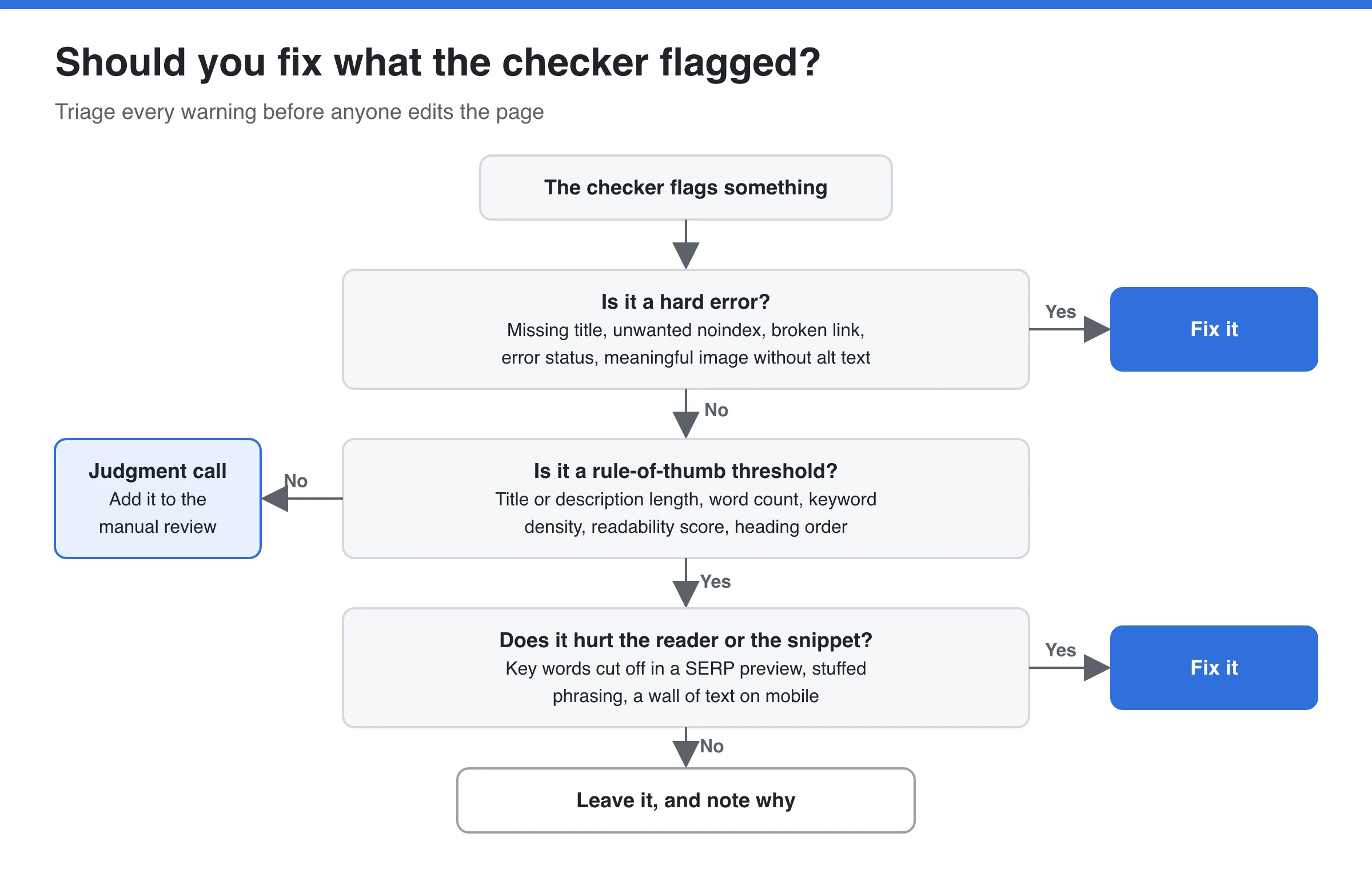
- Triage the flags. Fix hard errors right away: missing titles, unintended noindex tags, broken links, error pages. Question threshold warnings using the decision tree above. Move judgment calls to the manual list.
- Pick pages for manual review with Search Console. Good candidates are pages with many impressions but few clicks, pages sitting low on page one or on page two for valuable queries, and pages whose clicks are falling. For low click-through pages, also look at what the results page itself shows; the post on on-page SEO vs SERP features covers that.
- Run the manual checklist on those pages, starting with intent. A page that’s the wrong type for its query won’t be saved by a better title.
- Change one thing at a time where you can, and note the date. Compare clicks and average position in Search Console over the following weeks so you learn which fixes actually moved anything.
A fully manual audit, done by someone experienced, is worth paying for when an important page lost rankings and the tools show nothing wrong, when a few pages drive most of your revenue, when the topic affects people’s health or money, or before a redesign. Crawl, rendering and indexing problems are a different job, covered in the technical SEO audit guide linked above.
So, Can You Trust an On-Page SEO Checker?
Trust it for facts about your HTML: what’s missing, duplicated, blocked or broken. Question its thresholds, because most are rules of thumb that Google doesn’t set. Don’t ask it about intent, accuracy or experience; that’s what the manual review is for.
In practice, treat the report as a list of things to check, not a list of things to do. Let the tool find everything, fix the real errors, and spend your human time on the pages that earn traffic.
Frequently Asked Questions
- How reliable are on-page SEO checkers compared to manual audits?
- They're reliable for anything measurable in the HTML, such as missing tags, title and description length, keyword placement, noindex tags and broken links, and they're far faster than a person. They're unreliable for search intent, accuracy, originality and deciding which of your pages should rank. Treat their warnings as questions and review important pages by hand.
- Can automated website audit software replace a manual SEO audit?
- No, but it replaces the tedious part. Crawlers and checkers find many more mechanical issues than a person would, while a person decides which ones matter and catches problems of context. In NP Digital's small 2025 comparison, tools and human auditors agreed on only 74 errors, so each found things the other missed.
- Are free on-page SEO tools good enough?
- For the mechanical checks on a small site, usually yes. Lighthouse, the free Yoast and Rank Math plugins, Screaming Frog's free crawl of up to 500 URLs and Skribra's free checkers cover titles, descriptions, headings, alt text and indexability. Paid tools add site-wide monitoring, bigger crawls and content scoring against competitors.
- Do I need every check in Yoast or Rank Math to be green?
- No. Yoast itself says not every traffic light has to be green to rank, and some pages don't need a focus keyword at all. Fix flags that point to a real problem, such as a missing meta description, and ignore ones that would make the text worse to read.
- Which on-page SEO tool is best?
- It depends on the job. On WordPress, Yoast SEO or Rank Math checks each post as you write. For a whole site, Screaming Frog finds duplicates and broken links across every URL. For writers, a content optimizer like Surfer compares drafts with ranking pages. For quick free checks, use Lighthouse or Skribra's free tools.
- What is the difference between on-page SEO analysis and a technical SEO audit?
- On-page analysis looks at a page's content and HTML elements: title, meta description, headings, copy, links and images. A technical audit checks whether search engines can crawl, render and index the site at all, covering robots.txt, sitemaps, status codes, redirects and speed. They overlap on tags like canonical and noindex.
Publish Pages That Pass the Basics From Day One
Skribra’s free on-page SEO tools work without an account. If you’d rather not fix titles, descriptions and links after the fact, Skribra researches keywords, writes long-form articles with meta descriptions, JSON-LD schema and internal links, and publishes them to WordPress, Webflow, Notion, Shopify or a webhook.
Plans start at $19/month for 5 articles, and every plan comes with a 3-day free trial.
Written by
Skribra
This article was crafted with AI-powered content generation. Skribra creates SEO-optimized articles that rank.
Share: