January 13, 2026
·
Updated October 28, 2026
·
14 min read
Automated Content Workflows: 6 Examples for SEO Teams
Six automated content workflow examples for SEO teams. Each one lists its trigger, automated steps, tool options and human checkpoint, starting with how to automate content brief assembly.

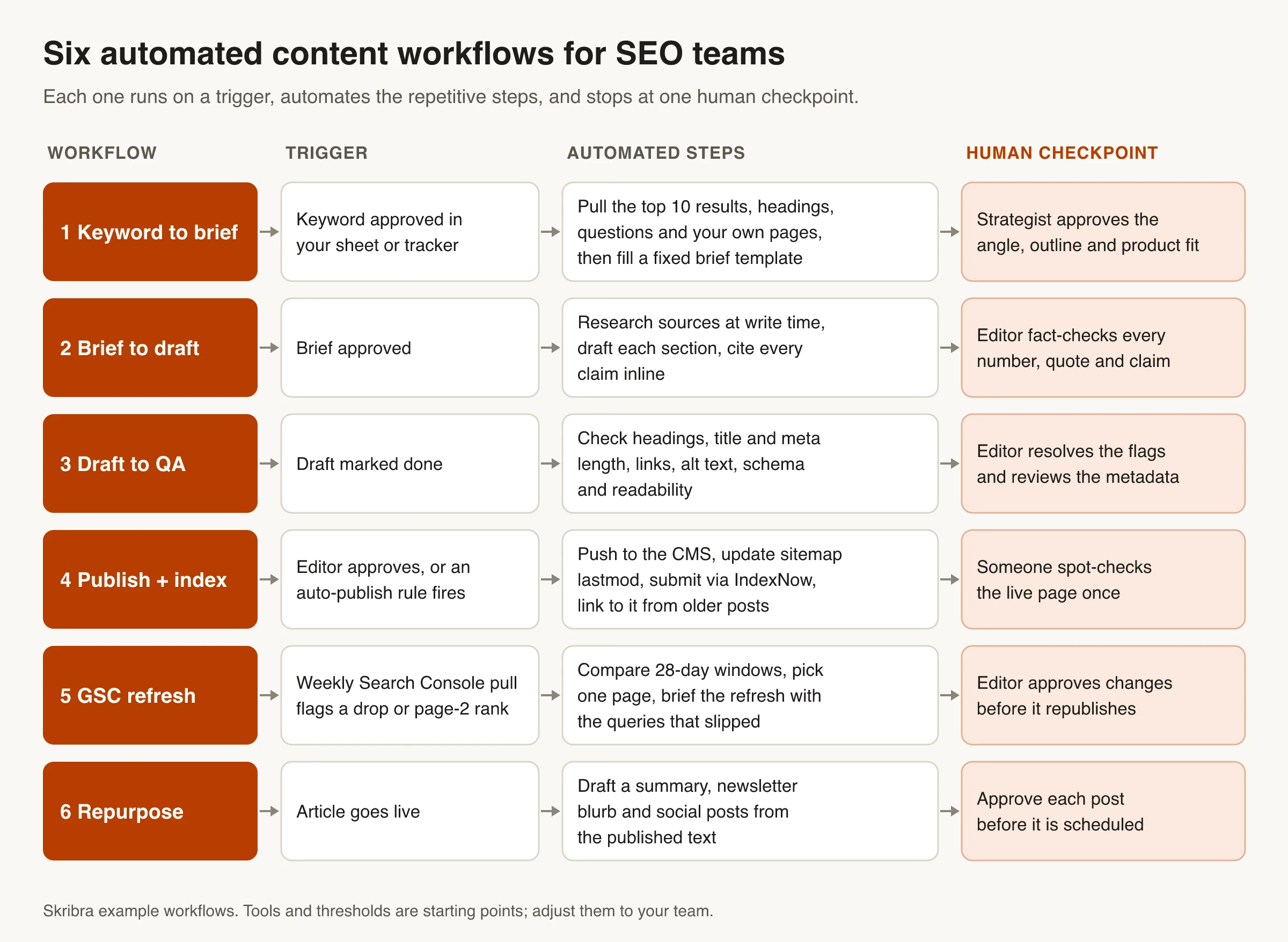
An automated content workflow is a chain of steps that starts on a trigger, such as a newly approved keyword, a finished draft or a drop in clicks, runs the repetitive work without anyone pushing it along, and stops at a person only where judgment matters. For an SEO team, six workflows cover most of that repetitive work: assembling content briefs, drafting with citations, pre-publish QA, publishing and indexing, refreshes triggered by Search Console, and repurposing.
Each example below gives the trigger, the automated steps, the tools you can build it with and the human checkpoint. We start with content brief automation, since most of a brief is research that software can gather for you. Skribra is our product. Where it runs a workflow for you we say so, and for every workflow we also describe the no-code route (Zapier, Make or n8n) for teams who'd rather build their own.
What is an automated content workflow?
Every workflow on this page has the same four parts:
- Trigger: the event that starts it. A row changes status in a spreadsheet, a CMS publishes a post, or a scheduled job runs.
- Automated steps: the work that doesn’t need judgment. Fetching search results, filling a template, checking title length, pinging a search engine.
- Human checkpoint: the one place a person approves, edits or rejects the output before it moves on.
- Output: what gets handed to the next workflow, such as a brief, a draft, a live URL or a refresh task.
Workflow automation isn’t the same thing as letting AI write everything. Google’s guidance on generative AI content says AI can be useful for researching a topic and adding structure. The same guidance warns that using it to produce many pages without adding value for users may violate the scaled content abuse policy. That’s why each workflow below keeps a checkpoint at the point where accuracy or judgment decides whether the page is worth publishing.
The six workflows chain together: the brief from workflow 1 feeds workflow 2, and workflow 5 sends older pages back through the loop. You don’t need all six to start.
Workflow 1: Keyword to content brief (content brief automation)
- Trigger: a keyword is marked “approved” in your keyword sheet, Airtable base or Notion database.
- Automated steps: pull the search results, extract competitor headings and questions, check your own site, and fill a brief template.
- Human checkpoint: a strategist approves the angle, outline and product fit.
- Output: a writer-ready brief and a task with a due date.
Most of a content brief is assembled from data that already exists in search results and in your own Search Console account, which makes it one of the easiest production steps to automate. The parts that need a person are small but decisive.
What are automated content briefs?
An automated content brief is a brief whose research and first draft are produced by software from live data: the target keyword, the current search results, the questions people ask and the pages you already have. A person reviews it before a writer starts and decides what the article should say that the top results don’t.
Here’s what goes into one and where each field’s data comes from:
| Brief field | Where the data comes from | Automate it? |
|---|---|---|
| Target keyword and related queries | Your keyword tool; Search Console queries for related pages | Yes |
| Search intent and format | Result types in the top 10 (guides, lists, tools, product pages) | Draft it, then confirm |
| Working title and H2 outline | Headings on the top-ranking pages, People Also Ask | Draft it, then edit |
| Questions to answer | People Also Ask, Search Console queries, forums | Yes |
| Sources to cite | Pages found during research | Collect automatically; vet by hand |
| Internal links | Your sitemap and existing related posts | Yes |
| Audience and goal | Your content strategy | Fixed per template |
| Product fit and CTA | Your product docs | Human only |
| Unique angle | Your data, experience and opinions | Human only |
| Deadline, writer, reviewer | Your project tool | Yes |
Getting the search intent right matters more than any other field. If the top 10 are all list posts and your brief asks for an opinion essay, the rest of the brief doesn’t matter.
How to automate brief assembly, step by step
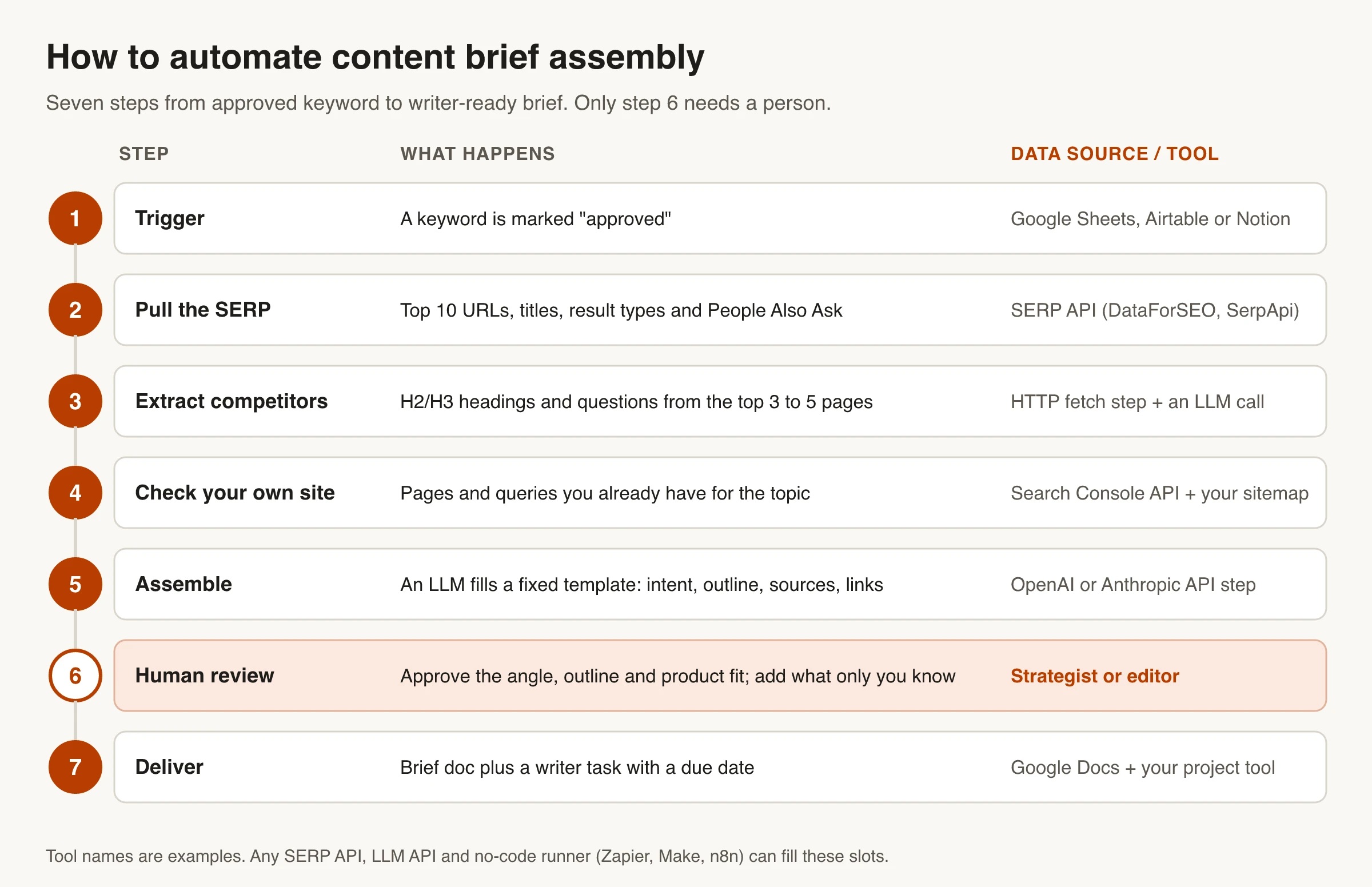
- Trigger on approval. Watch your keyword sheet for rows whose status changes to “approved”.
- Pull the search results. Call a SERP API such as DataForSEO or SerpApi for the top 10 URLs, titles and People Also Ask questions in the country you target.
- Extract what competitors cover. Fetch the top three to five pages and have an LLM step list their H2 and H3 headings and the questions they answer, as a structured list rather than a summary.
- Check your own site. Query the Search Console API for pages that already get impressions for the keyword. If one already ranks, you may need a refresh, not a new article. Related posts from your sitemap become internal link candidates.
- Assemble into a fixed template. Send everything to an LLM with your brief template and tell it to leave blank any field the inputs can’t support. A fixed template makes briefs easy to review.
- Route to a person. Set the status to “ready for review”, not straight to the writer. The reviewer approves the angle and adds the product fit and anything only your team knows.
- Deliver. Create the brief doc and a task with the writer, reviewer and due date.
Store a link to the raw SERP data with each brief, so an editor can see why a section is there.
Tools for content brief automation
There are three ways to run this workflow:
- Build it in Zapier, Make or n8n. Each has a generic HTTP step (Webhooks by Zapier, Make’s HTTP module, n8n’s HTTP Request node) that can call a SERP API, the Search Console API and an LLM API. It’s the most flexible route and the most maintenance, because every API change lands on you.
- Use a brief tool. As of October 2026, Frase describes its research as “content research that ends in a brief”, Surfer offers an Outline Builder alongside its Content Score, and AirOps publishes a content-brief template that imports keywords so you can create multiple briefs at once. These cover steps 2 to 5 for you; you still own the review.
- Skip the separate brief. In Skribra, the brief-equivalent work happens inside the article pipeline. Its writing agent, Scribe, researches the topic, plans an outline matched to the search intent and then drafts the article in the same run. Its keyword research also de-duplicates new keywords against what you already cover. If your writers are people and need a brief document, one of the first two routes fits better.
Workflow 2: Brief to draft with citations
- Trigger: a brief is approved.
- Automated steps: research sources at write time, draft each section against the brief, cite every claim inline, add internal links from the brief.
- Human checkpoint: an editor fact-checks every number, quote and claim.
- Output: a draft ready for QA.
The rule that makes this workflow safe is simple: no claim without a link. Google’s generative AI guidance points out that generative models don’t retrieve facts, so their output can contain errors, and it calls manual fact-checking of AI-generated content critical. So the drafting step should run a fresh web search, attach the source URL to each statistic or factual claim, and leave a visible marker wherever it couldn’t find one. The editor then verifies instead of rewriting: open each link, confirm it says what the draft says, cut what doesn’t hold up.
Draft section by section rather than in one prompt, so you can regenerate one weak section without touching the rest.
Skribra: Scribe runs live web research at write time, cites sources inline where the claims sit, and adds internal and glossary links. You can approve each article before it publishes or let articles auto-publish.
Workflow 3: Draft to pre-publish QA
- Trigger: a draft is marked done.
- Automated steps: check heading structure, title and meta description length, broken and missing links, image alt text, structured data and readability.
- Human checkpoint: an editor resolves the flags and reads the metadata.
- Output: a publish-ready article.
Most pre-publish checks are rules, and rules are what automation does best. A typical QA pass flags:
- More than one H1, or skipped heading levels (an H4 straight after an H2)
- A title or meta description that will be cut off in search results
- Links that return a 404 or redirect, and posts with no internal links at all
- Images with empty alt text
- Structured data that doesn’t validate or doesn’t match what’s on the page
- Paragraphs or sentences far longer than the rest of the article
Don’t skip the metadata review. Google’s generative AI guidance says to apply the same accuracy and quality checks to titles, meta descriptions, structured data and alt text, because those can appear in search results.
You can script these checks against the draft’s HTML in a code step, or run them by hand with free tools such as Skribra’s heading structure checker. For the judgment checks a script can’t make, such as intent match, sourcing and experience signals, use our AI SEO content writing checklist as the editor’s pass.
Workflow 4: Publish and submit for indexing (IndexNow + sitemap)
- Trigger: an editor approves the article, or an auto-publish rule fires.
- Automated steps: push to the CMS with metadata and images, update the sitemap’s lastmod, submit the URL through IndexNow, and add a link to the new post from a related older one.
- Human checkpoint: someone spot-checks the live page once.
- Output: a live URL that search engines have been told about.
Publishing through the CMS’s API removes the copy-paste step, along with the broken formatting and blank meta descriptions that come with it. What’s left is telling search engines the page exists, which works differently per engine:
- IndexNow is a protocol where you notify a search engine that a URL was added or changed. Per its documentation, you host a key file at your site’s root, can submit up to 10,000 URLs in one POST, and submissions are shared with all participating engines. The participant list currently includes Bing, Yandex, Seznam, Naver, Yep, the Internet Archive and Amazonbot. Google isn’t on it as of October 2026.
- For Google, keep your XML sitemap current. Google’s sitemap documentation says it uses the lastmod value only when it is consistently and verifiably accurate, and that it ignores priority and changefreq. So set lastmod when the main content actually changes, not on every deploy. For one-off urgent pages, the URL Inspection tool’s “Request indexing” button is still manual; our guide to request indexing vs XML sitemaps covers when each is worth it.
Teams often skip the last step: linking to the new post from an older one, so it doesn’t launch orphaned.
Skribra: auto-publishing goes to WordPress, Webflow, Notion and Shopify directly, or to any site through a webhook, with formatting, cover image and structured data in place. IndexNow auto-indexing is included from the Starter plan up, and its Weaver agent adds one contextual link from a related older post to new articles that have too few inbound links.
Workflow 5: Refresh pages when Search Console shows a drop
- Trigger: a weekly Search Console pull flags a page whose clicks are falling, or that sits just off page one with real impressions.
- Automated steps: compare two date windows, rank the candidates, and brief a refresh with the exact queries that slipped.
- Human checkpoint: an editor approves the changes before the page republishes.
- Output: an updated page with a new lastmod date.
Nobody checks hundreds of old posts by hand, which is why this workflow keeps paying off. A workable version:
- Pull the data weekly. Query the Search Console API’s Search Analytics endpoint grouped by page and query. One request returns up to 25,000 rows, and dates are in Pacific Time. Use finalized data rather than the fresh data option, which can still change.
- Compare windows. For each page, compare the last 28 days with the 28 days before. Flag pages whose clicks dropped noticeably, and pages averaging positions 5 to 15 with meaningful impressions. Those are the ones a better page can still move. Pick thresholds that fit your traffic; there’s no universal number.
- Diagnose before rewriting. A drop on one query usually means a competitor or a SERP change. A drop across every query can mean an indexing or technical problem, which no rewrite will fix.
- Brief the refresh with the signal. Pass along the queries that slipped and what the current top results cover that your page doesn’t. “Refresh this post” produces generic edits; “this page fell from position 6 to 11 for these three queries” produces focused ones.
- Approve, republish, cool down. Update lastmod, then leave the page alone for a few weeks so you can tell whether the change worked.
Skribra: this loop is what its content refresh agents run. Scout looks for articles in positions 5 to 15 with real impressions and pages whose clicks are sliding against their own 28-day baseline, picks one article per run, and refreshes it with that signal attached, with a 30-day cooldown per article. Hook rewrites only the title and meta description on high-impression, low-CTR pages. Articles you’ve edited by hand are skipped.
Workflow 6: Repurpose published articles
- Trigger: an article goes live (a CMS webhook or a new item in your RSS feed).
- Automated steps: draft a summary, a newsletter blurb and a few social posts from the published text, then place them in your scheduler as drafts.
- Human checkpoint: someone approves each post before it’s scheduled.
- Output: distribution drafts queued for the week.
This is the easiest workflow to build in a no-code tool. An RSS or webhook trigger, one LLM step with your voice rules, and a step that creates drafts in your scheduler or newsletter tool is usually enough. Keep the posts as drafts. Auto-posting AI copy to social accounts is how off-tone posts go out under your brand.
One SEO caution: repurposing means new formats on other channels, not new pages on your own site. Spinning one article into several near-identical posts on your blog is the kind of low-value scaled content Google’s spam policies describe. Skribra doesn’t handle social or newsletter distribution, so this is one to build yourself.
Where humans have to stay in the loop
Automation handles retrieval, formatting and rule checks well. It handles judgment badly. This split holds across all six workflows:
| Step | Safe to automate | A person owns |
|---|---|---|
| Keyword selection | Pulling volume, de-duplicating against existing pages | Whether the topic fits your business |
| Brief | SERP data, headings, questions, link candidates | Angle, product fit, what you know that others don’t |
| Draft | Research, first draft, inline citations | Checking every claim against its source |
| QA | Length, headings, links, alt text, schema validation | Intent match and overall quality |
| Publishing | CMS push, sitemap, IndexNow, internal links | A one-time check of the live page |
| Refresh | Detecting drops, ranking candidates, drafting changes | Diagnosing why the page dropped |
| Repurposing | Drafting posts and blurbs | Approving anything that goes out under your name |
Watch for checkpoints that turn into rubber stamps. If reviewers approve everything without changes, either the automation is very good or nobody is reading, so audit a sample properly each week. Our list of AI SEO automation limitations goes deeper on where automated SEO tends to go wrong.
How to start automating your content workflow
Start with one workflow, not six:
- Find the step where work waits. Time your process for a week; the step that sits longest is your first candidate.
- Write the manual version as a checklist. If you can’t, you can’t automate it. The checklist becomes your template and prompt.
- Build the smallest version and log every run. One trigger, a few steps, one checkpoint. What reviewers change tells you what to fix.
Before you scale a workflow that publishes on its own, check these autoblogging safeguards.
If you’d rather not maintain the plumbing, an end-to-end platform can cover most of workflows 1, 2, 4 and 5 in one pipeline, though you still own the editorial checks. How Skribra works walks through its version stage by stage. Either way, the workflows sit inside a broader SEO content marketing strategy. Automation speeds up execution; it doesn’t choose what’s worth publishing.
Which automated content workflow should you build first?
- Writers wait on research: build workflow 1, content brief automation. It saves the most manual time per article.
- Drafts come back with unsupported claims: add workflow 2’s no-claim-without-a-link rule before anything else.
- Errors reach the live site: automate workflow 3’s rule checks; they’re cheap to script.
- Publishing is copy-paste: connect your CMS and add IndexNow and sitemap updates (workflow 4).
- Old posts are losing traffic: a weekly Search Console comparison (workflow 5) finds them for you.
- Posts go out and nobody hears about them: workflow 6 is the quickest no-code build.
Whichever you pick, keep the human checkpoint. It’s what separates an automated workflow from scaled content.
Frequently Asked Questions
- What are automated content briefs?
- They are content briefs whose research and first draft are generated by software from live data: the target keyword, the current top search results, People Also Ask questions and your own Search Console queries. A strategist then reviews the brief, sets the angle and adds product fit before a writer starts.
- How do you automate content brief creation?
- Trigger a workflow when a keyword is approved, pull the top 10 results from a SERP API, extract the headings and questions from the top three to five pages, and check your own site for overlapping pages. Then have an LLM fill a fixed brief template and route it to a reviewer before it reaches the writer. Zapier, Make and n8n can all run this with HTTP steps.
- What is an example of an automated content workflow?
- A Search Console refresh loop is a good one. A weekly job compares each page's last 28 days with the previous 28, flags pages with falling clicks or rankings just off page one, and creates a refresh brief with the queries that slipped. An editor approves the changes before the page republishes.
- What is an automated content research workflow?
- It's a workflow that gathers the research for an article without someone opening dozens of tabs. Typically it pulls search results and questions for a keyword, extracts what competing pages cover, collects candidate sources with their URLs, and checks which of your pages already cover the topic. A person still vets the sources before anything is cited.
- Does Google penalize automated content?
- Google doesn't penalize content for being made with automation or AI. Its spam policies target scaled content abuse, meaning many pages generated mainly to manipulate rankings without helping users. Google's guidance also says to fact-check AI-generated content and review its titles, descriptions, structured data and alt text before publishing.
Run the Whole Content Workflow on Autopilot
If you’d rather not wire up APIs, Skribra researches keywords, writes cited long-form articles, publishes them to your CMS with IndexNow submission, and then uses your Search Console data to refresh pages that slip.
Plans start at $19/month for 5 articles, and every plan comes with a 3-day free trial.
Written by
Skribra
This article was crafted with AI-powered content generation. Skribra creates SEO-optimized articles that rank.
Share: