May 31, 2026
·
Updated October 28, 2026
·
13 min read
Competitor Keyword Research: How to Find Their Keywords
Competitor keyword research means finding the searches your competitors rank for, comparing them with your own rankings, and turning the difference into a short list of pages to write or improve. You can do it free with Google search, competitors' sitemaps and your own Search Console data, or faster with a keyword gap report in Ahrefs, Semrush or SE Ranking.


Getting a list of competitor keywords is the easy part. Any SEO tool will export thousands of them. The hard part is choosing competitors who actually share your search results, then cutting that export down to the few keywords worth acting on.
This guide covers both routes, free and paid, in the same four steps. It includes current tool prices (as of October 2026) and a triage chart for deciding what to refresh, what to write and what to skip.
What competitor keyword research is (and isn’t)
Competitor keyword research is keyword research that starts from other sites instead of a seed keyword. You look at the queries a competing domain ranks for, line them up against yours, and study the difference. That difference is your keyword gap: searches where competitors rank and you don’t, or where you rank well below them.
It’s related to a content gap, but it isn’t the same thing. A keyword gap is a list of queries. A content gap is a topic or question your pages don’t cover yet. One content gap often explains dozens of gap keywords, which is why the last step of this process groups keywords into pages.
Two things it isn’t:
- Copying their keyword list. A competitor’s keywords reflect their product, their audience and their site’s authority. Much of that list won’t fit you.
- A one-time export. Rankings move and competitors keep publishing, so plan to repeat the check, for example once a quarter or after a big competitor launch.
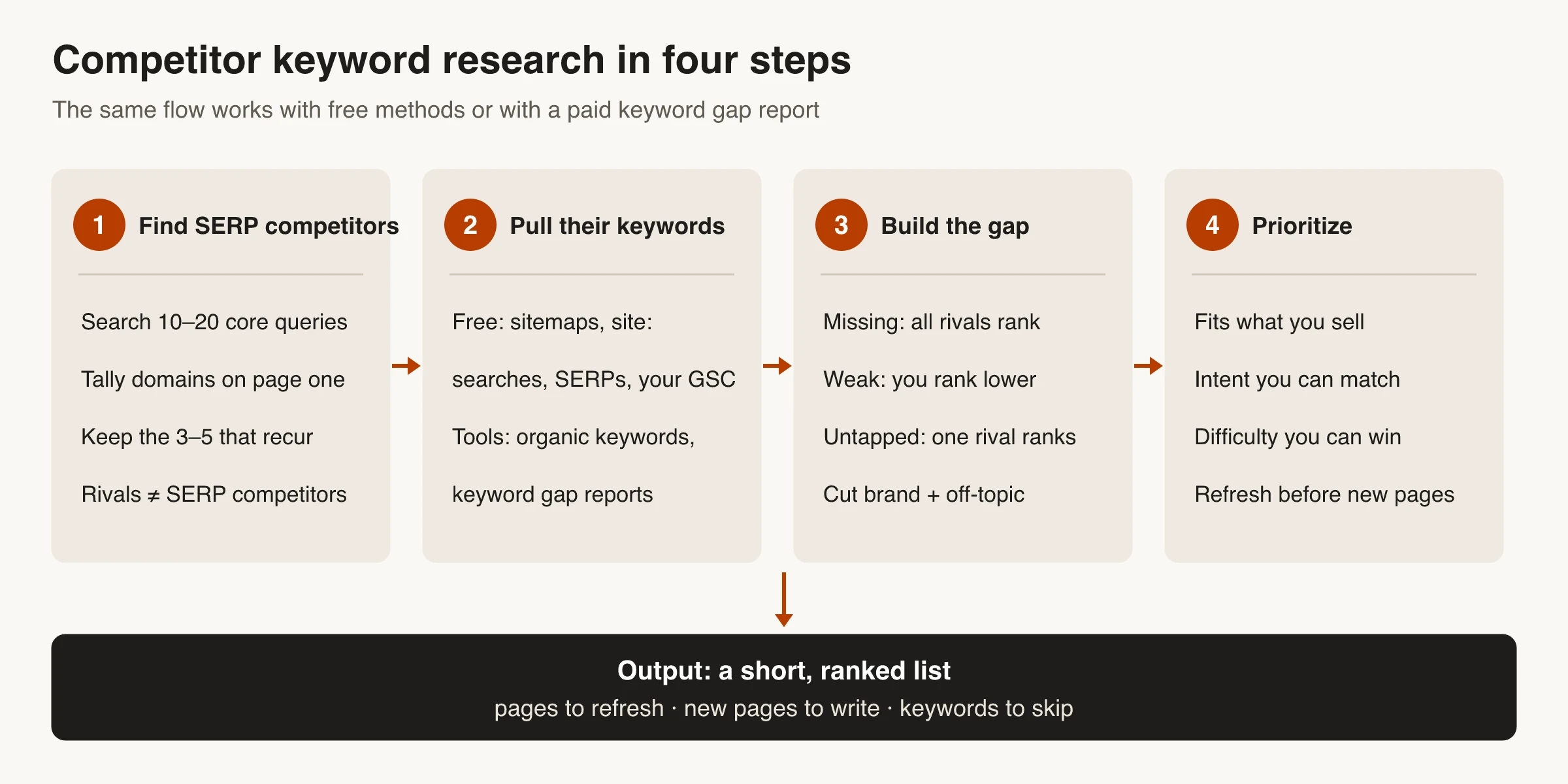
Step 1: Find your real search competitors
Your business rivals and your search competitors overlap, but they’re rarely the same list. For an informational query, page one is often publishers, software blogs, marketplaces or forums that sell nothing like you do. Those are the sites you’re actually competing with for the click.
A free way to find them:
- Write down 10–20 queries that describe what you sell and the problems you solve. Mix product terms (“invoice software for freelancers”) with questions (“how to chase an unpaid invoice”).
- Search each one and note the domains on page one. Use a clean browser window and set the country you sell in, because Google says results differ with time, location, language and device.
- Count how often each domain appears. The 3–5 that keep showing up are your core search competitors. Keep one or two direct business rivals on the list too, even if they appear less often.
- Label each one: direct rival, content publisher, or marketplace/forum. Each teaches you something different. Rivals show commercial keywords, publishers show informational topics, and forums show questions nobody has answered well.
Paid tools speed this up. Ahrefs, Semrush and SE Ranking each have a competitors report that lists the domains whose keywords overlap most with yours. Treat it as a starting point and check it against real results pages. Overlap reports often put huge general sites, like encyclopedias and big media, above the niche sites you can realistically learn from.
Step 2, free: find competitors’ keywords without paid tools
None of these methods gives you search volume for a competitor’s whole site. What they do show is what a competitor has deliberately targeted, which is often more useful than a raw ranking export.
Mine their sitemap and blog categories
Most sites publish an XML sitemap, usually at /sitemap.xml or listed on a Sitemap: line in /robots.txt, as the sitemaps protocol allows. Open it and you have the URLs the site wants indexed, often with a last-modified date.
Read the URL slugs as a keyword list. A slug like /blog/invoice-reminder-email-template tells you exactly what that page targets. Sort by last-modified date to see what they’re publishing or updating now. Blog category and tag pages show how they group topics, which gives you a rough map of their content clusters.
Use site: searches to see what they have on a topic
Search site:competitor.com invoice reminder to list their pages on one subject, or site:competitor.com/blog to browse a section. Google’s documentation warns that the operator’s results aren’t exhaustive, and without other search terms they aren’t ranked either. Use it to discover pages, not to count them.
Read the results page for each target query
For the queries that matter most, look at the whole results page, not just who’s first. Note:
- The title and H1 of each ranking page. They show the exact phrasing competitors chose.
- The page types: guides, lists, product pages, free tools, videos. They tell you which intent Google rewards.
- People Also Ask questions and related searches. They’re free long-tail ideas straight from Google.
- SERP features like AI Overviews, local packs or shopping results. They change how many clicks are left for regular results.
This is slow, so save it for your shortlist rather than every keyword. Our guide to checking keywords on Google walks through a controlled SERP check step by step.
Use your own Search Console data
Search Console can’t show a competitor’s queries, but it does show where you already compete with them. In the Performance report, open the Queries tab, sort by impressions, and look for queries with plenty of impressions but an average position worse than 10. Google already connects those searches to your site, but someone else is winning the click. Search each one and see which competitor is on top and what their page does better.
Two limits to know: report tables show at most 1,000 rows, and Google leaves out rare and anonymized queries (About the data). If you’re new to the tool, start with our Google Search Console glossary entry.
Add rough volumes with free keyword tools
Once you have a list of competitor topics, you need rough demand numbers to rank them:
- Google Keyword Planner has a “Start with a website” option that suggests keywords based on a site’s content. It needs a Google Ads account with billing details entered (Google Ads Help).
- Semrush’s free plan gives you 10 reports a day across its main tools and one project, which is enough for a quick look at a few competitor domains (Semrush pricing).
- Skribra’s free keyword research tool takes a seed keyword and returns up to 50 related keywords with search volume, keyword difficulty, CPC and intent for 8 countries, with no sign-up. It doesn’t analyze a competitor’s domain, so use it to expand topics you found in their sitemap.
Step 2, with tools: keyword gap reports
A keyword gap report covers steps 2 and 3 in one go. You enter your domain and a few competitors, and the tool lists the keywords each of you ranks for, with estimated volume, difficulty and positions. The three common options work much the same way. The differences are how many domains you can compare and what the plan costs.
Prices below are from each vendor’s pricing page as of October 2026:
| Tool | Gap report | Entry plan that includes it | Trial or free option |
|---|---|---|---|
| Semrush | Keyword Gap | SEO plan, $139/mo ($117.33/mo billed yearly) | 7-day trial; free plan with 10 reports a day |
| Ahrefs | Competitive Analysis | Lite, $129/mo with 1,000 credits per user | No trial; free Ahrefs Free account (formerly Ahrefs Webmaster Tools) for sites you own |
| SE Ranking | Competitive Research | Core, $129/mo ($103.20/mo billed yearly) | 14-day trial |
Semrush’s pricing page describes the SEO plan as including “basic keyword research and competitor analysis” but doesn’t list report limits per plan, so check Keyword Gap’s limits during the trial. To see which SEO tools have free trials beyond these three, check our SEO tools review.
Semrush Keyword Gap
Semrush’s Keyword Gap puts your keyword profile side by side with your competitors’ (its help page says up to five) for organic, paid or Google Shopping keywords. It sorts the results into tabs that make the gap easy to read:
| Semrush tab | What it means | What to do with it |
|---|---|---|
| Shared | Every domain you entered ranks | Benchmark; check where you trail |
| Missing | All competitors rank, you don’t | Strongest new-page candidates |
| Weak | You rank, but below every competitor | Refresh candidates |
| Strong | You outrank every competitor | Protect; little work needed |
| Untapped | At least one competitor ranks, you don’t | Wider pool; filter hard |
| Unique | Only you rank | Your current edge |
Start with Missing and Weak. Untapped is useful but noisy, because one competitor’s odd ranking is enough to put a keyword there.
Ahrefs Competitive Analysis (content gap)
In Ahrefs, the gap report lives in the Competitive Analysis tool, set to Keywords. Ahrefs’ own content gap tutorial has you enter your domain plus 1–3 competitors and click “Show keyword opportunities.”
Its suggested filters make a good default in any tool:
- Turn on main positions only, so image packs and sitelinks don’t count as rankings.
- Exclude competitors’ brand names.
- Set a minimum volume (the tutorial uses 20) and a maximum Keyword Difficulty (it uses 30) to surface easier wins.
Ahrefs pricing lists Competitive Analysis on the Lite plan and every plan above it, and Ahrefs doesn’t offer a free trial. If you’re weighing Ahrefs against a cheaper keyword tool, our Ahrefs vs KWFinder comparison breaks down the plans and credits.
SE Ranking Competitive Research
SE Ranking puts the gap inside Competitive Research. Enter your domain, find the Missing Keywords column for each competitor, and click the number to open a comparison filtered to keywords they rank for and you don’t. From there you can filter by volume, difficulty, intent or position and add up to two more domains (SE Ranking’s guide, July 2026).
The Core plan includes “unlimited keyword, competitor, backlink research” and comes with a 14-day free trial (SE Ranking pricing).
SEO tools vs manual SERP checks: which to trust for what
Tools and manual checks answer different questions, so the useful move is to use each one for what it’s good at:
| Question | Manual SERP check | Keyword tool |
|---|---|---|
| Which keywords does a competitor rank for across the site? | Not practical | Yes, from the tool’s own database (estimates) |
| What does the results page look like right now? | Yes, for your location, device and moment | Partly; snapshots on the tool’s schedule |
| What intent does Google reward for this query? | Best way to see it: you see the page types | Intent labels are a guess to verify |
| How much traffic could the keyword bring? | No | Estimated volume and traffic; use them to compare keywords |
| How many keywords can you check? | Dozens, slowly | Thousands per report |
| Cost | Your time | $129–$139/month entry plans, or limited free tiers |
Two cautions apply to both:
- Tool numbers are models, not measurements. Volume, difficulty and traffic come from each vendor’s own data and formulas, so the same keyword gets different numbers in different tools. Compare keywords within one tool instead of mixing numbers across tools.
- A manual check is one sample. Results vary with time, location, language and device, so one search from your desk isn’t “the” SERP. Set the country, use a clean window, and check again another day before you act on a surprise.
A practical split: use a tool or the free methods for breadth, then check by hand only the keywords that survive your filters.
If you’re tempted to automate manual checks with a script, don’t scrape Google yourself. Google’s spam policies name scraping results for rank-checking as machine-generated traffic. Use a tool or an official API instead. Our post on rank checker tools vs manual checks covers that trade-off for ongoing reporting.
Steps 3 and 4: Prioritize the gap without copying it
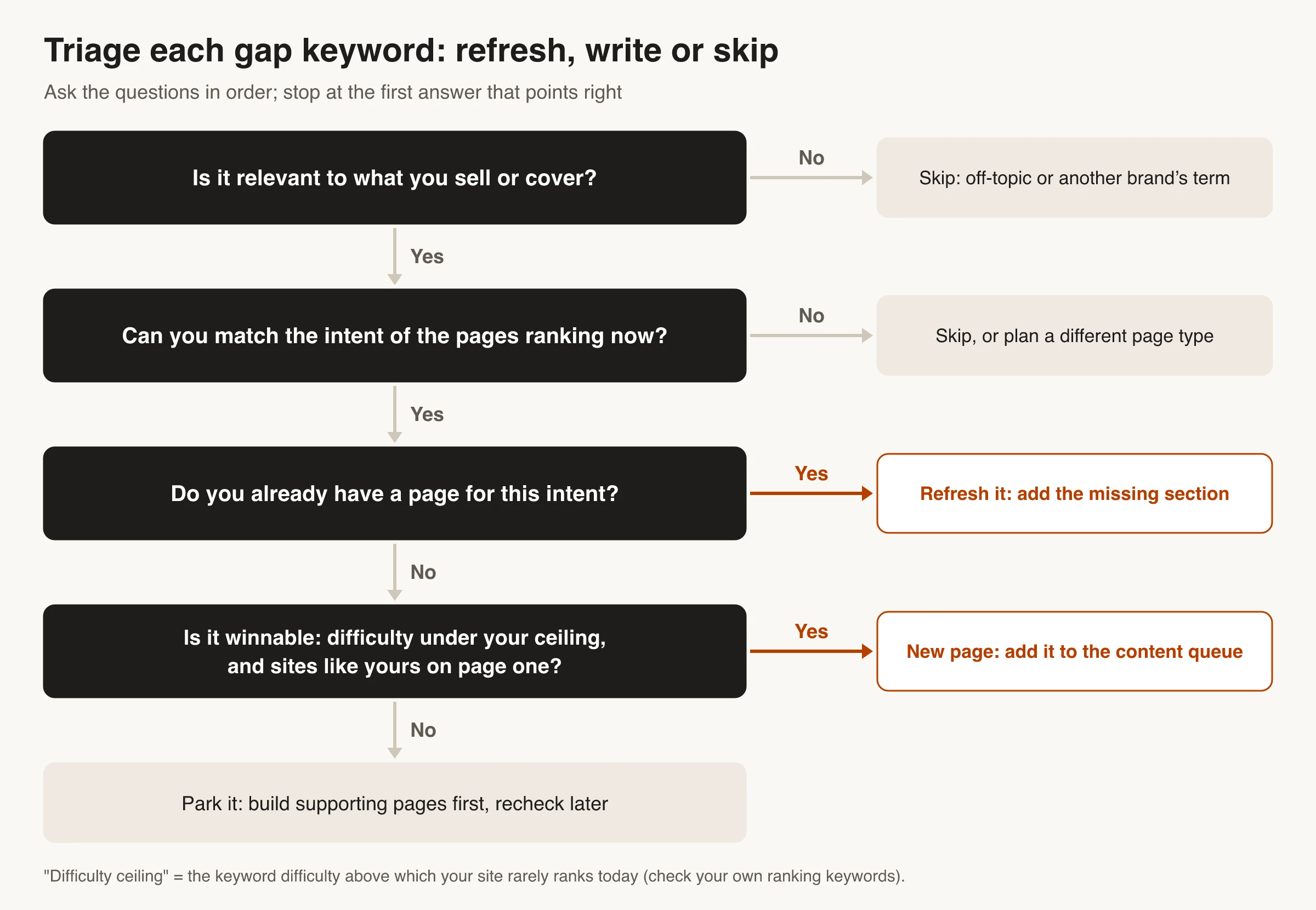
A raw gap export is mostly noise: competitor brand terms, keywords for products you don’t sell, and terms your site can’t win yet. Filter it in this order.
Business fit first
Remove competitors’ brand names and anything you wouldn’t want a customer to find you for. Be careful with brand terms, though. Searches like “[competitor] alternatives” or “[competitor] vs [you]” come from buyers who are still choosing, and they’re often worth targeting on purpose with dedicated comparison pages.
Match the intent Google already rewards
Search the keyword and look at what ranks. If page one is all product pages or free tools and you were planning a blog post, you’re fighting the search intent. Either build the page type that ranks or drop the keyword.
Set a difficulty ceiling from your own data
Difficulty scores mean little on their own. In your tool, look at the keywords you already rank for in the top 10 and note the highest keyword difficulty where you rank consistently. Keywords well above that ceiling go on a later list. Also check whether sites your size appear on page one. If every result is a household-name domain, the score may understate the job.
Refresh before you write
Weak keywords, where you rank but behind competitors, are usually cheaper to win than missing ones. The page already exists, and Google already connects it to the query. SE Ranking’s guide makes the same point about positions 11–30. Compare your page with the ones above it and add what’s missing: a section, a table, a clearer answer or an updated example.
Group keywords into pages
Cluster the keywords that survive so each page targets one intent plus its close variants. “Competitor keywords,” “find competitor keywords” and “check competitor keywords free” belong on one page, not three. Splitting them creates pages that compete with each other, which is the keyword cannibalization problem.
Write something better, not a copy
Google’s guidance on helpful, people-first content asks whether a page provides “original information, reporting, research, or analysis” and “substantial value when compared to other pages in search results.” A gap keyword tells you a topic is worth covering. It doesn’t tell you to rewrite the competitor’s page.
Before writing, list what the top results miss: outdated prices, no examples, no steps, a People Also Ask question nobody answers. That list is your brief.
Where Skribra fits
Skribra isn’t a keyword gap tool. It doesn’t export a competitor’s ranking keywords the way Ahrefs, Semrush or SE Ranking do. It covers the work around the research:
- Keyword research finds keywords for your site by search demand and competition, filters out off-topic and nonsensical terms, and checks new keywords against what you already cover so it doesn’t plan duplicate pages.
- Competitive content plans four articles for each competitor you approve (a comparison with your product, alternatives, pricing and a review). Each one is written from researched pricing and features, with sources.
- The Prospector agent reads the Search Console queries an article already gets impressions for, finds the ones the article doesn’t actually answer, and adds the missing sections. That’s the Search Console method from Step 2, automated for the articles Skribra manages.
A starter routine you can run this week
- List 10 core queries and tally the domains on page one.
- Open the sitemaps of your top three search competitors and copy the slugs that match your topics.
- In Search Console, export queries with impressions where your average position is worse than 10.
- Run the combined list through the four triage questions and keep the top 10.
- Check the results page for each of those 10 by hand and write a one-line brief: which page to refresh, or which new page to build.
If the list keeps growing faster than you can act on it, that’s the time to pay for a gap report.
Frequently Asked Questions
- How can I find competitors' keywords for free?
- Read their XML sitemap and blog categories for the topics they target, use site: searches to see their pages on a subject, and check page one for your core queries. Then use your own Search Console data to find queries where you get impressions but rank behind them. Semrush's free plan, with 10 reports a day, adds a quick look at a domain's ranking keywords.
- What is a keyword gap analysis?
- It compares the keywords your site ranks for with those of a few competitors and lists the difference: keywords they rank for and you don't, and keywords where you rank lower. Semrush calls these Missing, Untapped and Weak keywords. Ahrefs runs the same check in its Competitive Analysis tool.
- What is the best competitor keyword research tool?
- Semrush Keyword Gap, Ahrefs Competitive Analysis and SE Ranking Competitive Research all do the core job. As of October 2026, the entry plans that include them cost $129 to $139 a month. SE Ranking offers a 14-day trial, Semrush a 7-day trial, and Ahrefs none. Pick the one whose other tools, like rank tracking, audits or backlinks, you'll also use.
- How many competitors should I analyze?
- Three to five search competitors is a practical number: enough to see patterns, and few enough to review by hand. The tools set limits too. Ahrefs' tutorial compares your site with up to three competitors, and Semrush's Keyword Gap help page says up to five.
- Should I target my competitors' brand keywords?
- Not their plain brand name, because people searching it want that company. Comparison and alternatives searches that include their name are different. They come from buyers who are still choosing, and a fair, accurate comparison page can rank for them.
- How accurate are competitor keyword tools?
- They give estimates. Each tool builds its own keyword database and models volume, difficulty and traffic, so the numbers differ between tools and from your Search Console data. Use them to compare keywords against each other, then confirm intent and competition with a manual check of the results page.
Turn Your Keyword Gap Into Published Articles
Once you know which keywords to go after, Skribra handles the next step: it writes long-form articles with internal links and images, publishes them to your CMS, and refreshes them based on your Search Console data after they go live.
Plans start at $19/month for 5 articles, and every plan comes with a 3-day free trial.
Written by
Skribra
This article was crafted with AI-powered content generation. Skribra creates SEO-optimized articles that rank.
Share: