October 17, 2026
·
Updated October 28, 2026
·
12 min read
SEObot Pricing 2026: Plans, Free Trial and Cost per Article
SEObot's pricing as of October 2026: every published plan with cost per article, the free trial question, refund and billing rules, agency rates, and a cost comparison with Outrank, Byword and Skribra. All figures come from each vendor's own website and help center.

SEObot costs $49 a month for 9 articles on its entry plan, and there is no free trial or free plan. What SEObot offers instead is a full refund on the $49 plan if you contact them after your first article and aren't happy with it. Higher plans run up to $1,050 a month for 300 articles, or $3.50 per article, which matches the rate SEObot quotes for agency orders of 300+ articles.
Below you'll find every tier with its cost per article, the credit, upgrade and cancellation rules that change what you actually pay, a safe way to test SEObot using that refund, and how its per-article cost compares with autopilot tools that do have free trials.
SEObot Pricing at a Glance (October 2026)
Here are the short answers, taken from SEObot’s homepage and its help center pricing page in October 2026.
| Question | Answer |
|---|---|
| Starting price | $49/month |
| Articles on the entry plan | 9 per month |
| Free trial | None |
| Free plan | None |
| Refund | Full refund on the $49 plan if you contact SEObot after the first article and aren't satisfied |
| Top published plan | $1,050/month for 300 articles ($3.50 per article) |
| Agency rate | $3.50 per article for orders of 300+ articles |
| Unused articles | Credits don't expire and carry over, even after you cancel |
| Article length | Up to 4,000 words (SEObot says 3,000 on average) |
| Annual billing | Not published; the help center lists monthly prices only |
One caveat: SEObot’s help center says the complete plan list appears after you onboard your website. The prices below are the ones SEObot publishes. Check the subscription screen in the app before you pay, in case your checkout shows something different.
SEObot Plans and Cost per Article
SEObot publishes six subscription tiers. The cost per article is our own arithmetic: monthly price divided by included articles.
| Monthly price | Articles per month | Cost per article | Extras |
|---|---|---|---|
| $49 | 9 | $5.44 | Only plan with a stated refund |
| $99 | 20 | $4.95 | |
| $199 | 50 | $3.98 | |
| $499 | 100 | $4.99 | 20 directory listings per month |
| $570 | 150 | $3.80 | |
| $1,050 | 300 | $3.50 |
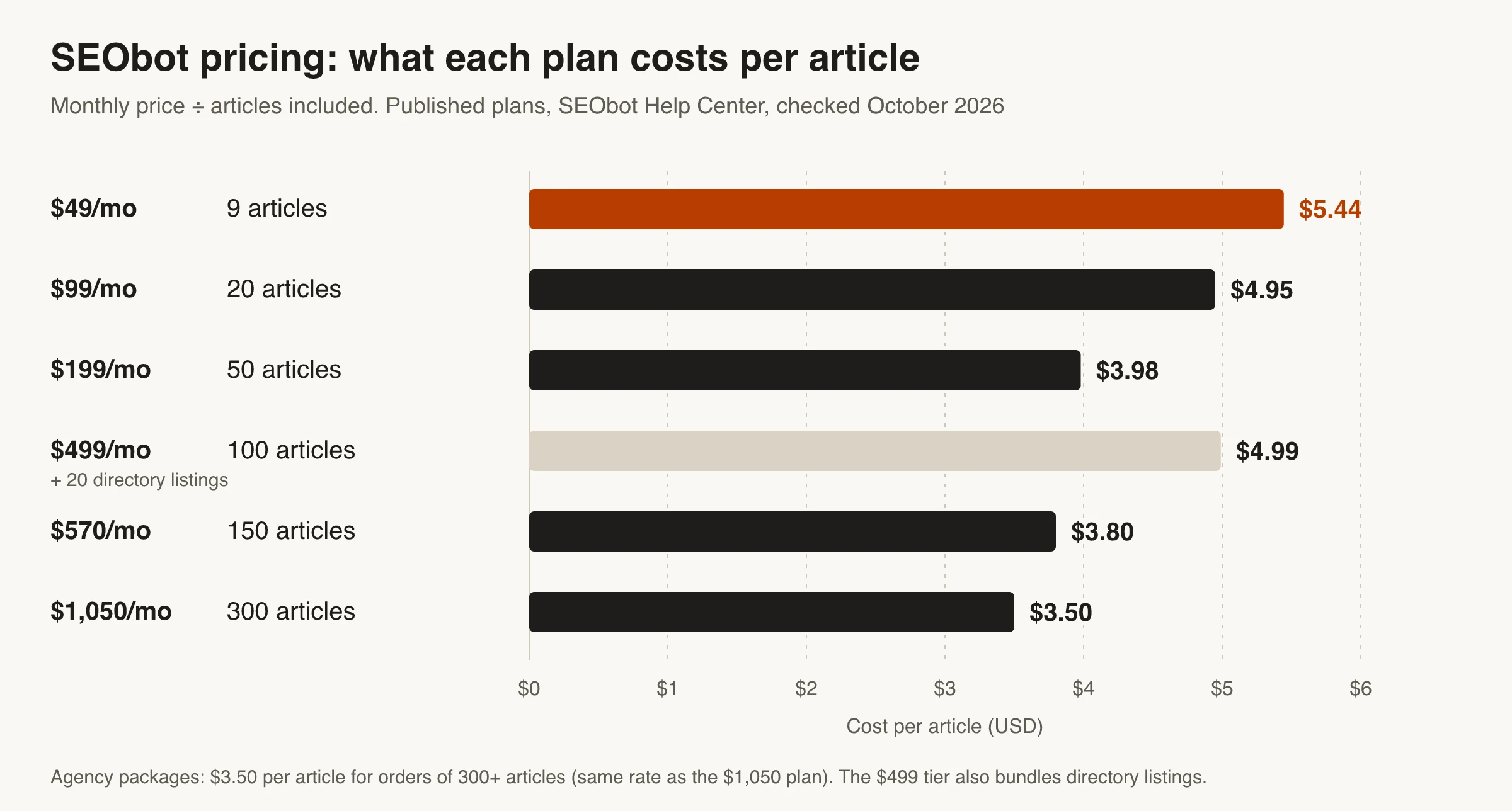
Three things stand out:
- Small upgrades save little. Moving from $49 to $99 only drops the per-article cost by about 50 cents. The real savings start at the $199 tier.
- The $499 tier costs more per article than the $199 tier. You’re paying for the 20 directory listings it adds. If you don’t need listings, the $199 and $570 tiers are better value per article. SEObot doesn’t say what a listing includes, though its homepage also promotes ListingBott, a separate product pitched at boosting domain rating.
- Plan names aren’t consistent. The pricing page identifies plans only by price and article count. SEObot’s billing article calls the $99 plan “Pro” and the $499 plan “Enterprise”, but no other tier names are published. Go by price and article count.
Is it 9 articles a month or one a week? Both descriptions exist. The homepage says SEObot makes a content plan and produces new articles every week, while the pricing page lists 9 articles a month for $49. These don’t conflict: the 9 credits are your monthly allowance, and you choose the pace in Settings → Advanced, where you can cap articles per day, week or month.
What One SEObot Credit Gets You
One article credit buys one AI-generated article. A few rules from SEObot’s help center affect what that credit is worth:
- Weak articles still use a credit. Regenerating or deleting an article is currently unavailable, which SEObot puts down to production costs. You can edit the article in SEObot’s editor or leave it unpublished, but the credit is spent.
- Manual articles are free. Articles you create yourself with the “+ Empty Article” button are unlimited and don’t use credits.
- SEObot only manages its own articles. It can’t rewrite posts that already exist on your site. Internal linking updates apply to the articles it generated.
- Backlink credits aren’t backlinks. Each new article earns one backlink credit, which SEObot defines as an attempt to place a link from its article pool, not a guaranteed link. To use it, you have to agree to dofollow links being placed in your own articles.
What Every SEObot Plan Includes
Every plan gets the same feature set on SEObot’s homepage: automated onboarding from your URL, site, audience and keyword research, a content plan, the option to approve, decline or edit articles before they go live, internal linking to your articles and site pages, and articles of up to 4,000 words with images, YouTube embeds, tables and a fact-checking step with cited sources.
SEObot says it supports 50+ languages and publishes to Framer, Ghost, HubSpot, Notion, Shopify, Unicorn Platform, Webflow, Wix and WordPress, with a REST API, webhooks, Next.js, Zapier and Make for everything else. Its FAQ also lists programmatic SEO pages, a news-article generator, SEO mini-tools and YouTube-to-article conversion.
Does SEObot Have a Free Trial?
No. As of October 2026, neither SEObot’s homepage nor its help center mentions a free trial or a free plan. If a third-party listing shows a lower starting price or a free plan, SEObot’s own pages don’t support it.
What SEObot offers instead:
- A refund on the first plan. SEObot’s FAQ promises a full refund on the $49 plan if you contact them after the first article and aren’t satisfied with the results. The same answer advises you to “always start with the smallest plan to test it first.”
- Sample articles before you buy. The help center says you can browse sample articles for different article types on the subscription screen (Menu → Subscriptions) before purchasing.
Read the fine print on that refund before you treat it like a trial:
- It covers only the $49 plan. No other tier mentions a refund.
- It’s tied to the first article. SEObot doesn’t publish a deadline, so ask as soon as you’ve reviewed that article.
- You have to contact SEObot to get it. Nothing happens automatically when you cancel.
- You still pay up front. A trial lets you try before paying; this lets you get your money back afterward.
If a no-cost trial matters to you, several autopilot tools have one. They’re compared further down.
How to Test SEObot Before You Commit
The refund makes the $49 plan a low-risk test, as long as you set it up so the first article tells you something. Here’s a process that works within SEObot’s rules:
- Check the sample articles first. If the samples on the subscription screen don’t fit your niche or tone, you can stop before paying anything.
- Subscribe to the $49 plan only. It’s the only plan with a stated refund, and it’s the plan SEObot itself recommends for testing.
- Turn off Auto-Publish. In Menu → Blog Sync Status, disable Auto-Publish so new articles reach your CMS as drafts instead of going live.
- Review article #1 like an editor. Check the facts and cited sources, whether internal links point to the right pages, whether the topic fits your keyword plan, and whether it reads like your brand. Also look for the generic, repetitive sections that Google’s scaled content abuse policy targets.
- Edit inside SEObot, not your CMS. SEObot’s help center warns that it can override changes made in your CMS to the content, headline, meta description, slug, main image or status. Only categories, tags and authors are safe to edit in the CMS.
- Decide before you upgrade. If you’re not satisfied, contact support right away for the refund. Upgrading first means paying a full new plan price that isn’t covered by the refund.
Billing Rules That Change What You Pay
SEObot’s billing works differently from most monthly SaaS plans, mostly because its credits never expire. These rules come from SEObot’s help center:
- Unused credits roll over. Credits carry over to the next billing cycle automatically, so a slow month doesn’t waste your allowance.
- Canceling keeps your articles and credits. You keep access to every article generated so far and can still spend leftover credits after you cancel (Menu → Subscriptions → Cancel Subscription).
- Upgrades charge the full new price immediately. There’s no proration on upgrades. SEObot’s own example: upgrading from the $99 plan (20 credits) to the $499 plan (100 credits) mid-cycle costs the full $499, and you keep your leftover credits on top of the new 100. If you want money back for the unused part of your old plan, you can ask support to calculate a prorated refund, which reduces your credit balance accordingly.
- Downgrades wait for the next cycle. You aren’t charged when you downgrade, and the lower price starts with your next billing period.
In practice, rollover credits make SEObot forgiving if your publishing schedule is uneven, and the upgrade rule makes it expensive to switch plans on a whim. Settle on a plan size before you change it.
Running Several Websites on One Plan
You don’t need a separate subscription for each website. SEObot lets you split one plan’s credits across several sites in Menu → Manage Credits. The catch: a site without its own subscription loses automatic article updates with internal links, monitoring for new pages, and optimizations based on Google Search Console data.
So pooling credits works for publishing articles to many sites, but each site where you want ongoing optimization needs its own plan. That makes multi-site costs hard to estimate from the pricing page alone.
SEObot Agency Pricing
SEObot’s only published agency offer is one line on its pricing page: $3.50 per article for agencies ordering 300 or more articles, described as its lowest price. That’s the same per-article rate as the $1,050 plan for 300 articles a month. SEObot doesn’t publish whether the 300 is a monthly volume or a one-time order, or how to buy it, so contact them before you build client pricing on it.
For comparison, as of October 2026:
- Outrank discounts the whole subscription by site count: 10% for 2–4 sites, 15% for 5–19 and 20% for 20–25, with larger portfolios handled by sales (outrank.so/pricing). A single site can go up to 90 articles a month for $259, about $2.88 each.
- Byword’s Scale plan is $999 a month for 300 articles, about $3.33 each (byword.ai).
- Skribra prices each client site as its own project, from $19 a month for 5 articles to $75 a month for 30. Our Skribra for agencies page covers white-label publishing and per-client setup.
If you resell articles, remember the multi-site rule above: a client site on pooled credits doesn’t get SEObot’s ongoing internal-link updates or Search Console optimizations. Content is only one line of the budget, too; our guide to the full agency SEO tool stack prices the rest per client.
SEObot vs Alternatives: Cost per Article
Here’s how SEObot’s cost compares with three autopilot tools that also research, write and publish to your CMS. Prices are monthly billing from each vendor’s site in October 2026. Cost per article is plan price divided by included articles.
| Tool | Entry plan | Cost per article | Lowest published rate | Free trial or refund |
|---|---|---|---|---|
| SEObot | $49 for 9 articles | $5.44 | $3.50 ($1,050 for 300) | No trial; full refund on the $49 plan after the first article |
| Byword | $99 for 25 articles | $3.96 | $3.33 ($999 for 300; extra articles on that plan cost $2.50) | Start free with 5 articles |
| Skribra | $19 for 5 articles | $3.80 | $2.50 ($75 for 30) | 3-day free trial on every plan |
| Outrank | $99 for 30 articles | $3.30 | $2.88 ($259 for 90, with the 90-article add-on) | Free trial; trial articles carry an Outrank watermark |
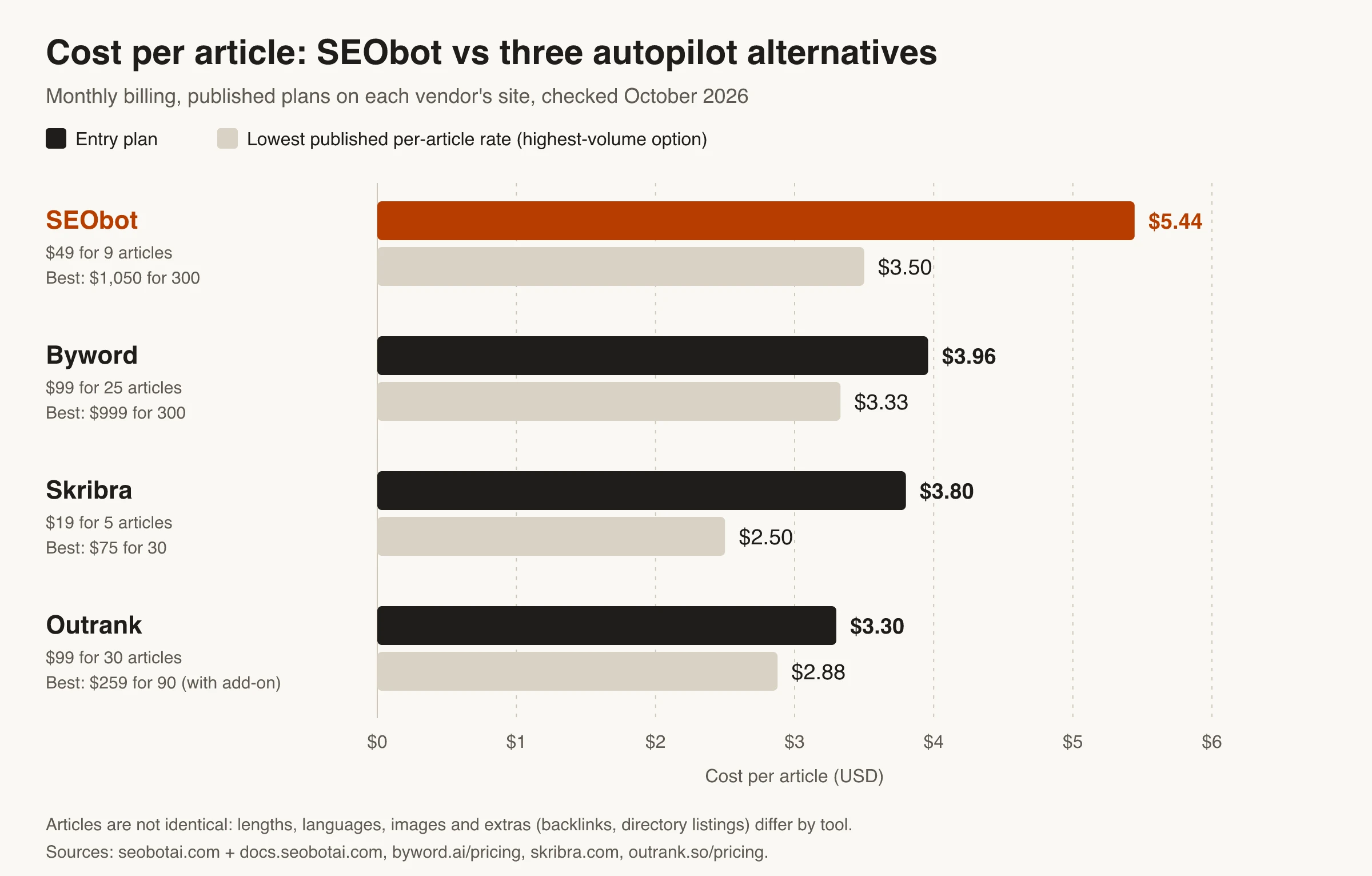
Cost per article isn’t the whole story, because the articles differ:
- Length. SEObot advertises up to 4,000 words. Outrank’s FAQ promises at least 1,200–1,700 words. Skribra’s plans list 1,700–3,300 words.
- Extras. Outrank’s $99 plan includes automated backlink building. SEObot’s $499 tier adds directory listings. Skribra includes IndexNow submission and refreshes articles after they’re published (content refresh); its Pro plan is the one that lists all five maintenance agents on every article.
- Publishing targets. SEObot’s integration list is long and includes HubSpot, Unicorn Platform, Zapier and Make. Skribra publishes to WordPress, Webflow, Notion and Shopify or any site through a webhook.
Koala works differently: it sells words rather than articles (Starter is $25 a month for 45,000 words, with 5,000 free words and no card needed to start), so it doesn’t fit a per-article comparison. Its pricing page also offers a 15-day refund window if you’ve used few credits (koala.sh).
For tool-by-tool detail, see our SEObot alternatives roundup, the Outrank vs SEObot head-to-head, and the Skribra vs SEObot comparison.
Is SEObot Worth the Price?
It depends on how much you’ll publish and how much control you want.
SEObot is a good fit if:
- You want a hands-off system with an approval step, and you’re fine paying about $5 per article at low volume.
- You publish in languages other than English (SEObot says it supports 50+), or you run your blog on Framer, Wix, HubSpot or Ghost.
- You want extras like programmatic SEO pages, news articles or YouTube-to-article conversion from the same subscription.
- Your publishing is uneven. Rollover credits mean a quiet month doesn’t cost you anything.
Look elsewhere if:
- You want a real free trial before paying.
- You publish fewer than 20 articles a month and per-article cost matters. SEObot’s two smallest plans cost $4.95–$5.44 per article, more than any entry plan in the table above.
- You want to regenerate weak articles, or have existing posts updated. SEObot can’t regenerate articles right now and doesn’t touch posts it didn’t write.
- You publish at volume with no human review. That’s a risk with any tool, not just SEObot; our list of autoblogging mistakes that lead to thin content covers what to watch for.
So What Will SEObot Actually Cost You?
At list prices, SEObot costs between $3.50 and $5.44 per article, starting at $49 a month for 9 articles. There’s no free trial, but the $49 plan comes with a full refund if you ask after the first article, which makes it a reasonable, low-risk test.
Use that refund well: review the samples, keep the first article as a draft, judge it like an editor, and decide before upgrading. If the article holds up and you value SEObot’s languages, integrations and approval flow, the higher tiers bring the per-article cost down. If you’d rather try a tool without paying first, Byword, Outrank, Koala and Skribra all offer some form of free start.
Frequently Asked Questions
- Does SEObot have a free trial?
- No. As of October 2026, SEObot doesn't offer a free trial or a free plan. Instead, it gives a full refund on the $49 plan if you contact them after your first article and aren't satisfied, and you can browse sample articles on the subscription screen before you pay.
- How much does SEObot cost per month?
- SEObot plans start at $49 a month for 9 articles. Published tiers go up to $99 for 20, $199 for 50, $499 for 100 plus 20 directory listings, $570 for 150 and $1,050 for 300 articles a month.
- How many articles do you get with the SEObot $49 plan?
- The $49 plan includes 9 article credits a month, according to SEObot's help center. That's about $5.44 per article. SEObot's homepage describes the output as articles every week, and you can set the publishing pace in the app's advanced settings.
- Can I get a refund from SEObot?
- Yes, but only on the $49 plan. SEObot offers a full refund if you contact them after the first article and aren't happy with the results. Upgrades are charged in full right away, though support can calculate a prorated refund for unused credits from your previous plan.
- Do unused SEObot credits expire?
- No. SEObot says its article credits never expire and roll over to the next billing cycle automatically. You can keep using them after you cancel your subscription, and you keep access to every article already generated.
- Is there a cheaper SEObot alternative with a free trial?
- As of October 2026, Byword lets you start free with 5 articles, Outrank has a free trial with watermarked articles, and Koala gives 5,000 free words without a credit card. Skribra starts at $19 a month for 5 articles with a 3-day free trial on every plan.
Try Autopilot SEO Before You Pay
If you’d like to see real articles on your own site before committing, Skribra researches keywords, writes long-form articles with internal links and images, publishes them to your CMS, and keeps refreshing them after they go live.
Plans start at $19/month for 5 articles, and every plan comes with a 3-day free trial.
Written by
Skribra
This article was crafted with AI-powered content generation. Skribra creates SEO-optimized articles that rank.
Share: