October 8, 2026
·
Updated October 28, 2026
·
12 min read
What Is Technical SEO? How It Works, Step by Step
A plain-language explainer of technical SEO: what it covers, how Google's crawl, render, index and serve stages work, what typically breaks at each stage and how to test it, how technical SEO differs from on-page and off-page SEO, and a checklist of the basics. Checked against Google Search Central and web.dev documentation in October 2026.

Technical SEO is the work that lets search engines find, fetch, render and index your pages, and pick the right URL to show. It deals with how your site is built and served (status codes, robots.txt, internal links, sitemaps, JavaScript, canonical tags, mobile versions and speed), not with what your pages say or who links to them.
It works in stages. Google discovers and crawls a URL, renders it, decides whether to index it and which duplicate counts as the canonical, and only then can show it for a query. A break at any stage stops everything after it, and each stage has its own test in Search Console. This explainer walks through the four stages, compares technical SEO with on-page and off-page SEO, and ends with a short checklist of the basics.
What is technical SEO?
Technical SEO covers everything about a site’s setup, as opposed to its words, that decides whether search engines can process its pages. If content SEO decides whether a page deserves to rank, technical SEO decides whether Google can find, read and store it in the first place.
That matters because nothing is automatic. Google says plainly that it “doesn’t guarantee that it will crawl, index, or serve your page”. Technical SEO is the work of removing the reasons it might not.
What falls under technical SEO:
- Crawl access: robots.txt rules, HTTP status codes, redirects, and how quickly and reliably your server answers.
- Discoverability: internal links, URL structure and XML sitemaps that lead crawlers to every page you care about.
- Rendering: whether your content and links still exist once Google runs your JavaScript.
- Indexing controls: noindex rules, canonical tags and how duplicate URLs are handled.
- Mobile and performance: the mobile version of each page and its Core Web Vitals.
- Machine-readable extras: structured data, hreflang for language versions, and HTTPS.
If any of these terms are new, the glossary entries on crawlability and indexing explain the two core ideas in a few paragraphs each. If you prefer video, Ahrefs’ SEO course has a short 2021 lesson on the same basics (it predates some of the 2024–2026 changes covered here):
How technical SEO works: crawl, render, index, serve
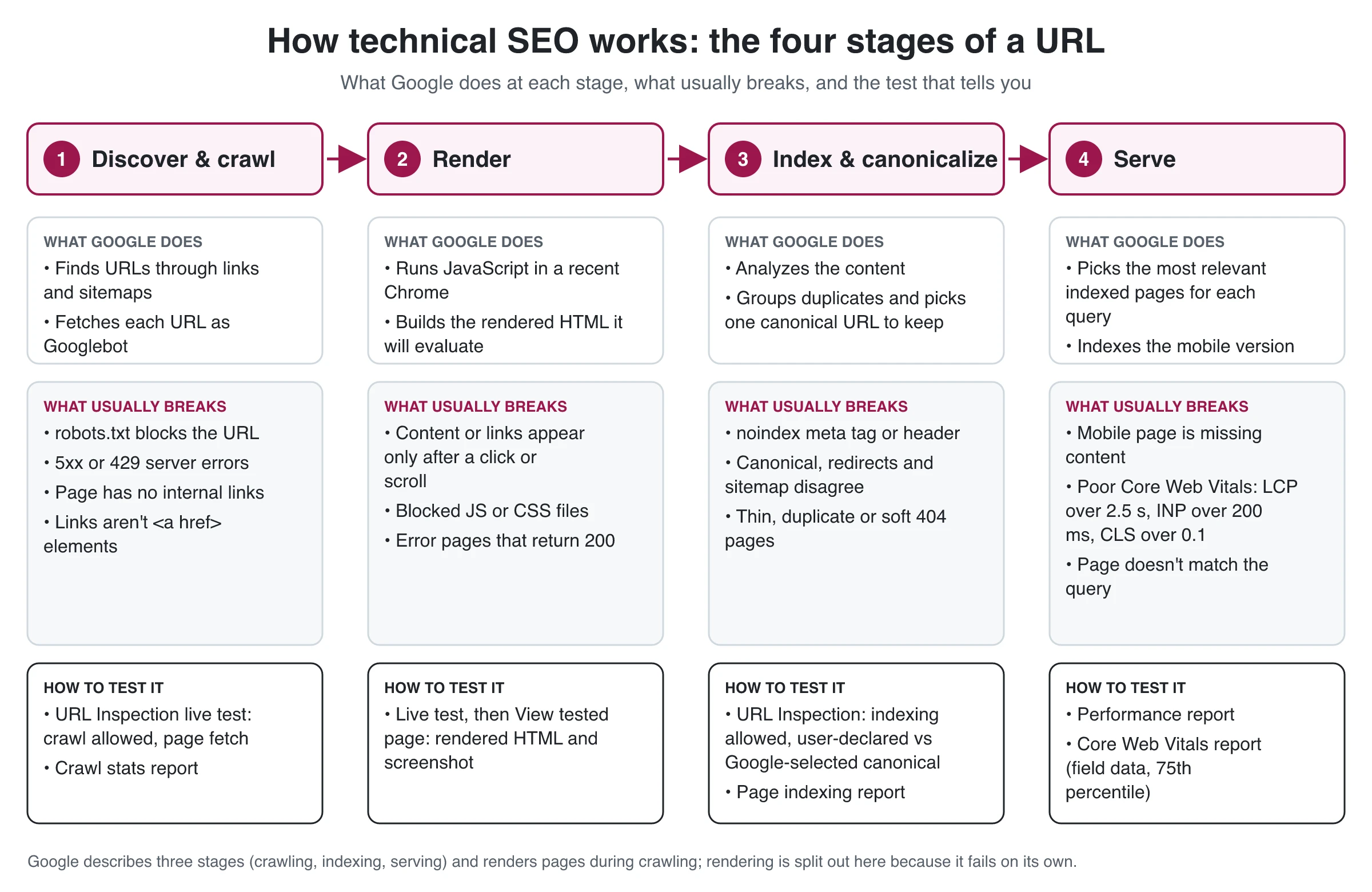
Google describes Search in three stages, crawling, indexing and serving, and it renders pages as part of the crawl. Splitting rendering out gives four stages, because rendering fails in its own way. The diagram at the top of this page summarizes them: what Google does at each stage, what usually breaks, and where to test it.
The practical rule: when a page isn’t performing, find the first stage where it stopped before you change anything. A fix for a later stage can’t help a page that never got past an earlier one.
Stage 1: Discovery and crawling
Google has no central list of web pages. It discovers URLs mostly by following links from pages it already knows and by reading the sitemaps you submit, then Googlebot requests each URL.
What matters at this stage:
- Links Google can follow. Google can only discover links that are
<a>elements with anhrefattribute. Navigation built on click handlers, or pages nothing links to, may never be found. - Sitemaps. A single sitemap is limited to 50,000 URLs or 50MB uncompressed and must be UTF-8 encoded. Google ignores
<priority>and<changefreq>, and uses<lastmod>only when it’s consistently accurate. For when a sitemap is enough and when to request indexing, see our guide to submitting URLs and sitemaps to Google. - robots.txt. This file tells crawlers which URLs they may request. It must sit at the root of each host, and Google ignores anything after the first 500 KiB. It manages crawling only: Google calls it “not a mechanism for keeping a web page out of Google”. The robots.txt glossary entry covers the syntax.
- Server health. When Googlebot gets 5xx or 429 responses, it slows down crawling, and URLs that keep returning server errors are eventually dropped from the index.
robots.txt is also where you opt out of some AI uses. Google’s Google-Extended token isn’t a separate crawler; it lets you opt your content out of Gemini training and grounding, and Google says it has no effect on inclusion or ranking in Search.
How to test it: inspect the URL in Search Console. The URL Inspection tool shows “Crawl allowed?” and “Page fetch” for the indexed version; run a live test to check the page as it is now.
Stage 2: Rendering
After fetching the HTML, Google queues the page for rendering and runs its JavaScript in an evergreen version of Chromium. Google says a page may stay in that queue for a few seconds, “but it can take longer than that.” What Google evaluates is the rendered HTML, so anything that only appears after a click, a scroll or a login isn’t seen at all.
Typical render problems:
- robots.txt blocks the JavaScript or CSS files the page needs to display its content
- main content or links are injected only after user interaction
- a single-page app shows a “not found” message while returning a 200 status (a soft 404)
Google still recommends server-side rendering or pre-rendering, because it makes pages faster for users and crawlers, and not every bot runs JavaScript. If your site runs on a headless CMS, the rendering mode is the first thing to check; see headless vs traditional CMS for SEO. The JavaScript SEO glossary entry covers the rendering options in more detail.
How to test it: run a live test in URL Inspection and open “View tested page”. It shows the rendered HTML, a screenshot, the HTTP headers and JavaScript console messages. If your main content or internal links are missing there, Google can’t use them.
Stage 3: Indexing and canonicalization
Google analyzes the rendered page, works out what it’s about and decides whether to store it. When several URLs show the same or nearly the same content (with and without a trailing slash, with tracking parameters, HTTP and HTTPS versions), Google groups them and picks one as the canonical: the version that may be shown in results.
You influence that choice; you don’t dictate it. According to Google’s canonicalization guide, redirects and rel="canonical" are strong signals and sitemap inclusion is a weak one, and they work best when they all point to the same URL. The canonical URL glossary entry explains the tag itself.
Two common traps:
- noindex behind a robots.txt block. A noindex rule, whether a meta tag or an
X-Robots-Tagheader, only works if Google can crawl the page and see it. Block the URL in robots.txt and the rule is invisible, so the URL can still appear in results, usually without a description. - Pages that look empty or redundant. Thin pages, near-duplicates and soft 404s can be crawled and still left out. Google lists low-quality content as one of the common reasons a page isn’t indexed.
How to test it: in URL Inspection, check “Indexing allowed?” and compare the user-declared canonical with the Google-selected canonical. For individual statuses such as “Crawled - currently not indexed”, see the guide to why a page isn’t indexed.
Stage 4: Serving and page experience
For each query, Google picks the most relevant pages from its index. Two technical inputs affect what it works with.
The mobile version. Under mobile-first indexing, Google uses the mobile version of your content, crawled with a smartphone agent, for indexing and ranking. If your mobile template drops text, structured data or robots meta tags that the desktop version has, Google sees the reduced page.
Page experience. Google states that Core Web Vitals are used by its ranking systems, but also that there is no single page experience signal and that it “always seeks to show the most relevant content, even if the page experience is sub-par.” Speed helps most when several pages are equally relevant. These are the Core Web Vitals thresholds for a good experience, measured at the 75th percentile of real page loads, segmented by mobile and desktop:
| Metric | What it measures | Good |
|---|---|---|
| Largest Contentful Paint (LCP) | Loading: when the main content appears | 2.5 seconds or less |
| Interaction to Next Paint (INP) | Responsiveness to clicks, taps and key presses | 200 milliseconds or less |
| Cumulative Layout Shift (CLS) | Visual stability: how much the layout jumps | 0.1 or less |
INP became a stable Core Web Vital in 2024, replacing First Input Delay (FID), so older guides that mention FID are out of date.
How to test it: the Core Web Vitals report in Search Console uses real-user field data; the Performance report shows whether the page earns impressions and clicks once it’s indexed.
Technical SEO vs on-page SEO vs off-page SEO
SEO work is usually split into three areas. They depend on each other, but they answer different questions, are checked in different places and are often owned by different people.
| Technical SEO | On-page SEO | Off-page SEO | |
|---|---|---|---|
| Question it answers | Can Google crawl, render and index the page? | Does the page satisfy the search? | Do other sites vouch for it? |
| Typical work | Status codes, robots.txt, redirects, sitemaps, canonicals, rendering, mobile parity, Core Web Vitals | Search intent, content depth, title tags, headings, internal link anchors, image alt text | Backlinks, brand mentions, digital PR, reviews |
| Usually owned by | Developers, with an SEO writing the requirements | Writers, editors and SEOs | PR, partnerships and marketing |
| Where you check it | URL Inspection, Page indexing, Crawl stats and Core Web Vitals reports | Performance report queries, comparing the page with the current results | Search Console Links report, third-party backlink tools |
| What failure looks like | Page missing from Google, or the wrong URL showing | Indexed, but ranks low or earns few clicks | A good page outranked by better-cited competitors |
The borders blur. Title tags and structured data live in your HTML, so some teams treat them as technical and others as on-page. Internal links are both: their structure helps discovery, their anchor text helps relevance.
The useful takeaway is the order. Technical SEO and content SEO aren’t rivals: a strong page Google can’t index earns nothing, and a perfectly indexable page with weak content won’t rank either. Clear the technical blockers on the pages that matter, then put your effort into the content, using a manual on-page SEO checklist or a tool.
Technical SEO basics: a 12-point checklist
This is the short version: twelve checks that cover the technical SEO basics for most sites. For the full process (setting up a crawler, reading logs, turning findings into developer tickets), follow Skribra’s guide on how to run a technical SEO audit.
| Check | What good looks like | Where to check |
|---|---|---|
| Key pages return 200 | Important URLs answer 200; removed pages return 404 or 410 or redirect once | URL Inspection, a site crawler |
| robots.txt allows what matters | No rule blocks important pages or the JS and CSS they need | Search Console robots.txt report |
| noindex only where intended | No leftover staging or plugin noindex on live pages | URL Inspection (“Indexing allowed?”) |
| One canonical per page | Canonical tag, redirects, internal links and sitemap all name the same URL | URL Inspection (declared vs selected canonical) |
| Clean XML sitemap | Only canonical, indexable URLs that return 200; submitted in Search Console | Sitemaps report |
| Content survives rendering | Main content and links appear in the rendered HTML | URL Inspection live test, “View tested page” |
| Every important page is linked | Reachable through normal <a href> links, not only the sitemap |
A site crawler |
| Short redirects | One hop where possible and no loops; Googlebot generally follows up to 10 hops | A site crawler |
| HTTPS everywhere | HTTP URLs redirect to HTTPS; no mixed content | Browser, a site crawler |
| Mobile parity | Mobile pages have the same content, structured data and robots meta tags as desktop | URL Inspection (crawled as smartphone) |
| Core Web Vitals pass | LCP ≤ 2.5 s, INP ≤ 200 ms, CLS ≤ 0.1 at the 75th percentile | Core Web Vitals report |
| Valid structured data | Passes the Rich Results Test, though Google doesn’t guarantee rich results | Rich Results Test |
For a quick first pass, Skribra’s free technical SEO audit tool runs 30 checks on your homepage and robots.txt, including canonical, meta robots, X-Robots-Tag, HTTPS redirect, status code, sitemap declaration and structured data. It parses the raw HTML without running JavaScript and doesn’t crawl beyond the homepage, so it won’t catch rendering problems or issues deeper in the site. Use URL Inspection and a crawler for those.
How to diagnose a technical SEO problem on one URL
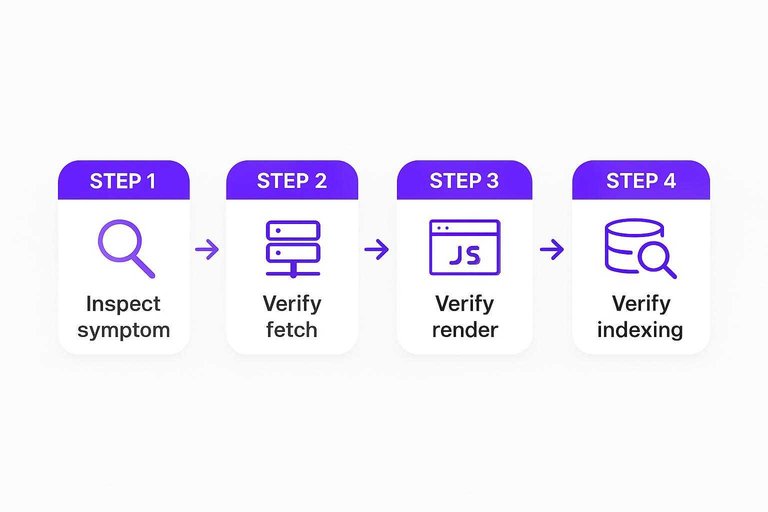
Most technical SEO questions start with one URL that isn’t behaving. Run the same short sequence every time, in pipeline order, and you’ll find the failing stage before you touch any settings.
- Name the symptom in one line. “Not on Google at all”, “wrong URL showing”, “content missing from the snippet” and “indexed but getting no clicks” point to different stages.
- Check the fetch. Status code, redirect chain, robots.txt rules and response headers. If Google can’t get a clean 200, nothing later matters.
- Check the render. Open “View tested page” in a URL Inspection live test and confirm the main content and internal links are in the rendered HTML.
- Check indexing and the canonical. Look for a noindex rule, then compare the declared canonical with the one Google selected and fix any signals that disagree.
- Only then look at serving. If the page is indexed, move on to mobile parity, Core Web Vitals and, beyond technical SEO, whether the content matches the query.
If the same symptom shows up on hundreds of URLs, the cause is usually a template, a CMS setting or a server rule rather than the pages themselves. That’s also the point where crawl budget can come up, but Google’s crawl budget guide is written for large sites: 1 million+ unique pages, or 10,000+ pages whose content changes daily. Most sites don’t need to think about it; if yours is that size, see the list of crawl budget mistakes on enterprise sites.
What technical SEO can’t do
Technical SEO removes friction. It doesn’t create demand, and it has hard limits worth knowing before you promise results.
- It can’t make a page relevant. A crawlable, fast, indexable page still won’t rank for a query it doesn’t answer well.
- It can’t force indexing. Google doesn’t guarantee indexing, and even a passing URL Inspection live test only confirms Google can access the page, not that it will be included.
- It can’t force rich results. Correct structured data makes a page eligible for enhanced results; Google decides whether to show them.
- It isn’t a one-time project. Theme updates, CMS plugins, migrations, new templates and server changes can quietly reintroduce a noindex, a robots.txt block or a canonical conflict. Check the Page indexing report regularly and re-test key templates after every release.
When a fix involves code, server configuration, caching or headers, it belongs with your developers. Your job as the SEO is to name the stage that’s failing, the exact URLs affected and the evidence from Search Console. For how technical work fits alongside keyword research, content and links, see Skribra’s SEO guide.
Technical SEO in short
Technical SEO is the part of SEO that makes your pages processable: Google has to discover and crawl a URL, render it, index it under the right canonical and then serve it. Each stage has its own failure modes and its own test, most of them in Search Console’s URL Inspection tool.
Start with the basics in the checklist above, check one URL at a time in pipeline order when something looks wrong, and treat it as maintenance rather than a one-off fix. Once Google can reliably process your pages, the results come down to the content and the links, which is where on-page and off-page SEO take over.
Frequently Asked Questions
- What is technical SEO in simple terms?
- Technical SEO is making sure search engines can find, fetch, read and store your pages, and show the right URL. It covers things like status codes, robots.txt, sitemaps, internal links, JavaScript rendering, canonical tags, mobile versions and page speed, rather than the words on the page.
- What is the difference between technical SEO and on-page SEO?
- Technical SEO decides whether Google can crawl, render and index a page. On-page SEO decides whether the page satisfies the search, through its content, title, headings and internal links. A page needs both: an indexable page with weak content won't rank, and great content Google can't index earns nothing.
- What are the basics of technical SEO?
- Important pages return a 200 status, robots.txt doesn't block them, there's no accidental noindex, each page has one consistent canonical URL, the XML sitemap lists only indexable URLs, and content survives JavaScript rendering. After that come mobile parity, HTTPS, short redirects and passing Core Web Vitals.
- Do Core Web Vitals affect rankings?
- Google says Core Web Vitals are used by its ranking systems, but relevance comes first and it will show the most relevant page even if its page experience is poor. The good thresholds are LCP of 2.5 seconds or less, INP of 200 milliseconds or less and CLS of 0.1 or less, at the 75th percentile of real visits.
- Can Google ignore my canonical tag?
- Yes. rel="canonical" is a strong signal, not a command, and Google picks the canonical from several signals including redirects, internal links and sitemap entries. If they disagree, Google may choose a different URL, which URL Inspection shows as the Google-selected canonical.
- Does a small site need to worry about crawl budget?
- Usually not. Google's crawl budget guide is aimed at sites with more than a million unique pages, or more than 10,000 pages whose content changes daily. Smaller sites get more from fixing blocked, duplicate or orphaned pages.
See Which Articles Google Has Indexed
Once the technical basics are in place, the next job is publishing pages worth indexing and confirming that Google actually indexes them. Skribra’s Search Console integration shows whether Google has indexed each article and when it was last crawled, next to its clicks, impressions and rankings, so posts that aren’t showing up stand out.
Plans start at $19/month, and every plan comes with a 3-day free trial.
Written by
Skribra
This article was crafted with AI-powered content generation. Skribra creates SEO-optimized articles that rank.
Share: